Solved

QuotaExceededError for kl-post-identification-sync

  • January 23, 2025
  • 4 replies
  • 150 views

Forum|alt.badge.img+2

I recently started getting this error:

Failed to execute 'setItem' on 'Storage': Setting the value of 'kl-post-identification-sync' exceeded the quota.
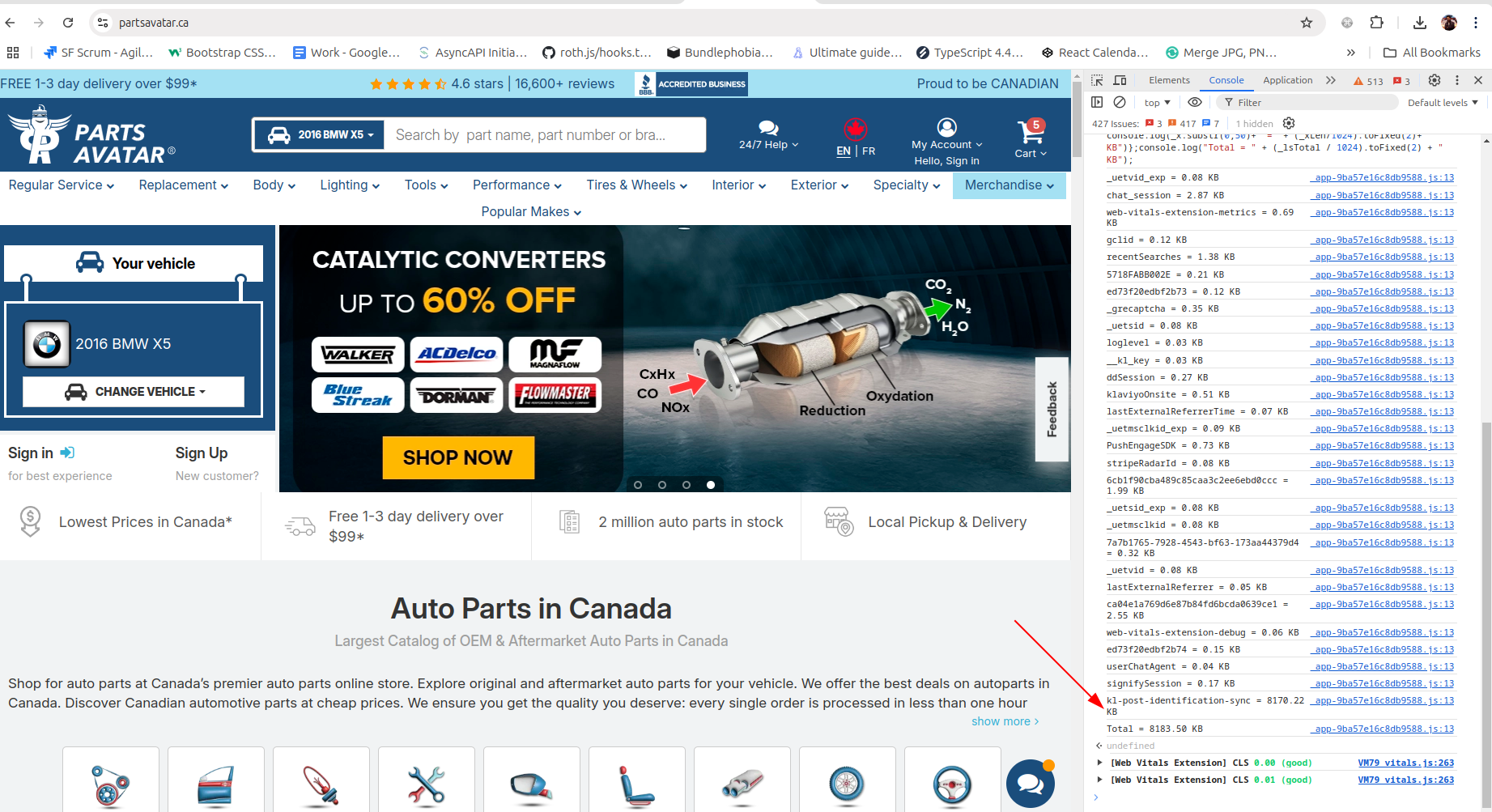
In the screenshot, kl-post-identification-sync is taking a lot of space. The limit for localstorage is 5000KB and klaviyo is talking 8000KB to store the data. How can I fix this issue? This can affect the usability of the website in places where we use localstorage


Best answer by MANSIR2094

Yes, you can clear data older than 1 day from kl-post-identification-sync to free up space. This shouldn’t affect Klaviyo’s functionality as it mainly uses recent data for tracking.

To ensure smooth operations:

A script can be implemented to delete entries older than 24 hours.

Testing this in a staging environment is recommended to confirm no disruptions.

I’d be happy to help you set this up quickly and efficiently. Let me know if we can proceed!

4 replies

MANSIR2094
Expert Problem Solver IV
Forum|alt.badge.img+21
  • Expert Problem Solver IV
  • January 23, 2025

Hello ​@bhavaypuri ,

Thank you for sharing the details of the issue you're facing. I understand how critical it is to maintain the usability of your website, especially with localStorage-related challenges like this.


The error you're encountering is due to the kl-post-identification-sync exceeding the browser’s localStorage quota, which is typically 5000KB. When this limit is breached, the storage fails to save additional data, leading to the error you're seeing.


This often happens when too much data is being stored in localStorage by Klaviyo, possibly due to unnecessary data accumulation or lack of periodic clean-up. Here are a few immediate strategies to address the issue:

1. Data Optimization: Review the data being stored by Klaviyo and identify unnecessary or redundant entries.

Compress or truncate data wherever possible to reduce its size


2. Use Alternative Storage Options: Offload some of the larger or less frequently accessed data to sessionStorage or cookies.

Consider leveraging server-side storage or IndexedDB for more complex data handling.

3. Regular Cleanup: Implement a script to monitor and clean up outdated or unused localStorage items.


Forum|alt.badge.img+2
  • Author
  • Contributor I
  • January 23, 2025

In localstorage, I found out that klaviyo has 2 weeks old data, can I clear entire kl-post-identification-sync data if it’s older than 1 day? I hope that does not affect klaviyo’s functionality.


MANSIR2094
Expert Problem Solver IV
Forum|alt.badge.img+21
  • Expert Problem Solver IV
  • Answer
  • January 23, 2025

Yes, you can clear data older than 1 day from kl-post-identification-sync to free up space. This shouldn’t affect Klaviyo’s functionality as it mainly uses recent data for tracking.

To ensure smooth operations:

A script can be implemented to delete entries older than 24 hours.

Testing this in a staging environment is recommended to confirm no disruptions.

I’d be happy to help you set this up quickly and efficiently. Let me know if we can proceed!


  • Contributor I
  • April 21, 2026

Why is Klaviyo not taking care of this for us. It’s ridiculous to keep this much data just for tracking of customers.And the solution of use clearing the data ourselves is pretty lackluster. Klaviyo needs to clean up their code, and be responsable with customers browsers.

Here is a snippet that clears everything but the most recent 1000 events in the case that the kl-post-identification-sync is over 1,000,000 chars


<script type="text/javascript">
// Klaviyo gets very greedy with local storage that blocks other functions from
// using it. This snippet checks if the kl-post-identification-sync content is
// larger than 1,000,000 chars and then slices the item down to 1000 items
(() => {
const KEY = 'kl-post-identification-sync';
const MAX_ITEMS = 1000;
const SIZE_THRESHOLD = 1_000_000;

const raw = localStorage.getItem(KEY);
if (!raw || raw.length < SIZE_THRESHOLD) return;

const data = JSON.parse(raw);
if (data.length <= MAX_ITEMS) return;

localStorage.setItem(KEY, JSON.stringify(data.slice(-MAX_ITEMS)));
})();
</script>