Problem Solver I
September 12, 2024
Solved

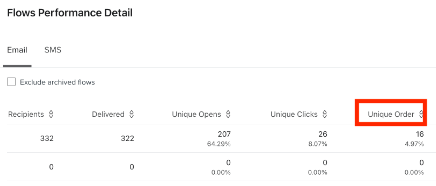
how can I get the metric unique_order from metric-aggregates API

  • September 12, 2024
  • 3 replies
  • 182 views

I want to fetch the unique_order by using metric-aggregates 

{
"data": {
"type": "metric-aggregate",
"attributes": {
"measurements": [
"unique",
"sum_value",
"count"
],
"filter": [
"greater-or-equal(datetime,2024-08-01)",
"less-than(datetime,2024-08-31)"
],
"by": [
"$flow"
],
"interval": "month",
"metric_id": "VRA121",
"page_size": 500
}
}
}

What is the name of the metric that indicates Order
 

    This topic has been closed for replies.
    Best answer by michaela.fooksa

    Hi Ronen, thanks for clarifying! To obtain number of unique orders using Query Metric Aggregates, make sure to use the ID of your Placed Order metric as the metric_id and include “unique” in the measurements list. 

    To find the ID of the Placed Order metric, log into Klaviyo and click Metrics on the left-hand side. Clicm on the metric that fires when customers place an order, and then copy the 6-digit metric ID from the URL. Check out this guide for detailed information on finding a metric ID. 

    Let me know if you have any additional questions on this!

    Michaela

    3 replies

    michaela.fooksa
    Klaviyo Alum
    September 16, 2024

    Hi Ronen,


    To get the number of unique orders by flow, you can use the Query Flow Series endpoint. Input the Placed Order metric ID as the conversion metric, and include conversion_uniques in the list of statistics to query for. This will return flow analytics matching what you see in the UI.


    ronen takAuthor
    Problem Solver I
    September 17, 2024

    Hi michaela.fooksa

    Thank for answered

    However, I do not want to use the Query Flow because of the restricted rate limit.

    Can I obtain ‘unique_order’ via API aggregation

    michaela.fooksa
    Klaviyo Alum
    September 17, 2024

    Hi Ronen, thanks for clarifying! To obtain number of unique orders using Query Metric Aggregates, make sure to use the ID of your Placed Order metric as the metric_id and include “unique” in the measurements list. 

    To find the ID of the Placed Order metric, log into Klaviyo and click Metrics on the left-hand side. Clicm on the metric that fires when customers place an order, and then copy the 6-digit metric ID from the URL. Check out this guide for detailed information on finding a metric ID. 

    Let me know if you have any additional questions on this!

    Michaela