Contributor I
January 16, 2023
Solved

Shopify - Notify me when available appear for in stock products & out of stock products

  • January 16, 2023
  • 4 replies
  • 480 views

Hi, 

The Klaviyo notify me when available is appearing for both in stock and out of stock products. Does anybody know how to make it appear for only out of stock products?
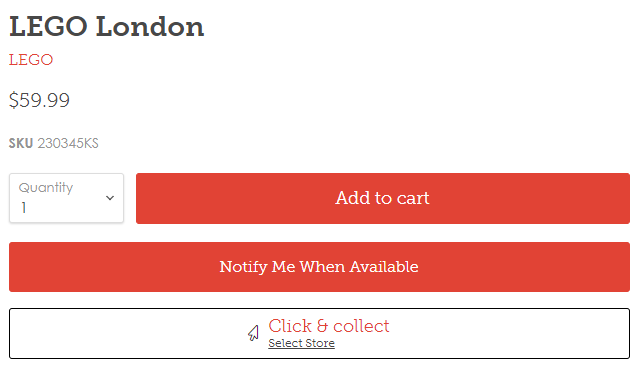
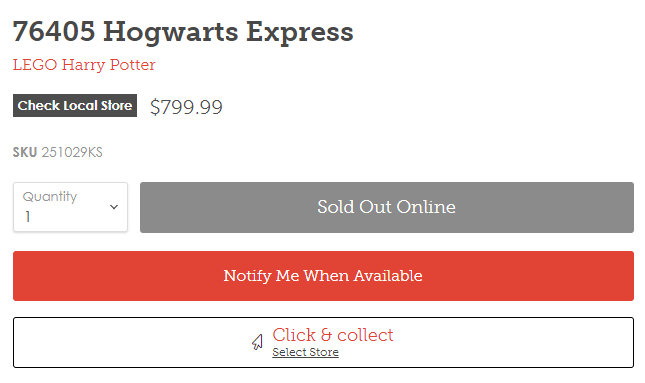
Instock 
Out of stock


    This topic has been closed for replies.
    Best answer by Omar

    Hi @RedSolider,

    This sometimes happens when you can select multiple variations on a page and the page does not refresh. I would suggest getting in touch with a shopify developer to help you with this.

    In any case it's solvable.

    Hope it helps

    Omar Lovert // Polaris Growth // Klaviyo Master Platinum Partner

    We help with e-commerce growth through CRO, Klaviyo and CVO

    4 replies

    Ashley I.
    Partner - Platinum
    2025 Champion
    January 16, 2023

    Hi @RedSolider !


    Can you please provide either a screenshot or copy/paste the code snippet you’ve added to your theme.liquid file to better help troubleshoot this issue?

    Ashley Ismailovski, Klaviyo Champion & Director of Email Marketing at SmartSites https://www.smartsites.com/
    Contributor I
    January 16, 2023

    Hi @Ashley I. 

    Please see the code below

    <!doctype html>
    <html class="no-js no-touch" lang="{{ shop.locale }}">
    <head>
    <meta charset="utf-8">
    <meta http-equiv="x-ua-compatible" content="IE=edge">

    <link rel="preconnect" href="https://cdn.shopify.com">
    <link rel="preconnect" href="https://fonts.shopifycdn.com">
    <link rel="preconnect" href="https://v.shopify.com">
    <link rel="preconnect" href="https://cdn.shopifycloud.com">
    <script src="https://kit.fontawesome.com/c21ecbce6f.js" crossorigin="anonymous"></script>

    <meta name="facebook-domain-verification" content="sirarwl7eop3kl5243zd96bvp4kfz7" />

    <title>
    {{- page_title -}}

    {%- if current_tags -%}
    {%- include 'advanced-tag-loop' -%}
    {% assign title_tags = '' %}
    {% assign meta_tags = current_tags | join: ', ' %}
    {%- for tag in current_tags -%}
    {% assign is_advanced_tag = false %}
    {% assign cat = tag | split: '_' | first %}

    {%- unless cat == tag -%}
    {%- if cat_array contains cat -%}
    {% assign is_advanced_tag = true %}
    {% assign title_tags = title_tags | append: ', ' | append: tag | replace_first: '_', ': ' %}
    {%- endif -%}
    {%- endunless -%}

    {%- unless is_advanced_tag -%}
    {% assign title_tags = title_tags | append: ', ' | append: tag %}
    {%- endunless -%}
    {%- endfor -%}
    {{ 'general.title.tags' | t: tags: title_tags | remove_first: ', ' }}
    {%- endif -%}

    {%- if current_page != 1 -%}
    {{- 'general.title.page' | t: page: current_page -}}
    {%- endif -%}

    {%- unless page_title contains shop.name -%}
    {{- 'general.title.shop' | t: shop: shop.name -}}
    {%- endunless -%}
    </title>

    {% if page_description != blank %}
    <meta name="description" content="{{ page_description | escape }}">
    {% endif %}

    {% include 'favicon' %}

    {% if template contains 'collection' and current_tags %}
    <meta name="robots" content="noindex" />
    <link rel="canonical" href="{{ shop.url }}{{ collection.url }}" />
    {% else %}
    <link rel="canonical" href="{{ canonical_url }}" />
    {% endif %}

    <meta name="viewport" content="width=device-width">

    {% assign twitter_handle = settings.social_twitter | split: 'twitter.com/' | last %}
    {%
    include 'social-meta-tags',
    twitter_handle: twitter_handle
    %}

    <link rel="preload" href="{{ settings.type_menu | font_url }}" as="font" crossorigin="anonymous">
    <link rel="preload" as="style" href="{{ 'theme.css' | asset_url }}">
    <link rel="preload" as="style" href="{{ 'custom.css' | asset_url }}">

    {{ content_for_header }}

    {{ 'theme.css' | asset_url | stylesheet_tag }}
    {{ 'ripple.css' | asset_url | stylesheet_tag }}
    {{ 'custom.css' | asset_url | stylesheet_tag }}
    <link rel="stylesheet" href="https://cdn.shopify.com/shopifycloud/shopify-plyr/v1.0/shopify-plyr.css">

    {% comment %}theme-object{% endcomment %}
    <script>
    window.Theme = window.Theme || {};
    window.Theme.routes = {
    "root_url": "{{ routes.root_url }}",
    "account_url": "{{ routes.account_url }}",
    "account_login_url": "{{ routes.account_login_url }}",
    "account_logout_url": "{{ routes.account_logout_url }}",
    "account_register_url": "{{ routes.account_register_url }}",
    "account_addresses_url": "{{ routes.account_addresses_url }}",
    "collections_url": "{{ routes.collections_url }}",
    "all_products_collection_url": "{{ routes.all_products_collection_url }}",
    "search_url": "{{ routes.search_url }}",
    "cart_url": "{{ routes.cart_url }}",
    "cart_add_url": "{{ routes.cart_add_url }}",
    "cart_change_url": "{{ routes.cart_change_url }}",
    "cart_clear_url": "{{ routes.cart_clear_url }}",
    "product_recommendations_url": "{{ routes.product_recommendations_url }}",
    };
    </script>

    <!--stockinstore product json - Start-->
    {% include 'stockinstore-json-product-snippet' %}
    <!--stockinstore product json - End-->


    {% render 'limoniapps-discountninja-header' %}{%- if product -%}{%- assign discountninjaproduct = product -%}{%- endif -%}{%- if collection -%}{%- assign discountninjacollection = collection -%}{%- endif -%}
    </head>

    <body class="template-{{ template.name }}" data-instant-allow-query-string {% if settings.reduce_animations %}data-reduce-animations{% endif %}>
    <script>
    document.documentElement.className=document.documentElement.className.replace(/\bno-js\b/,'js');
    if(window.Shopify&&window.Shopify.designMode)document.documentElement.className+=' in-theme-editor';
    if(('ontouchstart' in window)||window.DocumentTouch&&document instanceof DocumentTouch)document.documentElement.className=document.documentElement.className.replace(/\bno-touch\b/,'has-touch');
    </script>
    <a class="skip-to-main" href="#site-main">{{ 'general.accessibility.skip_to_content' | t }}</a>
    {% section 'static-announcement' %}
    <header
    class="site-header site-header-nav--open"
    role="banner"
    data-site-header
    >
    {% section 'static-header' %}
    </header>
    <div class="intersection-target" data-header-intersection-target></div>
    <div class="site-main-dimmer" data-site-main-dimmer></div>
    <main id="site-main" class="site-main" aria-label="Main content" tabindex="-1">
    {% if template == 'index' %}
    {% section 'static-slideshow' %}
    {% section 'static-highlights-banners' %}
    {% endif %}

    {{ content_for_layout }}
    <noscript class="endOfLayoutContentX" type="text/mark"></noscript>
    </main>

    {% section 'static-footer' %}

    {% comment %}
    Below are various templates used in JavaScript
    {% endcomment %}
    <div style="display: none;" aria-hidden="true" data-templates>
    {% include 'message-banner' %}
    {% include 'atc-banner' %}
    </div>

    {% comment %}
    Modal container, used on Collections, Password, and QuickShop
    {% endcomment %}
    {% include 'modal' %}
    {% include 'store-finder-modal' %}
    {% include 'add-gift-modal' %}

    {% comment %}
    This is the PhotoSwipe dialog which needs to be in the base page
    {% endcomment %}
    {% include 'product-gallery-zoom' %}

    {%- if template contains 'customer' -%}
    {{ 'shopify_common.js' | shopify_asset_url | script_tag }}
    {{ 'customer_area.js' | shopify_asset_url | script_tag }}
    {%- endif -%}

    {% unless settings.reduce_animations %}
    <script>
    (
    function () {
    var classes = {
    block: 'pxu-lia-block',
    element: 'pxu-lia-element',
    };

    document
    .querySelectorAll('[type="application/pxs-animation-mapping+json"]')
    .forEach(function (mappingEl) {
    const section = mappingEl.parentNode;
    try {
    const mapping = JSON.parse(mappingEl.innerHTML);
    mapping.elements.forEach(function (elementSelector) {
    section
    .querySelectorAll(elementSelector)
    .forEach(function (element) { element.classList.add(classes.element); });
    });

    mapping.blocks.forEach(function (blockSelector) {
    section
    .querySelectorAll(blockSelector)
    .forEach(function (block) { block.classList.add(classes.block); });
    });
    } catch (error) {
    console.warn('Unable to parse animation mapping', mappingEl, error);
    }
    });
    }
    )()
    </script>
    {% endunless %}

    <script src="{{ 'vendors-main.bundle.js' | asset_url }}" ></script>

    <script
    src="{{ 'empire.js' | asset_url }}"
    data-scripts
    data-shopify-api-url="{{ 'api.jquery.js' | shopify_asset_url }}"
    data-shopify-countries="/services/javascripts/countries.js"
    data-shopify-common="{{ 'shopify_common.js' | shopify_asset_url }}"
    data-shopify-cart="{{ 'jquery.cart.js' | asset_url }}"
    data-pxu-polyfills="{{ 'polyfills.js' | asset_url }}"
    >
    </script>

    {% include 'structured-data' %}

    <script>
    (function () {
    function handleFirstTab(e) {
    if (e.keyCode === 9) { // the "I am a keyboard user" key
    document.body.classList.add('user-is-tabbing');
    window.removeEventListener('keydown', handleFirstTab);
    }
    }
    window.addEventListener('keydown', handleFirstTab);
    })();
    </script>

    <script
    src="{{ 'instantPage.min.js' | asset_url }}"
    type="module"
    defer
    >
    </script>

    <script
    src="{{ 'main.bundle.js' | asset_url }}"
    type="module"
    defer
    >
    </script>
    <!-- stockinstore product page snippet Start -->
    {% include 'stockinstore' %}
    {% include 'stockinstore-clickcollect-product' %}
    <!-- stockinstore product page snippet End -->


    <style>
    .page-content {
    max-width: 1100px !important;
    }
    </style>


    {% include 'limoniapps-discountninja-body' %}
    </body>


    {% include 'limoniapps-discountninja-body' %}
    </body>
    <script src="https://a.klaviyo.com/media/js/onsite/onsite.js"></script>
    <script>
    var klaviyo = klaviyo || [];
    klaviyo.init({
    account: "PkZk5K",
    list: 'Rg5C6k',
    platform: "shopify"
    });
    klaviyo.enable("backinstock",{
    trigger: {
    product_page_text: "Notify Me When Available",
    product_page_class: "btn",
    product_page_text_align: "center",
    product_page_margin: "0px",
    replace_anchor: false
    },
    modal: {
    newsletter_subscribe_label: "Add me to your newsletter.",
    subscribe_checked: true,
    headline: "{product_name}",
    body_content: "Get notified when this product is back in stock!",
    email_field_label: "Email Address",
    button_label: "Notify me when available",
    subscription_success_label: "Welcome to the family! Keep an eye on your inbox, we will notify you when it's back in stock",
    footer_content: '',
    additional_styles: "@import url('https://fonts.googleapis.com/css?family=Helvetica+Neue');",
    drop_background_color: "#e14335",
    background_color: "#fff",
    text_color: "#222",
    button_text_color: "#fff",
    button_background_color: "#e14335",
    close_button_color: "#ccc",
    error_background_color: "#fcd6d7",
    error_text_color: "#C72E2F",
    success_background_color: "#d3efcd",
    success_text_color: "#1B9500",
    font_family: "century gothic"
    }
    });
    </script>
    </body>
    </html>


    Omar
    Partner - Platinum
    OmarAnswer
    2025 Champion
    January 16, 2023

    Hi @RedSolider,

    This sometimes happens when you can select multiple variations on a page and the page does not refresh. I would suggest getting in touch with a shopify developer to help you with this.

    In any case it's solvable.

    Hope it helps

    Omar Lovert // Polaris Growth // Klaviyo Master Platinum Partner

    We help with e-commerce growth through CRO, Klaviyo and CVO

    Helping E-commerce brands maximize Lifetime Value & Profits with Klaviyo, CRO & CVO - Get your free Audit - https://link.polarisgrowth.com/free-audit
    David To
    Klaviyo Employee
    Klaviyo Employee
    January 17, 2023

    Hey @RedSolider,

    Just thought I would share a past Community post discussing the great point that @Omar mentioned:

    Also keep in mind that our back in stock function is build to only work out of the box for select free basic themes developed by Shopify. For custom themes, it’s highly likely that some standard guidelines that allow Klaviyo's back-in-stock feature to function correctly aren’t followed. In which case you’ll want to work alongside either the theme developer or your own developer to make the appropriate code adjustments either in the theme or the back in stock code for the two to align. 

    David