Contributor I
February 1, 2023
Solved

Creating segments based on purchases of Shopify products with certain tags

  • February 1, 2023
  • 4 replies
  • 1518 views

May be an obvious one but working with a record label who have tagged all their Shopify products with the genre of the product:
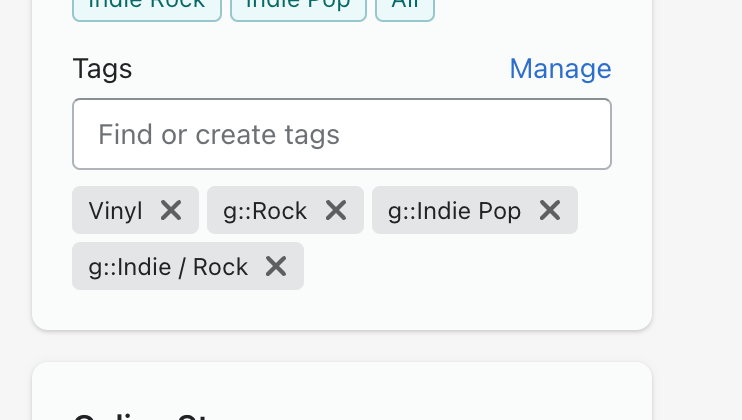


When I go to create the segment however, I don’t have an option to pull through any Shopify tags:
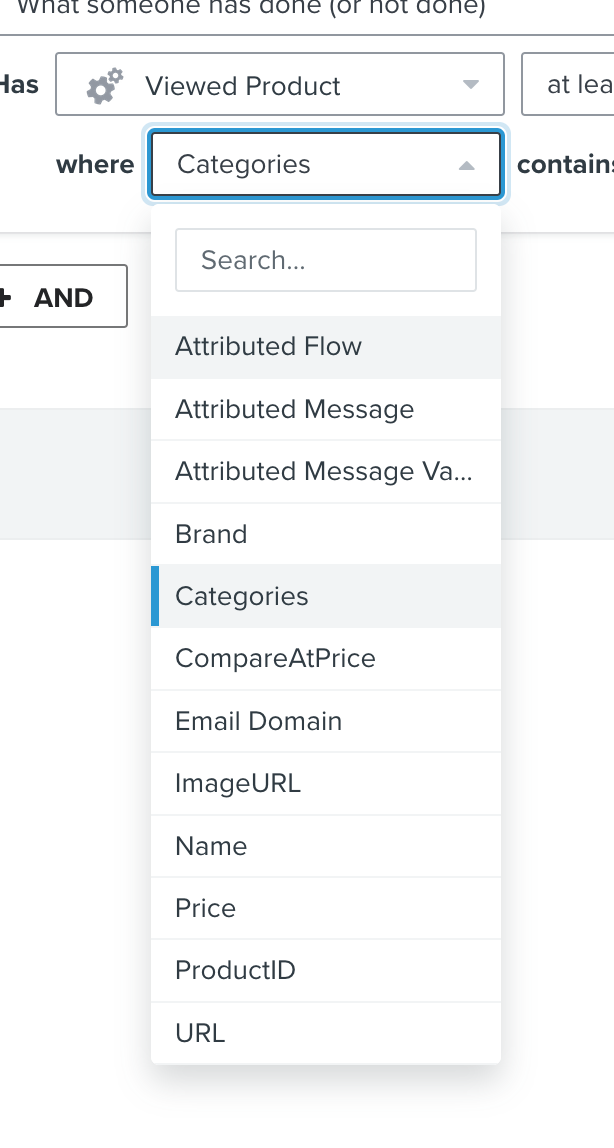
 

The Shopify connection is solid and working for everything else, I’m just confused how to find the tags we’ve assigned to Shopify products within Klaviyo and how I can create segments based off of them and activity on those products.


Thanks!

    This topic has been closed for replies.
    Best answer by Dov

    Hi @asheratmotive,

    Thanks for sharing this question with us.

    You’ll be able to segment on product tags using Ordered Product - the Viewed Product event will not capture that particular information.

    In terms of activity, you can always adjust “at least once” and “over all time” parameters to accommodate any timeframe for ordering the product. Additionally, you can add a “Viewed Product” event to the segment definition if you’d like to capture users who have ordered product X with tag Y and also viewed the product. You’d want to use the “AND” separator in this case. If you’d like to capture users who have ordered the product or viewed the product, you can use an “OR” separator. For more information, see our “AND vs OR” guide here. 

    Thanks for being a community member.

    4 replies

    Dov
    DovAnswer
    Klaviyo Alum
    February 1, 2023

    Hi @asheratmotive,

    Thanks for sharing this question with us.

    You’ll be able to segment on product tags using Ordered Product - the Viewed Product event will not capture that particular information.

    In terms of activity, you can always adjust “at least once” and “over all time” parameters to accommodate any timeframe for ordering the product. Additionally, you can add a “Viewed Product” event to the segment definition if you’d like to capture users who have ordered product X with tag Y and also viewed the product. You’d want to use the “AND” separator in this case. If you’d like to capture users who have ordered the product or viewed the product, you can use an “OR” separator. For more information, see our “AND vs OR” guide here. 

    Thanks for being a community member.

    DD
    Contributor I
    February 3, 2023

    Thanks! Very helpful

    Contributor I
    January 18, 2024

    @Dov 

    Related question…

    Does it filter…

    Product where Tags contain “picture”  AT THE TIME OF PURCHASE

    or

    Product where Tags contain “picture”  PRESENTLY


    I ask because we add/remove tags after a product sells out, and/or if a product is on sale, etc.


    We may need to rethink our tagging methodology depending on how Klaviyo applies the tags’ presence to the creation of a segment.


    Thanks!

    Alexander Hupfer
    Contributor I
    Contributor I
    December 11, 2024

    Hi, I actually would like to add another solution with more flexibility that makes enables you to send Shopify Segments to Klaviyo Lists. This is possible with Syncmatic.

    This is quite interesting since Shopify Segments growing ever more powerful and now even support Metafield and RFM segmentation out of the box.


    Best,

    Alex,

    Founder, Syncmatic

    Syncmatic on Klaviyo Marketplace: https://marketplace.klaviyo.com/en-us/apps/01jy5yrpxxtjvgj7vkd7xdrbh5/