Contributor I
May 30, 2025
Solved

How can I add a filter in a product feed using a custom profile property?

  • May 30, 2025
  • 5 replies
  • 178 views

Hi Team,

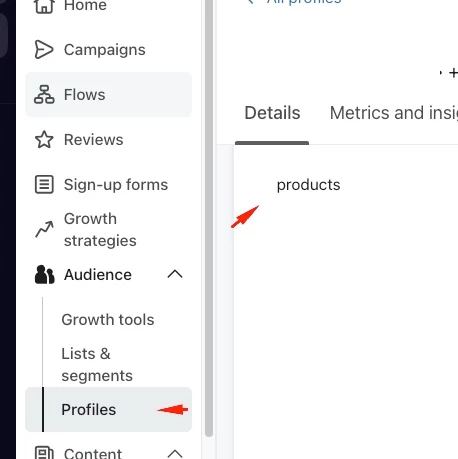
My profiles currently have an array property that contains the id of the products that the profile has available. (Please check the following screenshot)

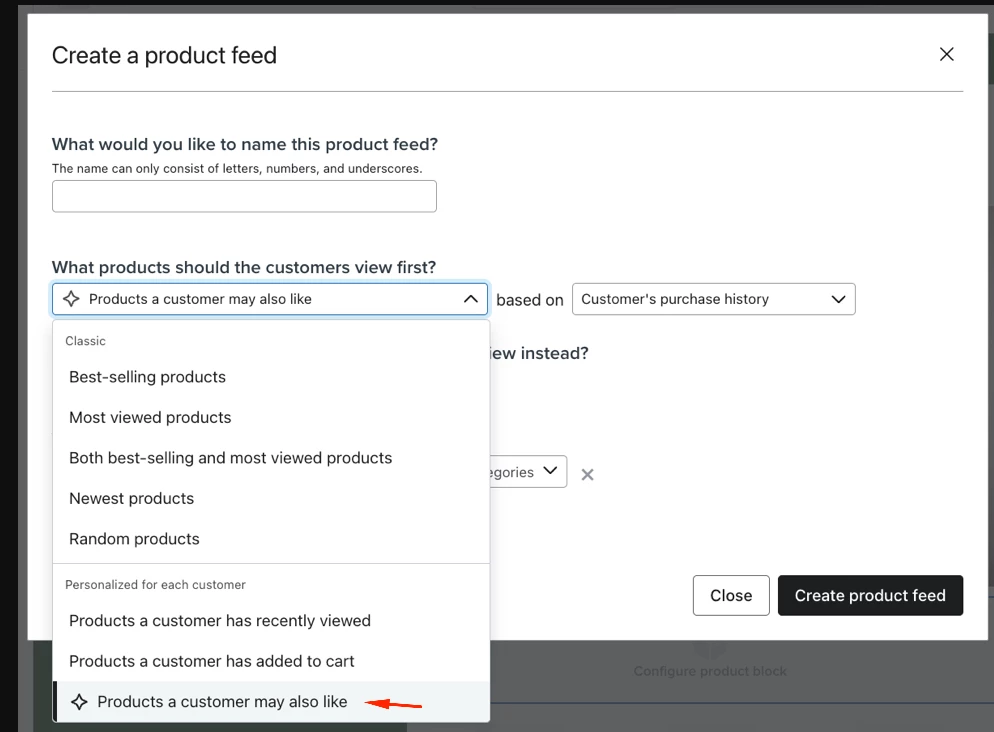
I would like to configure a dynamic feed to show products the user may like in my emails. But I need to add a filter in the feed to make sure that only products from the custom array profile property are shown. (please check the following screenshot)


Could you please provide some guidance on how to do this?

Thanks a lot

    Best answer by whereisjad


    @sncarlos Unfortunately, it is not possible to allocate dynamic elements within the product feed creator section. As a workaround, you can utilize Django blocks for email templates, as described in this resource: https://www.klaviyo.com/blog/solution-recipe-4-extending-klaviyos-product-block-functionality

    You can create a comprehensive product feed beforehand and then use a Django block with a for loop to iterate through the products, similar to the example below:

    {% with product_feed=feeds.ExampleProductFeed %}
    <table>
    <tbody>
    <tr>{% for item in product_feed %}
    <td>{% catalog item.item_id %}
    <table>
    <tbody>
    <tr>
    <th>{{ catalog_item.title }}</th>
    </tr>
    </tbody>
    </table>
    {% endcatalog %}</td>
    {% endfor %}</tr>
    </tbody>
    </table>
    {% endwith %}


    include an if statement within the Django template to check whether the catalog item's ID matches any value within the custom property array of the profile:

    {% if catalog_item.id in person.products %}

    Hope this helps, let me know if you have further questions.

    5 replies

    whereisjad
    Expert Problem Solver IV
    Expert Problem Solver IV
    May 31, 2025


    @sncarlos Unfortunately, it is not possible to allocate dynamic elements within the product feed creator section. As a workaround, you can utilize Django blocks for email templates, as described in this resource: https://www.klaviyo.com/blog/solution-recipe-4-extending-klaviyos-product-block-functionality

    You can create a comprehensive product feed beforehand and then use a Django block with a for loop to iterate through the products, similar to the example below:

    {% with product_feed=feeds.ExampleProductFeed %}
    <table>
    <tbody>
    <tr>{% for item in product_feed %}
    <td>{% catalog item.item_id %}
    <table>
    <tbody>
    <tr>
    <th>{{ catalog_item.title }}</th>
    </tr>
    </tbody>
    </table>
    {% endcatalog %}</td>
    {% endfor %}</tr>
    </tbody>
    </table>
    {% endwith %}


    include an if statement within the Django template to check whether the catalog item's ID matches any value within the custom property array of the profile:

    {% if catalog_item.id in person.products %}

    Hope this helps, let me know if you have further questions.

    — Jad A | Klaviyo + Shopify + API Integrations Specialist • 7+ Years' Experience Helping with new setups, seamless integrations, and API connections—happy to connect. http://ja-technical-consulting.xyz/

    sncarlosAuthor
    Contributor I
    June 2, 2025

    Thanks ​@whereisjad ! This approach would have the risk of sending an empty email if none of the catalog items are in person.products? Is there a way to mitigate this?

    whereisjad
    Expert Problem Solver IV
    Expert Problem Solver IV
    June 2, 2025

    @sncarlos 

    What is the intended outcome? Should the email be skipped if that none of the catalog items are in person.products?

    You may consider incorporating the modifier described here, which functions to short-circuit the process:

    {% catalog "_" unpublished="cancel" %}
    {% endcatalog %}
    — Jad A | Klaviyo + Shopify + API Integrations Specialist • 7+ Years' Experience Helping with new setups, seamless integrations, and API connections—happy to connect. http://ja-technical-consulting.xyz/

    sncarlosAuthor
    Contributor I
    June 2, 2025

    @whereisjad our catalog products might not be available to all customers, that’s the reason we create person.products to store the items that are available for an specific customer.

    The intended outcome is to skip the email if none of the catalog items are in person.products while all catalog items are still published.

    whereisjad
    Expert Problem Solver IV
    Expert Problem Solver IV
    June 2, 2025

    @sncarlos You are correct that, although we can iterate through the Klaviyo Product Feed using Django code, the current Django syntax does not support creating a variable to track whether we did not find a match between the profile’s products custom attribute and the Klaviyo Product Feed. As a result, we are unable to implement the short-circuit logic based on that condition.  Could we potentially determine that externally from Klaviyo and set it as a custom property for the profile before the profile enters the flow?

    — Jad A | Klaviyo + Shopify + API Integrations Specialist • 7+ Years' Experience Helping with new setups, seamless integrations, and API connections—happy to connect. http://ja-technical-consulting.xyz/