


Solved

How do I remove spacing around the sides
  • June 24, 2025
  • 1 reply
  • 83 views

Forum|alt.badge.img

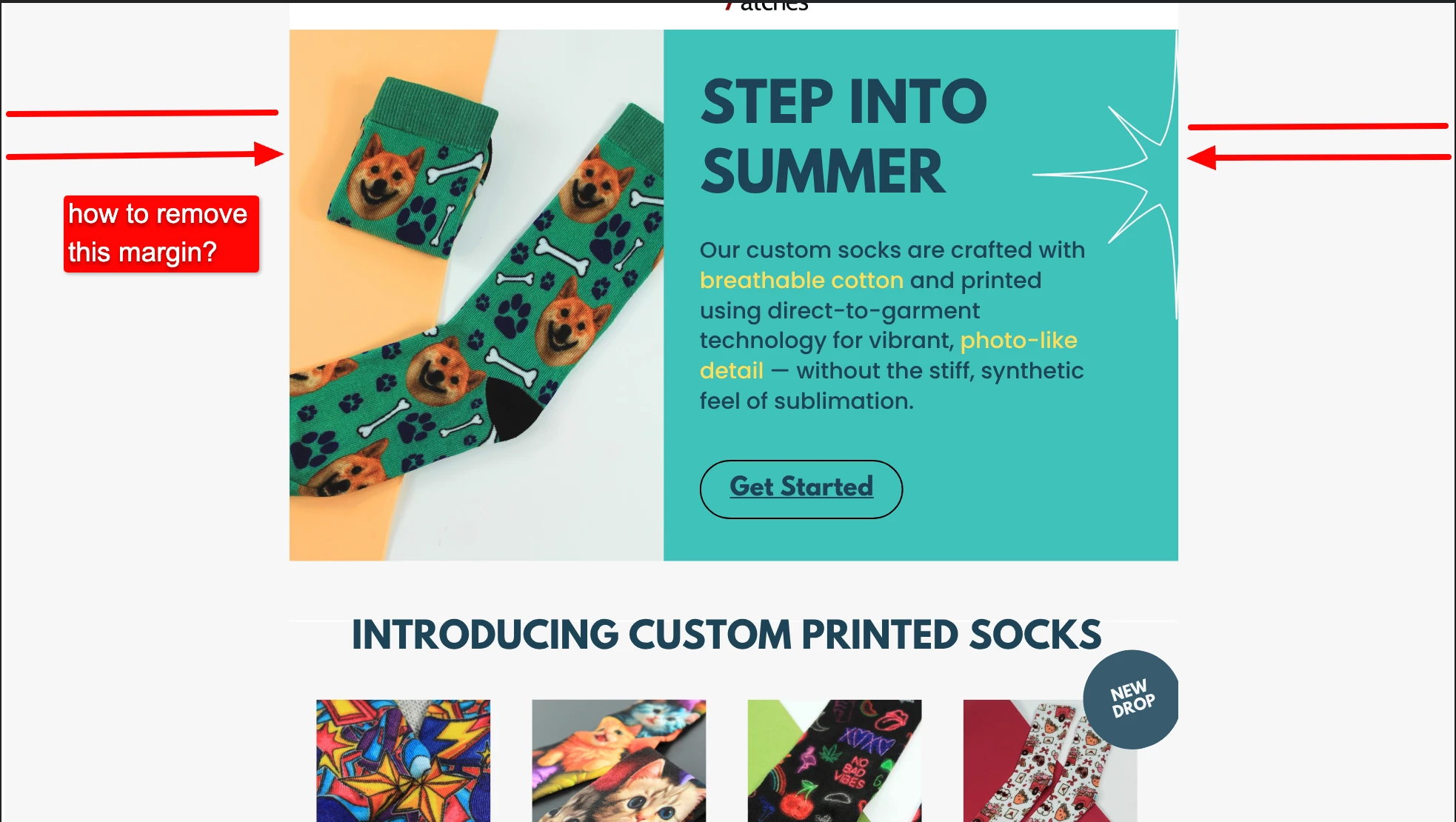
We've run into a consistent issue across all of our campaigns: a persistent side margin or padding appears in our sent emails, and we haven’t been able to resolve it despite multiple attempts.

Here’s what we’ve tried so far:

  • Adjusting the size of our artwork to fit standard email width (600–640px)

  • Building emails entirely with Klaviyo’s native blocks and tools

  • Removing all padding and spacing through the editor settings

  • Testing both image-based and block-based layouts

However, every time we send out a flyer-style email, it still renders with visible white margins on the sides, particularly on desktop. We’ve verified that all section and block padding is set to zero.

Could you please help us understand:

  1. What’s causing this?

  2. Is there a setting we’re missing?

  3. Is it a limitation of certain email clients or Klaviyo’s layout system?

I’ve attached a screenshot for reference. We’d love to resolve this so we can achieve true edge-to-edge layouts where needed.

Best answer by zacfromson

Hi ​@QualityPunch - thanks for your question. Here are some solutions to your issue:


Most likely cause: Email client rendering limitations

  • Outlook, Gmail, and Apple Mail often add default padding or margins to the email <body> or <td> tags.

  • Even if Klaviyo sections are set to 0 padding, the outer HTML wrapper still may apply spacing for rendering safety and compatibility.


Solutions / Workarounds:

  1. Use a full-width background color/image
    • Instead of making the image “flush” to the edge, set the background color of the email body and section to match your design edges. This gives the illusion of full-bleed.
    • In Klaviyo:
      • Go to each section > Styles tab > set section padding to 0.

      • Set section background color to match the image edge.

      • Use a background image for the section, and make it “cover” the entire width.

  1. Use a single image that includes the margin
    • Design your email with baked-in margins and spacing, then export it as a full-width image (600px wide or 2x for retina screens).
    • Drop that into a 1-column section with no padding, and it will render edge-to-edge inside the email wrapper.
  1. Custom HTML block (advanced)
    • You can add custom code via an HTML block in Klaviyo using:
    • <table width="100%" border="0" cellspacing="0" cellpadding="0">
        <tr>
          <td align="center">
            <img src="your-image-url.jpg" width="600" style="display: block; border: 0; max-width: 100%;" />
          </td>
        </tr>
      </table>
    • This forces email clients to render it full-width and center-aligned without added margins.

1 reply

zacfromson
Expert Problem Solver III
Forum|alt.badge.img+14
  • 2025 Champion
  • Answer
  • June 26, 2025

Hi ​@QualityPunch - thanks for your question. Here are some solutions to your issue:


Most likely cause: Email client rendering limitations

  • Outlook, Gmail, and Apple Mail often add default padding or margins to the email <body> or <td> tags.

  • Even if Klaviyo sections are set to 0 padding, the outer HTML wrapper still may apply spacing for rendering safety and compatibility.


Solutions / Workarounds:

  1. Use a full-width background color/image
    • Instead of making the image “flush” to the edge, set the background color of the email body and section to match your design edges. This gives the illusion of full-bleed.
    • In Klaviyo:
      • Go to each section > Styles tab > set section padding to 0.

      • Set section background color to match the image edge.

      • Use a background image for the section, and make it “cover” the entire width.

  1. Use a single image that includes the margin
    • Design your email with baked-in margins and spacing, then export it as a full-width image (600px wide or 2x for retina screens).
    • Drop that into a 1-column section with no padding, and it will render edge-to-edge inside the email wrapper.
  1. Custom HTML block (advanced)
    • You can add custom code via an HTML block in Klaviyo using:
    • <table width="100%" border="0" cellspacing="0" cellpadding="0">
        <tr>
          <td align="center">
            <img src="your-image-url.jpg" width="600" style="display: block; border: 0; max-width: 100%;" />
          </td>
        </tr>
      </table>
    • This forces email clients to render it full-width and center-aligned without added margins.