
Solved

Klaviyo Template image Still showing on the confirmation message

  • February 6, 2026
  • 3 replies
  • 18 views

Forum|alt.badge.img

Hello, I am new to the community. I just set up a spin the wheel popup, and I changed the image on the wheel to my own image. And when I go to my site, the image that I selected shows when the spin the wheel popup appears. However, when I get the confirmation “thanks for subscribing! Check your email for a confirmation message” the old image is still showing up. How do I  change it?

Best answer by Byrne C

Hi ​@ge01734567,

Did you add or edit the image on the success step? I’d imagine that the default image would show if you have a success step on your form, but never added your image to it. Can you confirm that this is the case? If not, happy to take a closer look at this!

3 replies

Byrne C
Community Manager
Forum|alt.badge.img+28
  • Community Manager
  • Answer
  • February 9, 2026

Hi ​@ge01734567,

Did you add or edit the image on the success step? I’d imagine that the default image would show if you have a success step on your form, but never added your image to it. Can you confirm that this is the case? If not, happy to take a closer look at this!


Forum|alt.badge.img
  • Author
  • Contributor I
  • February 15, 2026

Hi Byrne C,

Thanks for the help. I need to go to each step and remove the image and replace with mine.

I have one other question about this popup. I somehow removed the wheelio part of the popup, and because it autosaves, I could not get it back. Now it just shows the popup with the image of the person on the left, and a blank image on the right where the wheel used to be on desktop and mobile view. Can I retrieve that wheel or do I have to recreate the popup? Also is there a way to disable that autosave feature, at least while I am still learning how this thing works. It would be nice if there was an undo feature.

Thanks,


Don


Byrne C
Community Manager
Forum|alt.badge.img+28
  • Community Manager
  • February 18, 2026

Hi ​@ge01734567,

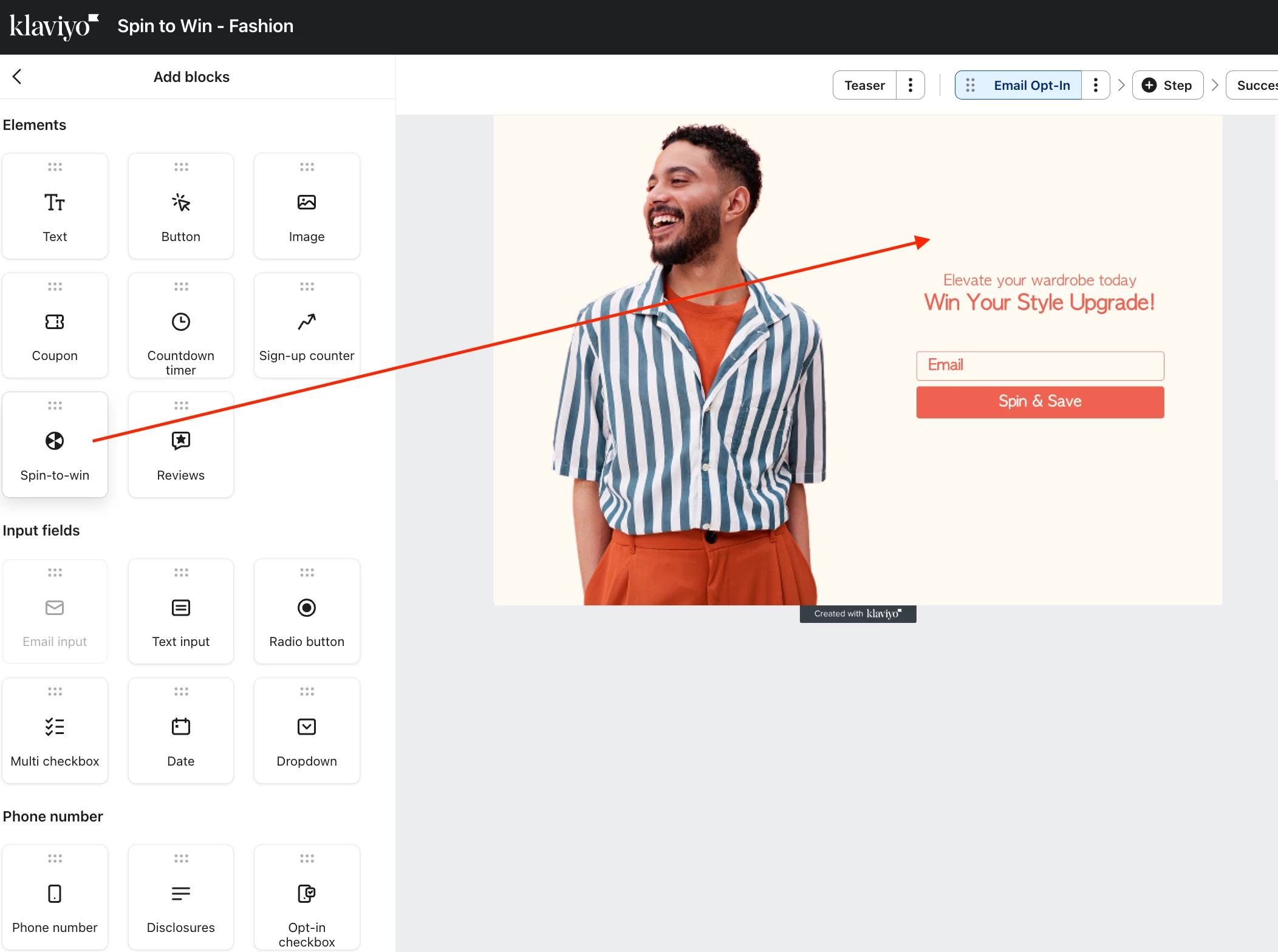
You won’t have to recreate the whole popup, but you will have to drag and drop the Spin-to-win wheel back into your form and set that specific element of the form up again. Screenshot below showing where to find this element, among the other blocks:

As of now, there’s no way to disable autosave. Apologies for this, but I’m happy to bring this up with my team.
