Question

WhatsApp Phone Number

  • March 5, 2026
  • 2 replies
  • 12 views

Forum|alt.badge.img

Hi,

In my Klaviyo, I have connected my whatsapp business account and created and updated rquired templates. But my WhatsApp phone number still showing “Action Required”. Please help me on this
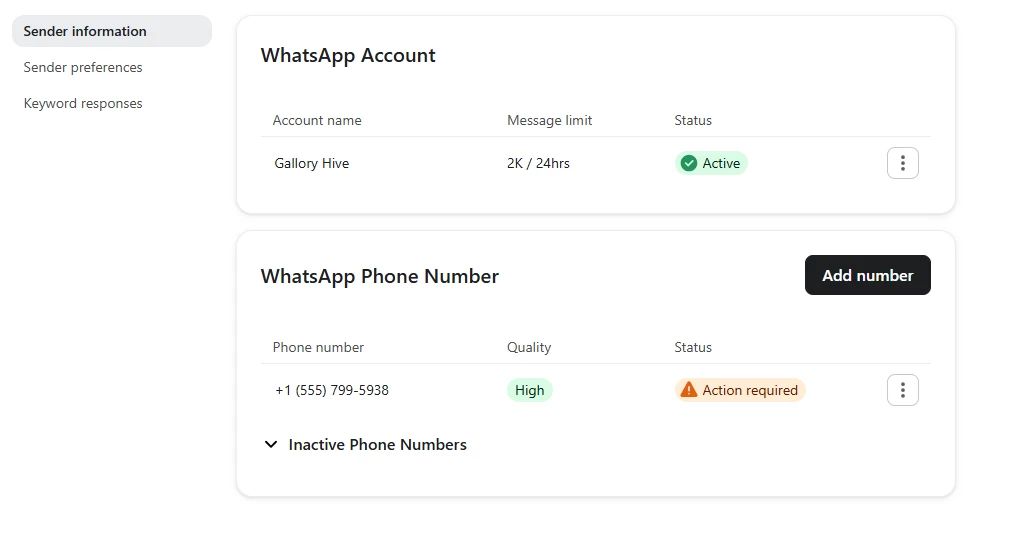

Screenshot


2 replies

Byrne C
Community Manager
Forum|alt.badge.img+28
  • Community Manager
  • March 12, 2026

Hi ​@galloryhive,

There are a few different reasons that “Action Required” may pop up as a warning on your WhatsApp phone number, so reaching out to our support team would allow us to determine the specific reason why this is happening. That being said, we do often see this issue when the WhatsApp Business Account you’re using was previously connected to another platform. Currently, Klaviyo does not support moving a WABA, so a new WABA must be created. Could you try disconnecting and connecting again, but creating a new WhatsApp Business Account during setup?

If that doesn’t seem to fix the issue, our support team can take a look at your account specifically to pinpoint what’s likely wrong.


Forum|alt.badge.img
  • Author
  • Contributor I
  • March 13, 2026

Hi Byrne C,

Thank you for the reply! I have tried disconnected and reconnect the WABA in Klaviyo several times and it did not help. I think I need to add a real phone number instead of using one which have provided by Meta. I have tried to reach the support team in Klaviyo but I couldn’t contact them since my support plan for email and chat has expired.


Regards

GH