Question

Dynamic Image URL

  • January 4, 2026
  • 5 replies
  • 39 views

Forum|alt.badge.img+3

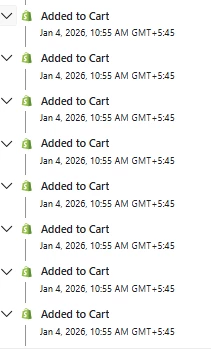
There is a main product. That main product comes with a free tool kit which has 7 items in it. when someone add the main product to cart, then added to cart metric is triggered 8 times as shown in figure.


And when the abandoned cart email is sent, the dynamic product contains some random product among those 7 items instead of the main product. I want the links to be appeared for the main product.

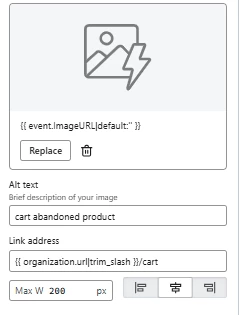
Here're the link address i used:

Image: {{ event.ImageURL|default:'' }}
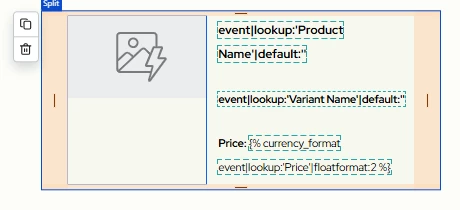
Product name: {{ event|lookup:'Product Name'|default:'' }}
Dynamic Product Link: {{ organization.url|trim_slash }}/cart

Links shown in image below:


5 replies

Byrne C
Community Manager
Forum|alt.badge.img+28
  • Community Manager
  • January 5, 2026

Hi ​@suyogp,

Just to make sure we’re on the same page, is the issue that {{ event.ImageURL|default:'' }} is displaying a seemingly random image that you’re not expecting, and you want to ensure that you’re displaying the actual product image?

{{ event.ImageURL|default:'' }} pulls the URL directly from the Added to Cart data that Shopify sends to us, directly from the “ImageURL” line. When you preview and test a flow email triggered by Added to Cart, does the URL on the ImageURL line display the image that corresponds with the product name and product ID that also should show up in the event data? 

If that variable isn’t working as expected, you can also try using a catalog lookup tag to pull in the image URL. Try this:  

{% catalog event.ProductID unpublished="cancel" %}{{ catalog_item.featured_image.full.src }}{% endcatalog %}

Let me know if this works, or if I can answer any additional questions!


Forum|alt.badge.img+3
  • Author
  • Contributor III
  • January 6, 2026

Yes. The product that is displayed in email has the corresponding name (a random item among those 8 items). But that's not what I want. I want the main product to be appeared with the main product name.

The added to cart metric is triggered 8 times (due to 8 products in that bundle) with a single click on ‘add to cart’ button in website as shown in screenshot previously.
When I preview the email, the same profile of a person is shown 8 times with different products (one product at a time) each time I tried to switch the profile.
I think the same abandoned cart email would have been sent up to eight times simultaneously to the same person with different products each time, if the filter “Has not been in the flow in the last 30 days” was not applied.


Help!


Byrne C
Community Manager
Forum|alt.badge.img+28
  • Community Manager
  • January 7, 2026

@suyogp,

Thanks for explaining! I will admit, this makes the situation a bit trickier, as the issue relates to how Shopify sends us data, and your store’s Add to Cart function differs from what we typically see.

From what you’re explaining, when a person clicks “Add to Cart”, 8 different Added to Cart events are sent from Shopify to Klaviyo at the exact same time. This creates what’s called a race condition. These events are all racing each other to get to the shopper’s Klaviyo profile, and events may be received, and therefore, trigger the flow, out of order, so there’s no guarantee that the Added to Cart event containing the main product will always be recorded first. Because of this, there isn’t a way to ensure that the main product is the product that triggers the flow, and is shown in the image.

As a workaround, if you only have a small number of products like this, you could always set up some show/hide logic in your email to display a static image, based on the type of product the person added to their cart. For example, if the 8 added to cart events are all from one specific category, or share a similar item name, you can add a static image of the product of your choice, and set it to only show if the item name in the Added to Cart event contains certain words. I recognize this is an imperfect solution, but it’s likely the best way to achieve the outcome you’re looking for.


Forum|alt.badge.img+3
  • Author
  • Contributor III
  • January 9, 2026

Can say more in detail please. Those 7 other products are also individually listed on shopify with their individual prices.


Byrne C
Community Manager
Forum|alt.badge.img+28
  • Community Manager
  • January 12, 2026

Hi ​@suyogp,

Sure thing!

To address my first point, there is not a way to ensure that the Added to Cart event for the main product is recorded first, and is the event to trigger the flow, if 8 Added to Cart events occur at the exact same time.

That being said, if you want to ensure that the image for the main item always shows, you can use show/hide logic in your emails to make this happen. Let’s say you’re selling hats, and clicking “Add to Cart” adds 8 different types of hats to your cart. In the abandoned cart flow, you’d do this, if you want the main hat to be the one that always shows, 100% of the time:

  1. Add an image block to your email
  2. Add the image of the main product to the image block. You can just add it as a static image if you’d like. Download it from your site, upload it to Klaviyo, then add it in.
  3. Click “Display” near the top of that toolbar
  4. In the “Show/hide logic builder” section, press “use code”
  5. You’d add show/hide logic to only show that image to those who added a hat to their cart. Example syntax would be this:      'hats' in event|lookup:'categories'
  6. You’d change hats' to whatever the name of the collection is, and might need to adjust the syntax based on how the event data is structured, but our Conditional Logic Reference help article explains how to do this.
  7. Save your changes, and the block should only show to those who added a certain category of item to their cart. Repeat for other categories.

Let me know if I can answer any follow-up questions about this!