


Contributor I
April 11, 2022
Solved

Error: profiles is a required parameter.

  • April 11, 2022
  • 5 replies
  • 302 views

Hi - I am trying to add a Member to a list with the node.js sdk, however I got the following error :

profiles is a required parameter


I copy-paste exactly the opts of the docs, see my code below :

    var opts = {
profiles: [
{
email: "george.washington@klaviyo.com",
},
],
};

console.log(opts);

var newsletter_id = "WUxgjT";

var data = await klaviyo_client.ListsSegments.addMembers(
newsletter_id,
opts
);


Is there any encoding we need to do on the opts ? 

Thank you
    This topic has been closed for replies.
    Best answer by nicolama

    Hi @alex.hong - thanks for your answers.

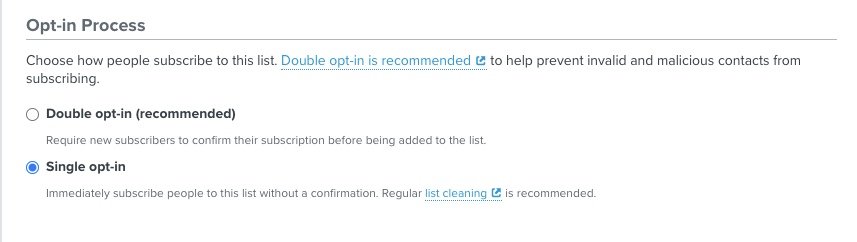
    I finally found the issue, I just had to switch the settings of the list to “single opt-in” and it worked perfectly.


    5 replies

    alex.hong
    Klaviyo Alum
    April 11, 2022

    Hi there @nicolama,

    Welcome to the Community.

    Do you mind providing which resource you found that template from? Per our docs, you would just make a post request following this format:

    curl --request POST \
    --url 'https://a.klaviyo.com/api/v2/list/LIST_ID/members?api_key=API_KEY' \
    --header 'Accept: application/json' \
    --header 'Content-Type: application/json' \
    --data '
    {
    "profiles": [
    {
    "email": "george.washington@klaviyo.com"
    },
    {
    "phone_number": "+13239169023"
    }
    ]
    }
    '


    All the best,

    Alex

    nicolamaAuthor
    Contributor I
    April 12, 2022

    Hi Alex - thanks for your answer. I am using the new klaviyo node.js sdk : https://github.com/klaviyo/klaviyo-node-sdk#add-members-to-a-list

    Is it not official ?

    alex.hong
    Klaviyo Alum
    April 12, 2022

    Hi @nicolama

    Thanks for sharing the resource. You could use that but as you can see if you click on any of the sections it does lead back to our developer portal.

    For example, clicking on the add member to list [ListsSegments.addMembers(listId, opts)] directs you to the javascript example:

    const options = {
    method: 'POST',
    headers: {Accept: 'application/json', 'Content-Type': 'application/json'},
    body: JSON.stringify({
    profiles: [{email: 'george.washington@klaviyo.com'}, {phone_number: '+13239169023'}]
    })
    };

    fetch('https://a.klaviyo.com/api/v2/list/LIST_ID/members?api_key=API_KEY', options)
    .then(response => response.json())
    .then(response => console.log(response))
    .catch(err => console.error(err));

    I will do some further investigating and report back.

    alex.hong
    Klaviyo Alum
    April 12, 2022

    Hey @nicolama 

    Just to add in here: I would recommend double checking the syntax for your initial attempt + follow the guidance on our developer portal. It could be something as simple as a syntax and formatting error since your original post does have the profile parameter included. 

    nicolamaAuthorAnswer
    Contributor I
    April 14, 2022

    Hi @alex.hong - thanks for your answers.

    I finally found the issue, I just had to switch the settings of the list to “single opt-in” and it worked perfectly.