Contributor I
July 16, 2025
Solved

Abandoned Cart Vertical display, how to not stack items?

  • July 16, 2025
  • 4 replies
  • 182 views

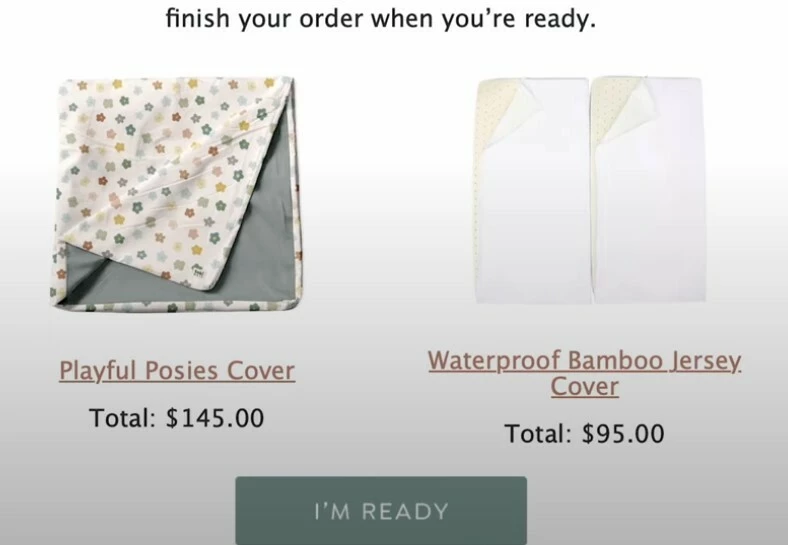
Does anyone know how to display items side by side (image on top, text below) when there are multiple items, instead of having them stacked vertically? Currently, they only appear one on top of another. I’ve attached an image for reference 


    Best answer by StefanUE

    Hey, thanks for the tap in!

    @mariotapia why don’t you try using this in an HTML block instead of the Klaviyo default checkout block, and let me know if that worked (you can adjust the styling any way you need to):
     

    <div style="display: flex; flex-wrap: wrap; gap: 20px; justify-content: center;">

    {% for item in event.extra.line_items %}

      <div style="display: inline-block; width: 200px; vertical-align: top; text-align: left; border: 1px solid #ddd; padding: 10px;">
        
        <img src="{% if item.product.variant.images.0.src %}{{item.product.variant.images.0.src}}{% else %}{{item.product.images.0.src|missing_product_image}}{% endif %}" width="180" style="display: block; margin: 0 auto 10px;" />

        <strong>{{ item.product.title }}</strong><br/>
        Quantity: {{ item.quantity|floatformat:0 }}<br/>
        Total: {% currency_format item.line_price|floatformat:2 %}

      </div>

    {% endfor %}

    </div>

    4 replies

    MANSIR2094
    Expert Problem Solver IV
    Expert Problem Solver IV
    July 16, 2025

    Hey ​@mariotapia nice sharing this ...

    What's happening is your items are stacked because the layout you are using is block based. To fix it use a 2 column layout in klaviyo if you are using the drag drop builder. Just drop your product (image and text) into each column for more two, just duplicate the section. If you are using HTML, a basic table will do the trick: 


    <table>

      <tr>

        <td align="center">

          <img src="IMAGE_URL_1" style="width:150px;" /><br/>

          <a href="#">Playful Posies Cover</a><br/>

          <strong>$145.00</strong>

        </td>

        <td align="center">

          <img src="IMAGE_URL_2" style="width:150px;" /><br/>

          <a href="#">Waterproof Bamboo Jersey Cover</a><br/>

          <strong>$95.00</strong>

        </td>

      </tr>

    </table>


    This keeps everything side by side with the image on the top and text below.

    Mansir Digital Portfolio
    In the Inbox
    Partner - Platinum
    2025 Champion
    July 17, 2025

    Hi ​@mariotapia -

    This is a great question (and idea)!

    I actually don’t think this is currently possible because the dynamic nature of the loop in Klaviyo I believe is based on the row, not the column. So, even if you code a table with two columns, when you apply the dynamic language to the table, it will continue to loop the products by row. 

    I tried setting this up myself, and each column showed the same product, and each row showed a different product. I wasn’t able to get one product per column. 

    But, I’d like to toss this out to a few other Klaviyo Champions, especially the more technical ones, to see if they have a solution here. ​@DavidV ​@Omar ​@StefanUE ​@retention ​@ebusiness pros 

    Best,

    @In the Inbox 

    Bryan Richey // Klaviyo Champion & Email Strategist at In the Inbox // https://intheinbox.co/
    StefanUE
    Expert Problem Solver III
    StefanUEAnswer
    Champion & Partner
    July 17, 2025

    Hey, thanks for the tap in!

    @mariotapia why don’t you try using this in an HTML block instead of the Klaviyo default checkout block, and let me know if that worked (you can adjust the styling any way you need to):
     

    <div style="display: flex; flex-wrap: wrap; gap: 20px; justify-content: center;">

    {% for item in event.extra.line_items %}

      <div style="display: inline-block; width: 200px; vertical-align: top; text-align: left; border: 1px solid #ddd; padding: 10px;">
        
        <img src="{% if item.product.variant.images.0.src %}{{item.product.variant.images.0.src}}{% else %}{{item.product.images.0.src|missing_product_image}}{% endif %}" width="180" style="display: block; margin: 0 auto 10px;" />

        <strong>{{ item.product.title }}</strong><br/>
        Quantity: {{ item.quantity|floatformat:0 }}<br/>
        Total: {% currency_format item.line_price|floatformat:2 %}

      </div>

    {% endfor %}

    </div>

    Get in touch at https://www.linkedin.com/in/stefan-milicevic-706331137/
    Lina
    Active Contributor IV
    Active Contributor IV
    February 12, 2026

    I am wondering if someone was able to configure two columns instead of one only? I tried ​@StefanUE provided code, but it’s not working for me.