Contributor II
February 14, 2025
Solved

Abandoned Checkout Flow - Items not showing

  • February 14, 2025
  • 5 replies
  • 391 views

Hi there,


I am trying to create an abandonded checkout flow which is triggered off the checkout started trigger. 


I duplicated the new flow from the Shopify Abandonded Cart Flow. When testing the checkout flow the images and product information is not appearing. 


This is the code

img: {{ event.URL }}

description: 

{{ event|lookup:'Product Name'|default:'' }}


Price: {% currency_format event|lookup:'Price'|floatformat:2 %}

link: {{ event.URL }}


What are the correct codes to show someone what was in their checkout and take them directly to checkout? 


Cheers

    Best answer by annasophiefc

    Hi ​@kellycous93 


    Thank you for posting in the Community!


    First of all, is your flow being triggered of the Added to Cart or the Started Checkout metric in Shopify?


    If it is the Added to cart you can try setting in these variables:

    Image URL: {{ event.ImageURL|default:'' }}

    Product Name: {{ event.Name|default:'' }}

    Product URL: {{ event.URL|default:'' }}

    Price: {{ event.Price|default:'' }}


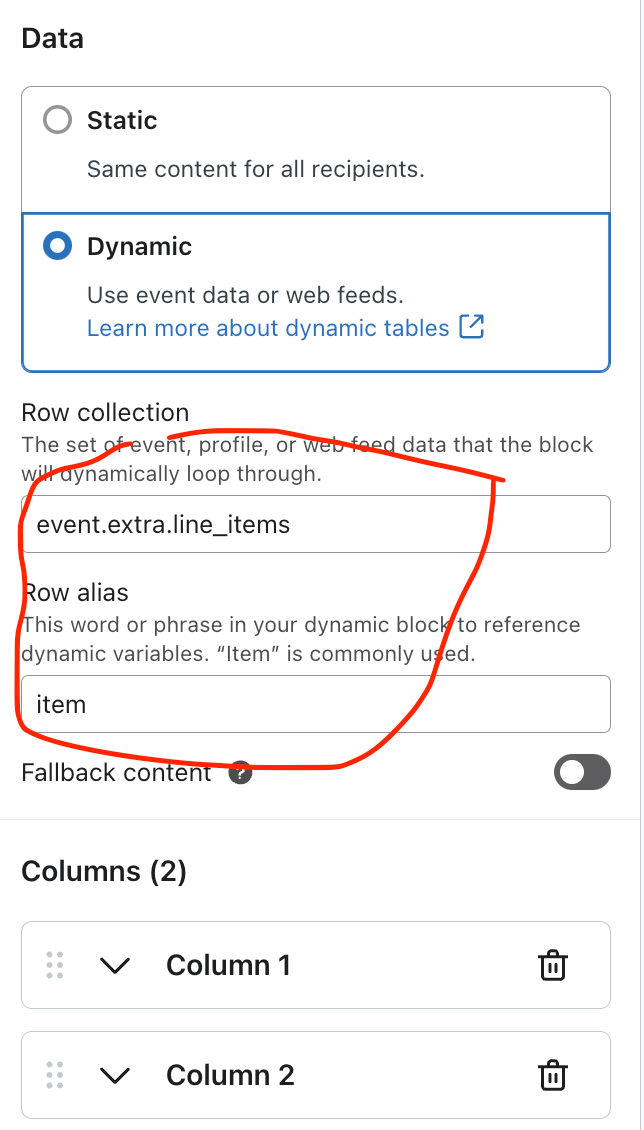
    If it is the Started checkout metric it will dynamically pull in all products in the cart, therefore you should setup a table with row collection and row alias as shown below. From there, you can pull in the attributes:

    Image URL: {% if item.product.variant.images.0.src %}{{item.product.variant.images.0.src}}{%else%}{{item.product.images.0.src|missing_product_image}}{%endif%}

    Product Name: {{item.product.title}}

    Product URL: {{ organization.url|trim_slash }}/products/{{ item.product.handle }}

    Price: {{ item.price|default:'' }}


    I sincerely hope this helps you - otherwise I am happy to assist further!


    5 replies

    Amos Peace
    Problem Solver III
    Problem Solver III
    February 14, 2025

    Hello ​@kellycous93,

    You're on the right track, but the issue is likely that the event data structure for "Checkout Started" is different from "Abandoned Cart" in Klaviyo. The correct variables depend on how Shopify sends the data. Try using the following:

    1. Correct the Image, Product Name, Price, and Checkout Link

    Replace your current code with this:

    {% for item in event.extra.line_items %} **Product:** {{ item.product.title }} **Price:** {% currency_format item.line_price %} **Image:** <img src="{{ item.product.images.0.src }}" alt="{{ item.product.title }}" width="200"/> **Link to Checkout:** [Return to Checkout]({{ event.extra.checkout_url }}) {% endfor %}

    2. Explanation of Fixes:

    • event.extra.line_items → Loops through all products in the abandoned checkout.
    • item.product.title → Displays the product name.
    • item.line_price → Formats the price correctly.
    • item.product.images.0.src → Grabs the first product image.
    • event.extra.checkout_url → Directs the user back to their checkout.

    3. Next Steps

    • Test this in Klaviyo's "Preview" mode to confirm the correct data is pulling in.
    • If images still don’t appear, check Shopify’s event data to ensure images are included in the webhook.

     Kindly reach out if you need adjustments.


    Best Regards,

    Peace - Turning Emails Into Opportunities 💼 Email Marketing Specialist | 🚀 Klaviyo Expert 📧 amosfolashade2@email.com WhatsApp -+2349023453575 “Delivering the right message, to the right person, at the right time.”
    Contributor II
    February 14, 2025

    Hi, thanks for your response but that didn’t work for me :( 


    Adunni
    Problem Solver II
    Problem Solver II
    February 14, 2025

    Hi ​@kellycous93,

    Great question! The issue is that the event data in your abandoned checkout flow is different from the abandoned cart flow. The correct way to display product details in your abandoned checkout emails is to use the right event properties. Try this updated version:

    Image:

    <img src="{{ event.extra.line_items.0.product.image.src }}" alt="Product Image">

    Product Name:

    {{ event.extra.line_items.0.product.title }}

    Price:

    {{ event.extra.line_items.0.line_price | money }}

    Checkout Link:

    {{ event.extra.checkout_url }}

    This will dynamically pull in the first product from the abandoned checkout and link the customer back to their checkout session. If you want to show multiple products, you need to loop through event.extra.line_items.

    Let me know if you need further clarification!

    Cheers,
    Adunni

    Whats A p p No - +234- 07042366365, E ma i l- waliyatkehinde 46 @ g ma i l . c om
    Contributor II
    February 16, 2025

    I don’t know what I am doing wrong, but that’s not working either :( 


    annasophiefc
    Partner - Platinum
    2025 Champion
    February 17, 2025

    Hi ​@kellycous93 


    Thank you for posting in the Community!


    First of all, is your flow being triggered of the Added to Cart or the Started Checkout metric in Shopify?


    If it is the Added to cart you can try setting in these variables:

    Image URL: {{ event.ImageURL|default:'' }}

    Product Name: {{ event.Name|default:'' }}

    Product URL: {{ event.URL|default:'' }}

    Price: {{ event.Price|default:'' }}


    If it is the Started checkout metric it will dynamically pull in all products in the cart, therefore you should setup a table with row collection and row alias as shown below. From there, you can pull in the attributes:

    Image URL: {% if item.product.variant.images.0.src %}{{item.product.variant.images.0.src}}{%else%}{{item.product.images.0.src|missing_product_image}}{%endif%}

    Product Name: {{item.product.title}}

    Product URL: {{ organization.url|trim_slash }}/products/{{ item.product.handle }}

    Price: {{ item.price|default:'' }}


    I sincerely hope this helps you - otherwise I am happy to assist further!


    Champion & Klaviyo Partner based in Aarhus, Denmark. It is all about communicating the right message to the right people at the right time!