The dev team for my company’s website was investigating some mysterious website crashes we’ve been having.
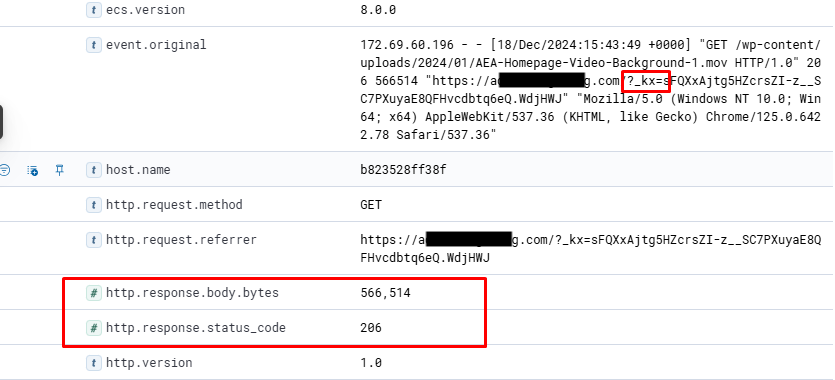
They found an extremely high number of incoming requests within a short period of time (‹1 minute) for file accesses (=GET). All of them were related to downloading media files ~ 2GB.
All the requests had the parameter '_kx' indicating they were coming from links embedded in Klaviyo emails.
My question is: how do I go about tracking down where these requests are coming from? And how do I prevent this from happening in the future?
Best answer by MANSIR2094
Hello John,
The issue you're facing is likely due to a large number of recipients clicking on media file links in your Klaviyo emails simultaneously. The _kx parameter indicates these requests are generated from Klaviyo’s email links, which helps track engagement.
Steps to Address the Issue:
Identify the Source:
In Klaviyo, go to the campaign or flow that includes the media file link.
Check the email’s analytics to identify which email or audience segment triggered the spike in downloads.
Mitigate the Load:
Host large files on a dedicated content delivery network (CDN) to handle high traffic efficiently.
Consider replacing direct file links with a landing page where users can download the file manually or request it via email.
Prevent Future Spikes:
Add a download limit or implement rate-limiting at the server level to control excessive requests.
Use expiring links or token-based access for media files to ensure better control.
If you need help implementing these solutions or setting up preventive measures, feel free to reach out. I would be happy to assist and make the process easy to understand!
The issue you're facing is likely due to a large number of recipients clicking on media file links in your Klaviyo emails simultaneously. The _kx parameter indicates these requests are generated from Klaviyo’s email links, which helps track engagement.
Steps to Address the Issue:
Identify the Source:
In Klaviyo, go to the campaign or flow that includes the media file link.
Check the email’s analytics to identify which email or audience segment triggered the spike in downloads.
Mitigate the Load:
Host large files on a dedicated content delivery network (CDN) to handle high traffic efficiently.
Consider replacing direct file links with a landing page where users can download the file manually or request it via email.
Prevent Future Spikes:
Add a download limit or implement rate-limiting at the server level to control excessive requests.
Use expiring links or token-based access for media files to ensure better control.
If you need help implementing these solutions or setting up preventive measures, feel free to reach out. I would be happy to assist and make the process easy to understand!
Search saves time. Contributing compounds value.
The ROI of your reply? One helpful answer can support dozens of teams, build your credibility, sharpen your own expertise over time, foster connectivity, and create good karma – because what goes around comes around. The community is what YOU make it.