


Contributor I
Aug 13, 2024 2:14 AM UTC
Solved

How to auto add profiles into newsletter list when updated profiles customer attribute Shopify Tags to newsletter

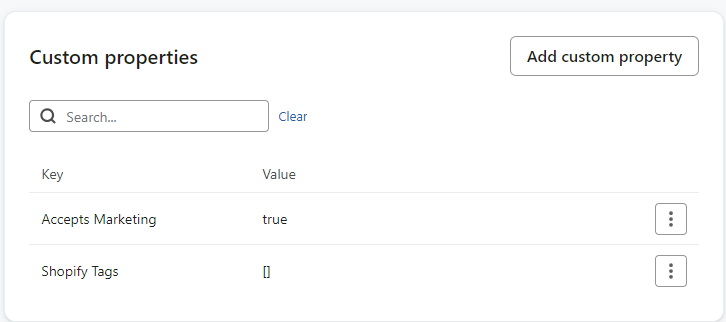
Shopify has already synced the Shopify Tags with [] and now I integrated update profiles api to update the Shopify Tags value and it’s able to update. But now the problem is I have a list called newsletter, so whenever i update the Shopify tags to [“newsletter”], I want the profiles automatically added into newsletter list? How can i achieve as currently I only able to update the Shopify tags value. 
 

    This topic has been closed for replies.
    ArpitBanjara
    Principal User II
    Aug 13, 2024 5:00 AM UTC

    Hey @cycy 

    welcome to the community

    • Create a segment - Properties about someone -> Shopify Tags -> contains -> newsletter.
    • Now only way you can add these profiles from a segment to a list is by exporting it to a csv file and then importing it into your newsletter list.
    • To export your segment - Click on the "Manage Segment" button (three dots in the top right corner). Select "Export Segment to CSV". Save the exported CSV file to your computer.
    • To Import Profiles into a List - Click on the "Manage List" button (three dots in the top right corner). Select "Import Contacts". Choose "Upload File". Upload the CSV file you exported in Step 2. Map the columns from your CSV to the appropriate fields in Klaviyo. Review and complete the import process.

    I know this is manual process and you will have to do this every week or month, but unfortunately currently there is no way to do this with the help of a flow to automatically add profiles from a segment to a list (as per my knowledge). 

    I hope this helps

    Cheers

    Arpit Banjara


    Arpit Banjara - Lead Email Marketing Specialist at Flowium

    1 reply

    ArpitBanjara
    Principal User II
    Principal User II
    Aug 13, 2024 5:00 AM UTC

    Hey @cycy 

    welcome to the community

    • Create a segment - Properties about someone -> Shopify Tags -> contains -> newsletter.
    • Now only way you can add these profiles from a segment to a list is by exporting it to a csv file and then importing it into your newsletter list.
    • To export your segment - Click on the "Manage Segment" button (three dots in the top right corner). Select "Export Segment to CSV". Save the exported CSV file to your computer.
    • To Import Profiles into a List - Click on the "Manage List" button (three dots in the top right corner). Select "Import Contacts". Choose "Upload File". Upload the CSV file you exported in Step 2. Map the columns from your CSV to the appropriate fields in Klaviyo. Review and complete the import process.

    I know this is manual process and you will have to do this every week or month, but unfortunately currently there is no way to do this with the help of a flow to automatically add profiles from a segment to a list (as per my knowledge). 

    I hope this helps

    Cheers

    Arpit Banjara


    Arpit Banjara - Lead Email Marketing Specialist at Flowium