Solved

Issue with Link error - tracking

  • January 12, 2021
  • 3 replies
  • 1313 views

Forum|alt.badge.img+2

Hello! I have an email that I am hoping to send out with a link that takes you to a website. This website is where clients we work with login to access information. The link in the email currently takes you to a 404 error page on the site, even though when I paste the link in a browser it works correctly. I had a coworker figure out that this was because of tracking settings in Klaviyo. However, she no longer works with us and I don’t know what the setting is that we are supposed to change in order for that link to work properly. Would anyone have an idea on what tracking settings I might be able to change for this to work? Thank you!

Best answer by caroline

Hi there,

It sounds like you might be referring to Klaviyo’s email-to-web tracking, which will append a string to your URL. This help center article describes how you can disable this tracking.

Hope that helps!

Best,

Caroline

3 replies

caroline
Forum|alt.badge.img+8
  • Klaviyo Alum
  • 215 replies
  • Answer
  • January 13, 2021

Hi there,

It sounds like you might be referring to Klaviyo’s email-to-web tracking, which will append a string to your URL. This help center article describes how you can disable this tracking.

Hope that helps!

Best,

Caroline


Forum|alt.badge.img+2
  • Author
  • Contributor I
  • 2 replies
  • June 10, 2021

Hello! I followed this step for the last time I needed it. But I just tried it again for a new email I was sending and it is no longer working, I am getting that 404 error page again. I turned off email to web tracking and my link is still not working. Any help would be really great!!


Dov
Forum|alt.badge.img+61
  • Klaviyo Alum
  • 1493 replies
  • June 14, 2021

Hello @caitmcswny,

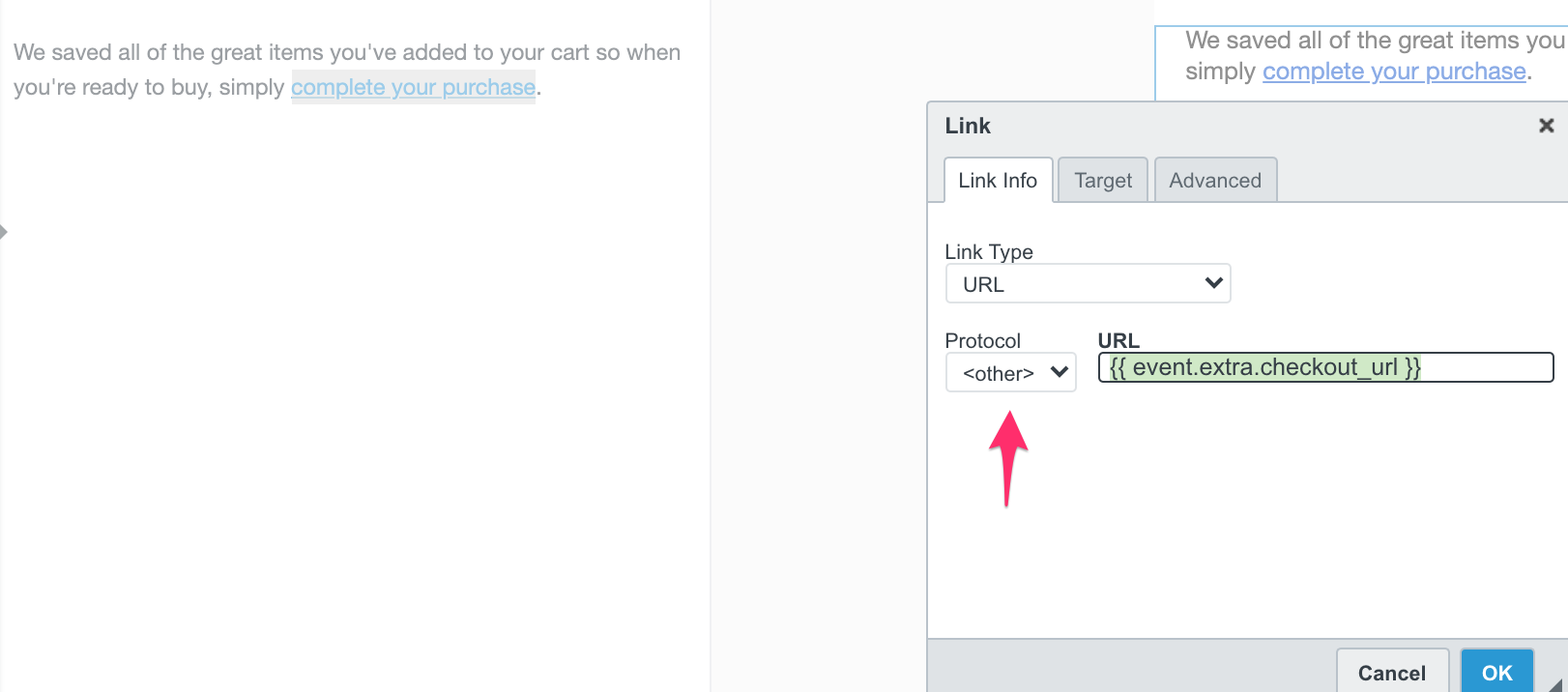
Does the link happen to be populating in Klaviyo through a dynamic event variable? Or is it a hyperlinked in a text block? If so, I recommend double-clicking on the text in question and checking the protocol for the link.

If you are using a dynamic tag, ensure that the protocol is set to <other>. If the protocol is set to http or https then there will be a duplicate http or https in the URL which can also break the link (which commonly happens when you’re using a dynamic tag as screenshotted below).


If this does not resolve the issue, I would also turn off UTM tracking for the email in question and see if this resolves.

Thanks and have a wonderful day.