Question

separate abandoned cart flow for each product

  • March 25, 2026
  • 2 replies
  • 16 views

Forum|alt.badge.img

Is it possible to create separate abandoned cart flows for different products? We have three main product lines, and my client wants each of them to have its own abandoned cart flow. What is your thoughts of this pls? I need your help

2 replies

Byrne C
Community Manager
Forum|alt.badge.img+28
  • Community Manager
  • March 30, 2026

Hi ​@jssalvrx,

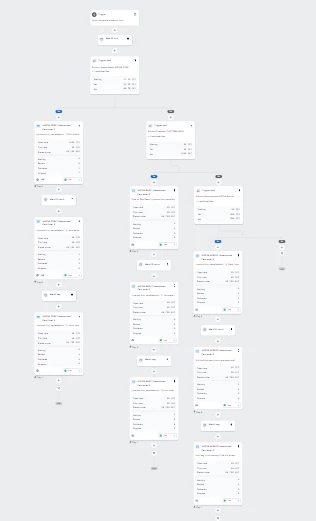
This is definitely possible! That being said, it might be easier to keep everything in one flow, but use trigger splits to send different people down different branches of the flow. To set this up, you’d do this:

  • Create a flow triggered by Added to Cart.
  • Add a trigger split under the trigger. 
  • Define that split as “Product Name equals Example_Product”. Replace Example_Product with an actual product name.
  • People who add that product to their cart will go down the YES path in this split. Add any emails/time delays you want under this path, so people who add this product to their cart follow the journey you choose for them.
  • Under the NO path of this split, add another trigger split. 
  • Define this split using the same method, but swap out your product name with the next one.
  • Add all relevant flow actions for this product under the YES path of this split.
  • Add another trigger split under the NO path. Repeat this product for every product you want to include in this flow.

While it’s technically possible to make 3 entirely different flows, you might want to keep everything under one flow. Let me know if you have any questions about the above!


Forum|alt.badge.img
  • Author
  • Contributor I
  • April 1, 2026

Hi ​@Byrne C IS THIS CORRECT?