




Klaviyo Q1 2026 product updates: Composer launch + key feature releases
Hey everyone,
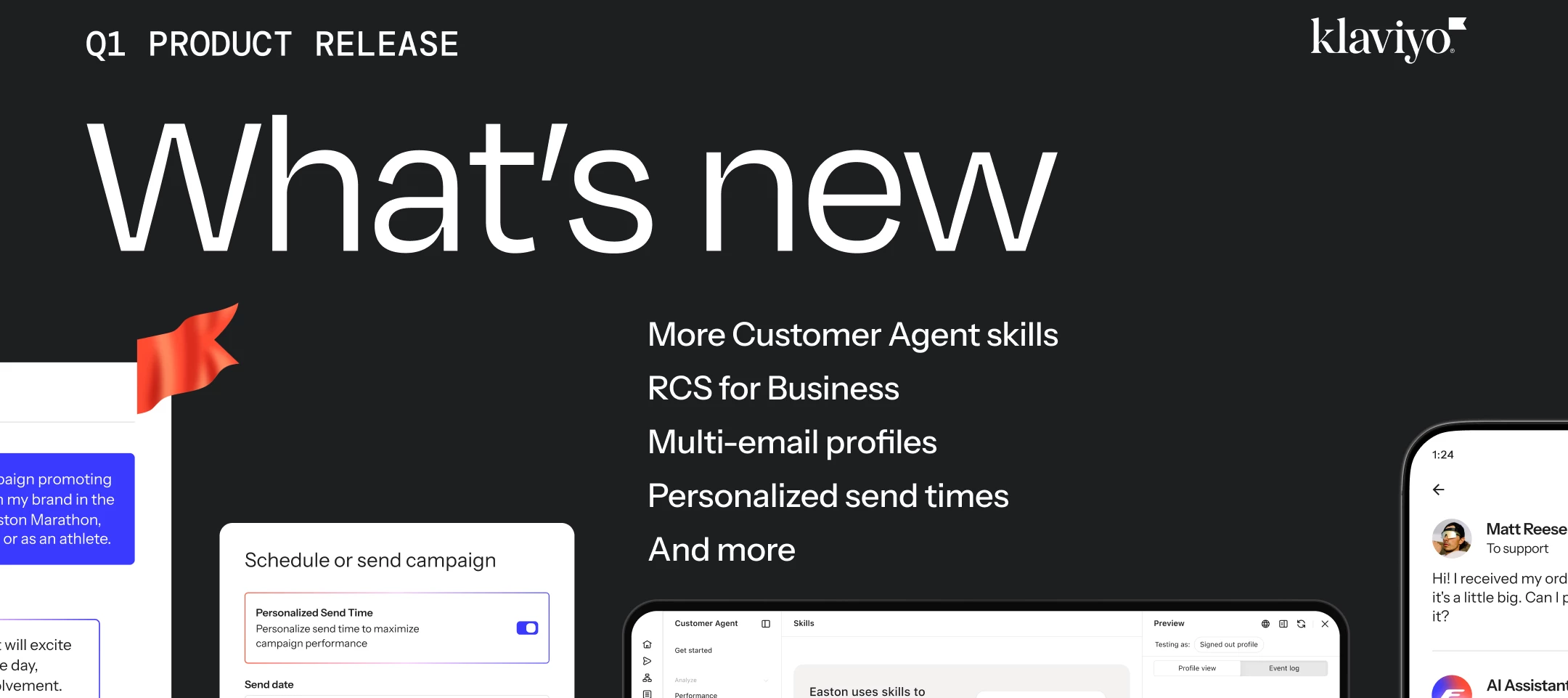
Klaviyo just shipped its Q1 2026 release and… there’s a lot in here. Some genuinely big stuff, plus a bunch of quality-of-life upgrades that should make your day-to-day a lot smoother.
Here’s the rundown on what's new and how you can start using these features today.
Composer: From idea to launched campaign, in minutes
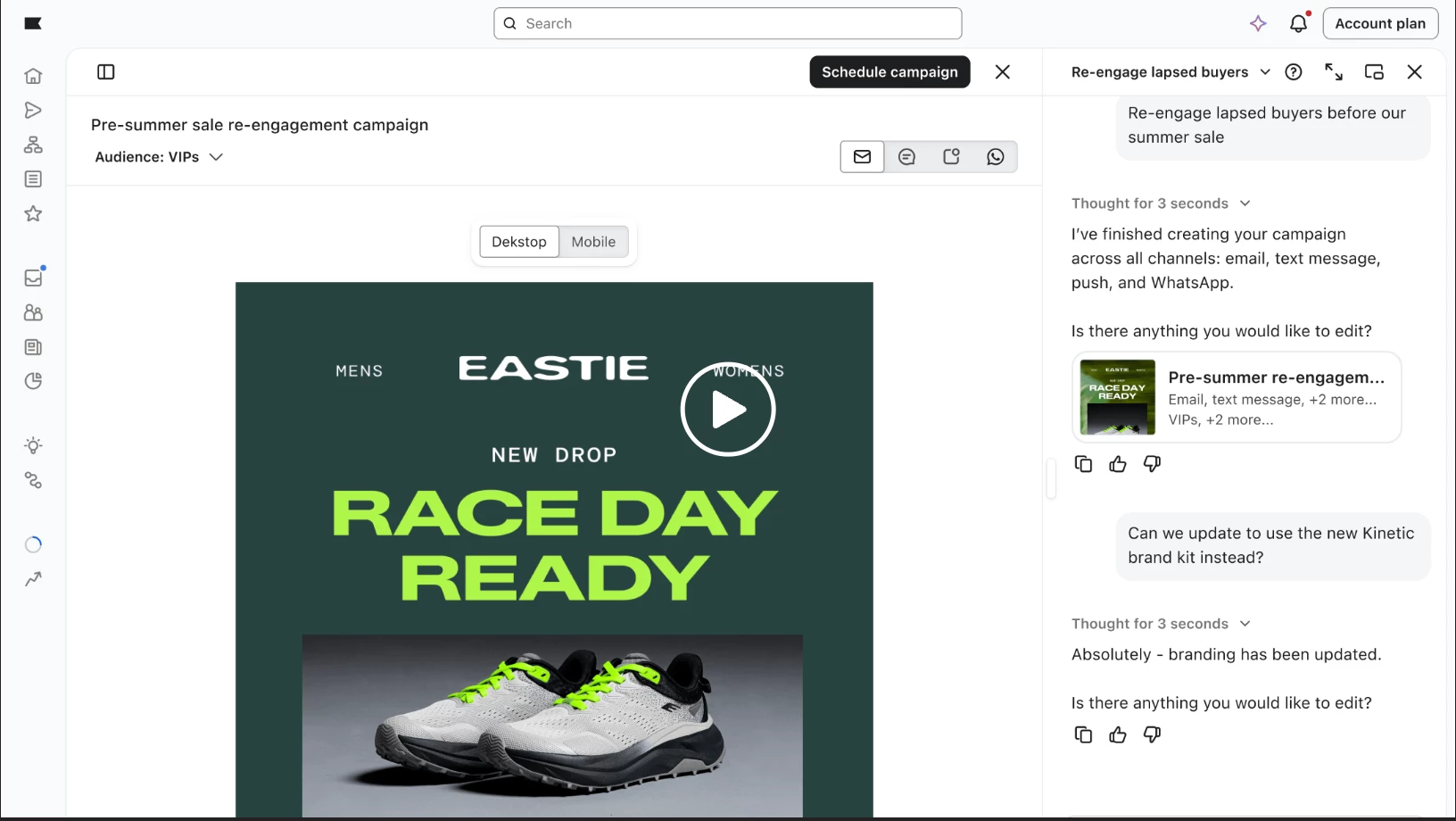
The real headline this quarter is Composer, a new AI-powered capability that generates complete, launch-ready campaigns from a simple prompt.
Here's how it works: You describe what you want, like "create a spring product launch campaign for high-value customers", and Composer builds the entire thing: subject line, copy, images, audience segments, and send logic. You review it, adjust if needed, and launch.
What makes Composer different:
- Built on real marketing intelligence: Every campaign Composer creates is informed by 14+ years of performance data across billions of customer interactions on Klaviyo. It's not just generating content–it's applying what actually works.
- Brand-controlled from the start: Composer learns your voice, tone, and compliance rules. Nothing goes live without your approval.
- Works with the tools you already use: Composer integrates with platforms like Google, Canva, and Figma, so you can pull in brand assets and launch campaigns without switching between tools.
Composer is currently available in private beta. If you're interested in trying it, you can join the waitlist here.
Other Q1 updates worth checking out
Beyond Composer, this quarter delivered concrete improvements across Klaviyo AI, Marketing, Service, and Analytics. Here's what's new and why it matters for your day-to-day work.
Smarter AI and personalization
Agent Guidance (Klaviyo AI)
You can now define exactly how your Customer Agent communicates, tone, decision-making rules, and when to escalate to a human. This gives you full control over how AI represents your brand in customer conversations, especially in sensitive situations.
- What changed: Set custom tone (professional, friendly, clever), define communication style rules, and configure escalation triggers.
- Why it matters: Your AI agent stays on-brand and knows when to hand off complex issues with full context, so customers get consistent, helpful experiences.
- Learn more: How to customize your Customer Agent with Guidance.
Customer Agent now supports Email and WhatsApp (GA)
Customer Agent, your 24/7 AI assistant, now works across email and WhatsApp in addition to chat and SMS. This significantly expands your automation coverage while keeping the customer experience unified.
- What changed: Brands can now deliver fast, accurate, AI-powered responses across four high-volume support channels.
- Why it matters: More channels covered = more questions resolved instantly, freeing up your team for higher-value work.
- Learn more: Customer Agent setup guidance
Expanded retail skills for Customer Agent
Customer Agent now handles even more out-of-the-box retail use cases: enhanced order tracking, order editing, subscription management, returns & exchanges, and loyalty lookup. A new Skills page lets you see what's live, what needs setup, and how each skill is performing.
- What changed: More pre-built capabilities that work from day one, plus better visibility into skill performance.
- Why it matters: Automate high-volume retail questions without custom development, and track which skills drive the most value.
- Learn more: Skills overview
Better messaging and channels
RCS is now GA
RCS (Rich Communication Services) brings branded, interactive messaging into the native Android messaging app. Think: rich media, quick-reply buttons, and branded sender info, all without requiring customers to download another app.
- What changed: You can now send RCS messages alongside your email and SMS campaigns.
- Why it matters: Stand out in the inbox with richer, more engaging messages that drive higher engagement and trust.
- Learn more: How to get started with RCS | RCS page to sign up
Klaviyo Social auto-replies (GA)
Convert Instagram engagement into email, SMS, and WhatsApp subscribers automatically. When someone comments on your posts, Klaviyo can trigger an auto-reply that captures their contact info and adds them to your list.
- What changed: You can now grow your list directly from Instagram comments with automated, compliant opt-in flows.
- Why it matters: Turn social engagement into owned channels, no manual DM management required.
- Learn more: Klaviyo Social Marketing overview | YouTube: How to grow your subscriber list with instagram on Klaviyo
Stronger data and analytics
Multi-Email Profiles
Customers can now have up to five email addresses in a single Klaviyo profile. This preserves consent, history, and targeting accuracy across inboxes, and delivers more accurate analytics.
- What changed: One profile can track multiple emails without creating duplicates or losing data.
- Why it matters: Better data accuracy means better segmentation, cleaner reporting, and no more duplicate profiles cluttering your account.
- Learn more: How to create and manage multiple accounts in Klaviyo
Personalized Send Time (GA)
Klaviyo now learns the best time to send emails to each individual subscriber based on their engagement patterns, and delivers messages automatically at that optimal moment.
- What changed: Toggle on Personalized Send Time when scheduling a campaign, and Klaviyo handles the rest.
- Why it matters: Higher open rates and conversions without manual send-time testing or guesswork.
- Learn more: Drive performance with Personalized Send Time
Audience Optimization
With one click, you can now automatically exclude profiles who are likely to unsubscribe from your campaign audience. This protects your list health and keeps engagement strong.
- What changed: A simple toggle when building your campaign audience removes high-risk profiles.
- Why it matters: Maintain healthy engagement rates and reduce unsubscribes without manual list scrubbing.
- Learn more: Customer profile marketing guide
Next Best Product for Mobile Channels
You can now add dynamic, personalized product blocks to SMS and mobile push messages, just like you do in email. Each recipient sees products tailored to their browsing and purchase history.
- What changed: Product recommendations are now available in text messages, not just email.
- Why it matters: Drive more revenue from SMS by showing customers exactly what they're most likely to buy.
- Learn more: Getting started with product analysis dashboard
Expanded service capabilities
Personalized Onsite Banners (Customer Hub)
You can now place dynamic, segment-targeted banners at the top of your website, visible to up to 100% of visitors. Built natively into Customer Hub, these banners let you deliver personalized offers, announcements, or VIP recognition without code.
- What changed: Onsite personalization now extends beyond the Hub drawer to full-page banners.
- Why it matters: Reach more visitors with relevant messages and drive action without relying on developers.
- Learn more: How to create a personalized onsite banner | How to style your Customer Hub
Customer Hub for WooCommerce (GA)
Customer Hub is no longer Shopify-only. WooCommerce merchants can now deploy Klaviyo's onsite service experiences directly on their storefronts.
- What changed: Customer Hub now works on WooCommerce sites, bringing the same self-service and personalization features to a new platform.
- Why it matters: If you're on WooCommerce, you can now give customers the same seamless onsite experience that Shopify brands have been using.
- Learn more: Getting started with Customer Hub for WooCommerce
How to stay caught up on new releases
- Visit the Q1 2026 Quarterly Release hub: What's New page.
- Subscribe to updates: Get notified when new features go live by subscribing to the What's New feed or the Announcements & Product Updates channel in here, in the Community
Join the conversation: Drop your questions, feedback, or use cases right here in the Community, we're listening, and so is the product team.
Additional resources
You can find setup guides and best practices in the Klaviyo Help Center, and if you run into questions, drop them here.
Also check out the blog for more information and guidance!
What are you most excited to try?
Curious what’s standing out to everyone:
-
Planning to test Composer?
-
Going deeper on Customer Agent?
-
Already seeing wins from anything here?
Drop what you’re experimenting with (or questions) below. It’s always helpful to see how others are using this stuff in the wild.