Partner - Gold
October 6, 2022
Solved

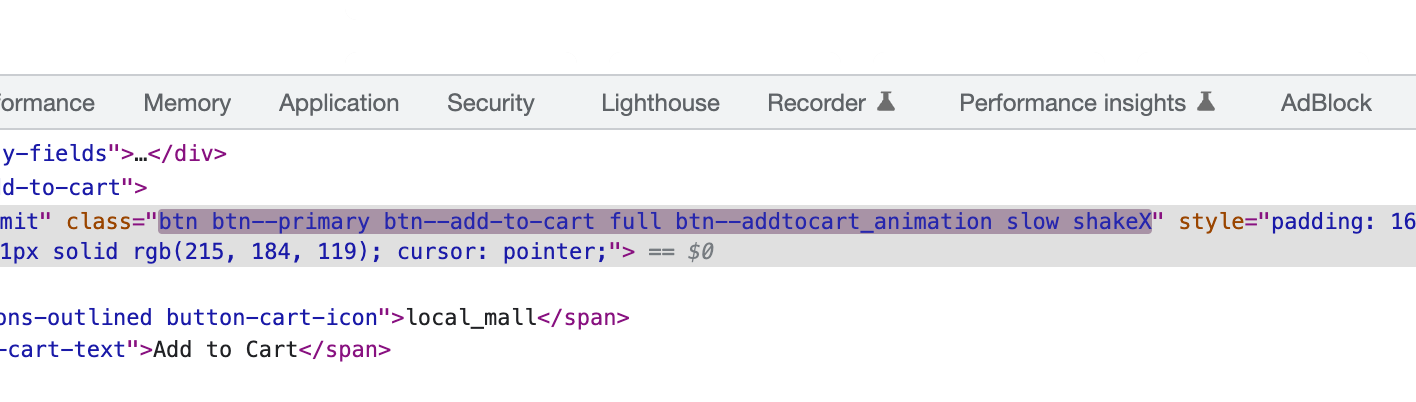
Changing add to cart class for animation

  • October 6, 2022
  • 1 reply
  • 91 views
There the class is not static maybe this why add cart is not working. please help me


    This topic has been closed for replies.
    Best answer by Dov

    Hi@proecom,

    Thanks for sharing this with us.

    As a first step, since your buttons have multiple classes, I recommend targeting one of the “common denominator classes” in your added to cart snippet that is consistent for all buttons that isn’t changing i.e. btn--add-to-cart

    If that doesn’t work, you can try targeting the parent class telling it to find any nested buttons.  This would require a query selector as oppose to getElementByClassname:

    <script type="text/javascript">
    var _learnq = _learnq || [];
    document.querySelector(".INSERT_CLASS_HERE").addEventListener('click',function (){
    _learnq.push(['track', 'Added to Cart', item]);
    });
    </script>

    Let’s say this is your set-up: 

    <div class="parent-div">
    <button class="btn--add-to-cart">Add To Cart</button>
    </div>

     You could adapt the querySelector portion to something like:

    document.querySelector('div.parent-div > button')

    I hope that’s helpful.

    1 reply

    Dov
    DovAnswer
    Klaviyo Alum
    October 6, 2022

    Hi@proecom,

    Thanks for sharing this with us.

    As a first step, since your buttons have multiple classes, I recommend targeting one of the “common denominator classes” in your added to cart snippet that is consistent for all buttons that isn’t changing i.e. btn--add-to-cart

    If that doesn’t work, you can try targeting the parent class telling it to find any nested buttons.  This would require a query selector as oppose to getElementByClassname:

    <script type="text/javascript">
    var _learnq = _learnq || [];
    document.querySelector(".INSERT_CLASS_HERE").addEventListener('click',function (){
    _learnq.push(['track', 'Added to Cart', item]);
    });
    </script>

    Let’s say this is your set-up: 

    <div class="parent-div">
    <button class="btn--add-to-cart">Add To Cart</button>
    </div>

     You could adapt the querySelector portion to something like:

    document.querySelector('div.parent-div > button')

    I hope that’s helpful.

    DD