



Answer

Customise Email Performance Review dashboard

  • December 3, 2021
  • 1 reply
  • 184 views

Stela
Contributor II
Forum|alt.badge.img+3

Hi all,

I’ve seen in one of the help centre articles the following screenshot showing this dashboard above the list of campaigns in the Campaigns tab. 
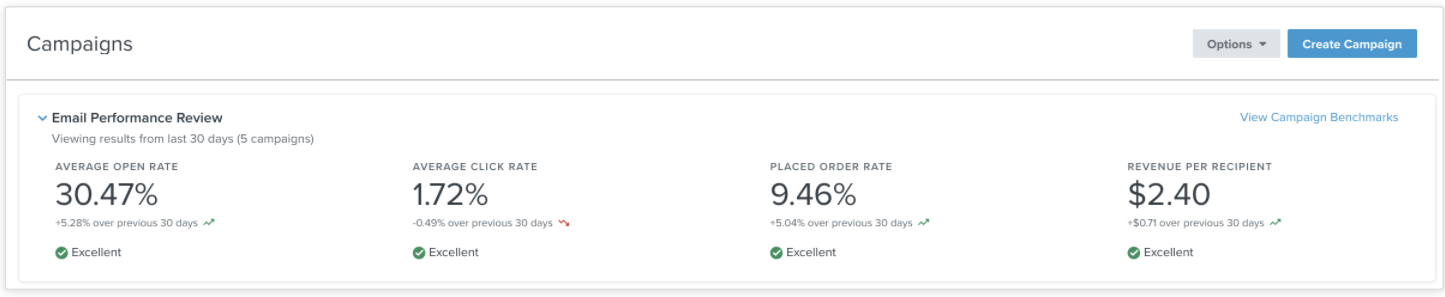
In my Email performance dashboard there’s the 4th item: Revenue per recipient missing, I have the first 3. Is there a way to add it? I’ve been browsing through articles and menues with no luck.

Thanks! 

Best answer by David To

Hello @Stela,

Great question! 

Do you happen to be a business that uses a currency that is not USD ($)? Revenue per recipient can only be calculated for USD currency. Therefore if your account is set to a different set of currency standard, Klaviyo wouldn’t be able to calculate and compare that benchmark. 

David

1 reply

David To
Klaviyo Employee
Forum|alt.badge.img+60
  • Klaviyo Employee
  • Answer
  • December 3, 2021

Hello @Stela,

Great question! 

Do you happen to be a business that uses a currency that is not USD ($)? Revenue per recipient can only be calculated for USD currency. Therefore if your account is set to a different set of currency standard, Klaviyo wouldn’t be able to calculate and compare that benchmark. 

David