


Contributor I
April 22, 2023
Solved

Added to Cart Trigger not working

  • April 22, 2023
  • 3 replies
  • 495 views

Hey All!

I am running Warehouse Theme using Shopify 2.0.

I have installed the following snippets on my product page

Snippet 1

<script type="text/javascript">
var _learnq = _learnq || [];
var item = {
Name: {{ product.title|json }},
ProductID: {{ product.id|json }},
Categories: {{ product.collections|map:'title'|json }},
ImageURL: "https:{{ product.featured_image.src|img_url:'grande' }}",
URL: "{{ shop.secure_url }}{{ product.url }}",
Brand: {{ product.vendor|json }},
Price: {{ product.price|money|json }},
CompareAtPrice: {{ product.compare_at_price_max|money|json }}
};
_learnq.push(['track', 'Viewed Product', item]);
_learnq.push(['trackViewedItem', {
Title: item.Name,
ItemId: item.ProductID,
Categories: item.Categories,
ImageUrl: item.ImageURL,
Url: item.URL,
Metadata: {
Brand: item.Brand,
Price: item.Price,
CompareAtPrice: item.CompareAtPrice
}
}]);
</script>

Snippet 2;

<script type="text/javascript">
var _learnq = _learnq || [];
document.querySelector('add_to_cart').addEventListener('click',function (){
_learnq.push(['track', 'Added to Cart', item]);
});
</script>

Snippet 3;

<script type="text/javascript">
var _learnq = _learnq || [];
var classname = document.getElementsByClassName("product-form__add-button button button--primary");
var addToCart = function() {
_learnq.push(['track', 'Added to Cart', item]);
}; for (var i = 0; i < classname.length; i++) {
classname[i].addEventListener('click', addToCart, false);
}
</script>


My theme uses the class notation for the add to cart button which I have referenced accordingly. I have noticed that also when I view a product it is not recognised even though I have the Klaviyo.js enabled.
    This topic has been closed for replies.
    Best answer by Brian Turcotte

    Hi@GeorgeYDesign!


    The Added to Cart metric has two pre-requisites:

    1. Active on Site (Klaviyo.js) is enabled
      • I see that you mentioned Klaviyo.js is enabled - have you tested this? If so, how have you tested it? If you are able to cookie yourself and show that Active on Site is being tracked, then it’s probably not the cause of the issue.
    2. Viewed Product tracking is enabled
      • Since you mentioned that you weren’t seeing Viewed Product events, it’s likely that this wasn’t installed correctly. Have you recently changed to the Warehouse Theme, or did you originally integrated with that theme?
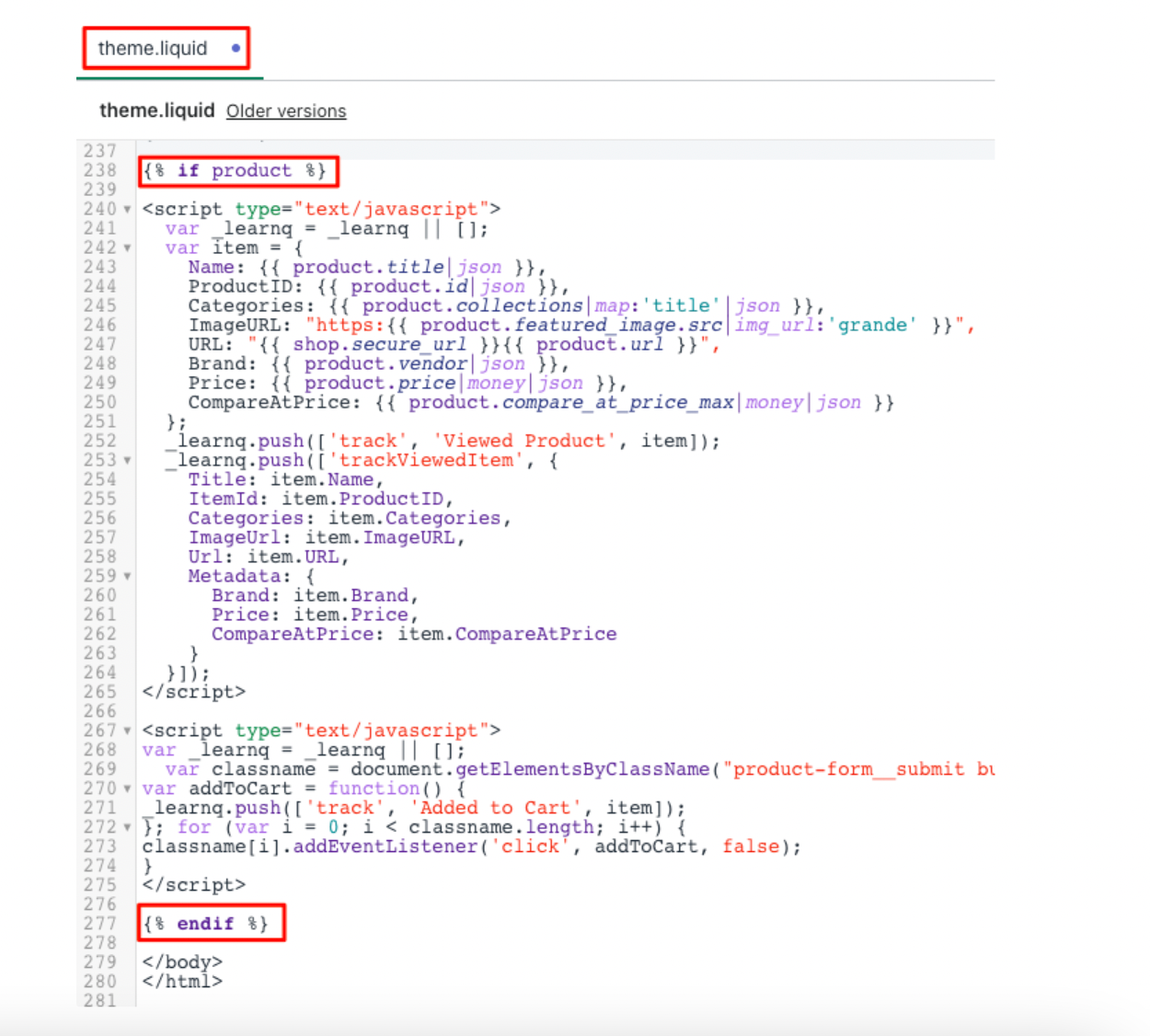
      • When you placed the Viewed Product snippet on your product page, did you add it directly above the closing </body> tag like this:

    These questions will help myself and other Community members gather some more context on the issue.


    Best,

    Brian


    3 replies

    Brian Turcotte
    Klaviyo Alum
    April 24, 2023

    Hi@GeorgeYDesign!


    The Added to Cart metric has two pre-requisites:

    1. Active on Site (Klaviyo.js) is enabled
      • I see that you mentioned Klaviyo.js is enabled - have you tested this? If so, how have you tested it? If you are able to cookie yourself and show that Active on Site is being tracked, then it’s probably not the cause of the issue.
    2. Viewed Product tracking is enabled
      • Since you mentioned that you weren’t seeing Viewed Product events, it’s likely that this wasn’t installed correctly. Have you recently changed to the Warehouse Theme, or did you originally integrated with that theme?
      • When you placed the Viewed Product snippet on your product page, did you add it directly above the closing </body> tag like this:

    These questions will help myself and other Community members gather some more context on the issue.


    Best,

    Brian


    Contributor I
    April 24, 2023

    Hi@GeorgeYDesign!


    The Added to Cart metric has two pre-requisites:

    1. Active on Site (Klaviyo.js) is enabled
      • I see that you mentioned Klaviyo.js is enabled - have you tested this? If so, how have you tested it? If you are able to cookie yourself and show that Active on Site is being tracked, then it’s probably not the cause of the issue.
    2. Viewed Product tracking is enabled
      • Since you mentioned that you weren’t seeing Viewed Product events, it’s likely that this wasn’t installed correctly. Have you recently changed to the Warehouse Theme, or did you originally integrated with that theme?
      • When you placed the Viewed Product snippet on your product page, did you add it directly above the closing </body> tag like this:

    These questions will help myself and other Community members gather some more context on the issue.


    Best,

    Brian


    Hey Brian!

    Thank you for your help however after a day of just leaving it alone it finally decided to kick in and work properly.

    Brian Turcotte
    Klaviyo Alum
    April 26, 2023

    I’m glad to hear you got it working @GeorgeYDesign!