I’m wondering if someone can help me out with this! I have a pop-up on my website that says “Sign up for 10%!”, which adds them to my “10% off” list, and triggers a flow to send them a discount code. The problem I’m having is, is that I don’t know how to make sure their e-mail is ALSO added to my “Newsletter” list. I want to keep these separate, because I don’t want people who sign up for my email at my footer to get 10% off also. Does this make sense? If so, is this possible? Any help is appreciated! Thanks so much :)
Jean-Luc
Best answer by Spark Bridge Digital LLC
Hey Jean-Luc!
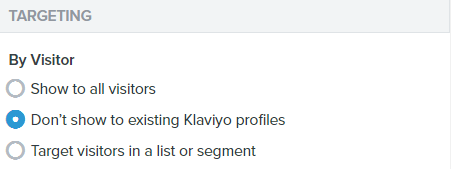
In your pop-up settings, under ‘Behaviors’ if you select -
That’ll help to filter this pop-up to only show to new non-subscribed traffic to your site. Same with ‘Target Visitors in a list...” in there you can filter out all users in the ‘Newsletter’ List to not see the offer pop-up.
The only route I know for having someone subscribe to another List is via the API. Which you could have listen out for this pop-up to submit and then the API could POST a member to your other List/fire off the Subscribe to List Metric. Or you can also do this via Zapier as well.
In your pop-up settings, under ‘Behaviors’ if you select -
That’ll help to filter this pop-up to only show to new non-subscribed traffic to your site. Same with ‘Target Visitors in a list...” in there you can filter out all users in the ‘Newsletter’ List to not see the offer pop-up.
The only route I know for having someone subscribe to another List is via the API. Which you could have listen out for this pop-up to submit and then the API could POST a member to your other List/fire off the Subscribe to List Metric. Or you can also do this via Zapier as well.