

Contributor I
August 16, 2023
Solved

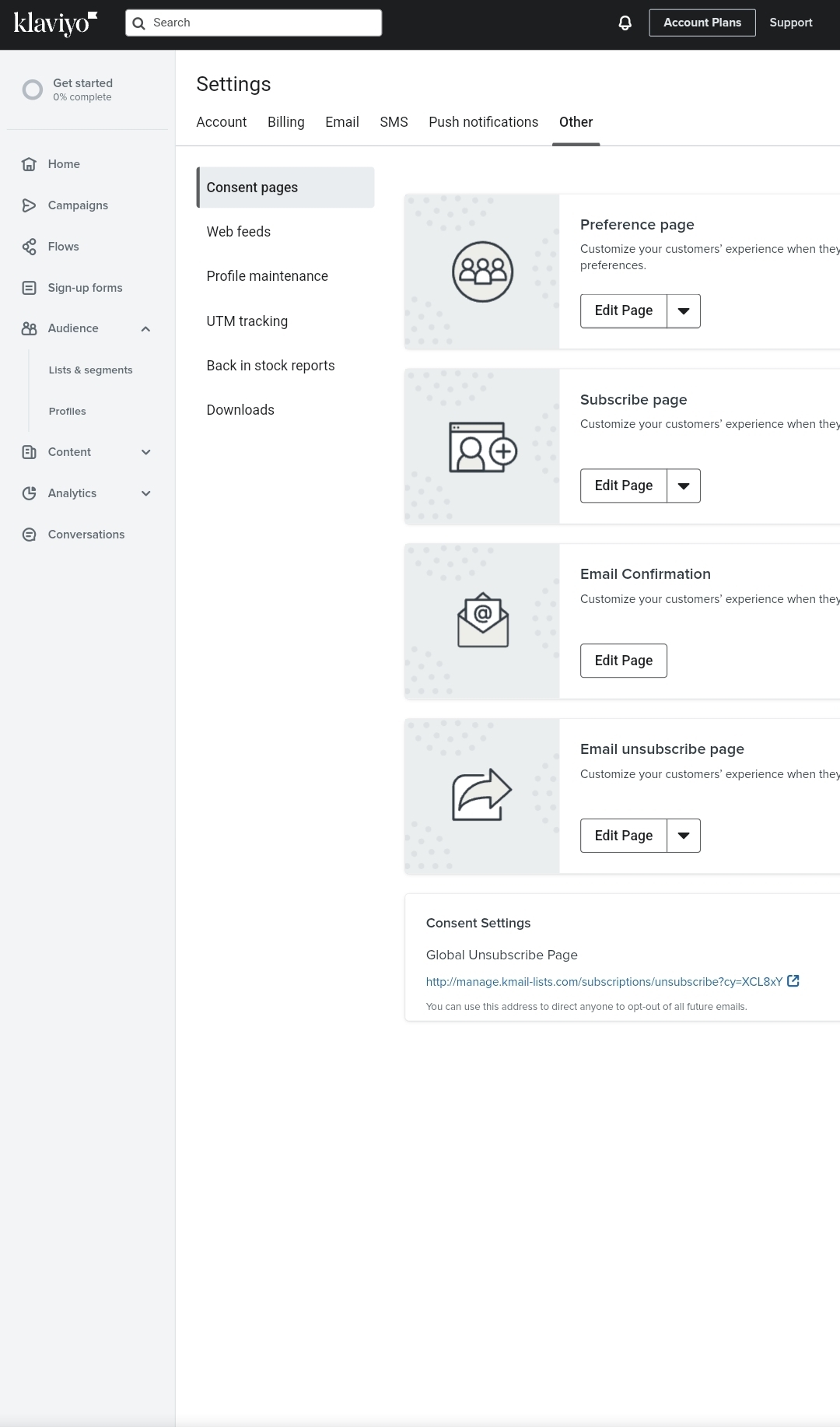
Klaviyo settings not showing properly on mobile. how to fix it?
  • August 16, 2023
  • 4 replies
  • 406 views
As you can see I can't access few of the buttons on the right side of the website through mobile. I tried to swipe but it won't move. It's only happens when I'm in the settings page. In homepage you can easily swipe to the right and see everything.


    This topic has been closed for replies.
    Best answer by Taylor Tarpley

    Hi @Shifat27


    Thanks for sharing this feedback with us and @Ashley I. for helping to troubleshoot!


    Although you can’t see the ‘Settings’ tab in the bottom left tab as you would on your desktop, and as @Ashley I. mentioned, our UI functions best on desktop, you can navigate to your Setting by clicking the ‘Account plans’ tab. This will lead you to your Settings page! However, I will give this feedback to our product team.


    Hope this helps!

    -Taylor 

    4 replies

    Ashley I.
    Partner - Platinum
    2025 Champion
    August 16, 2023

    Hi @Shifat27 ,

    I have never actually tried to login to Klaviyo on mobile before today - so thank you for introducing me to that experience! 

    I am seeing the same thing you are when on mobile in the Settings tabs for my account. Strange that on the other pages I can scroll left and right but not on these pages. I tried to rotate my screen to landscape, and while I was able to see more content that way, I still couldn’t swipe left or right on these tabs.

    For the best experience, I always recommend accessing Klaviyo from desktop, but it seems this may be a temporary glitch on mobile. 


    -- Ashley Ismailovski

    Ashley Ismailovski, Klaviyo Champion & Director of Email Marketing at SmartSites https://www.smartsites.com/
    Shifat27Author
    Contributor I
    August 16, 2023

    Hello @Ashley I. 


    I did try the landscape mode it doesn't work. I hope they fix this issue. Cause I only access klaviyo with mobile.

    Taylor Tarpley
    Community Manager
    Community Manager
    August 21, 2023

    Hi @Shifat27


    Thanks for sharing this feedback with us and @Ashley I. for helping to troubleshoot!


    Although you can’t see the ‘Settings’ tab in the bottom left tab as you would on your desktop, and as @Ashley I. mentioned, our UI functions best on desktop, you can navigate to your Setting by clicking the ‘Account plans’ tab. This will lead you to your Settings page! However, I will give this feedback to our product team.


    Hope this helps!

    -Taylor 

    Shifat27Author
    Contributor I
    August 23, 2023

    Hi @Taylor Tarpley 

    Thanks for your answer.

    Hope the product team fix the scrolling issue in settings page.
