

Contributor I
December 27, 2021
Solved

remove quantity variable

  • December 27, 2021
  • 2 replies
  • 299 views

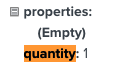
How do I remove the “.0” in product quantities? 

The value from the e-commerce platform only shows “1”
    This topic has been closed for replies.
    Best answer by Indy.

    Hey there! You can remove this by using ‘float format’ - try putting 

    |floatformat:0

    after the property, before you close it. So it would look like: 

    {{ INSERTPROPERTY|floatformat:0 }}

    https://help.klaviyo.com/hc/en-us/articles/115005084927-Guide-to-Template-Tags-and-Variable-Syntax#basic-filters-15


    That should do the trick!

    2 replies

    Indy.
    Problem Solver I
    Indy.Answer
    Problem Solver I
    December 27, 2021

    Hey there! You can remove this by using ‘float format’ - try putting 

    |floatformat:0

    after the property, before you close it. So it would look like: 

    {{ INSERTPROPERTY|floatformat:0 }}

    https://help.klaviyo.com/hc/en-us/articles/115005084927-Guide-to-Template-Tags-and-Variable-Syntax#basic-filters-15


    That should do the trick!

    Have a great day!
    May 20, 2022

    I am having this same issue, but this did not solve it for me. Any other options?
