Hi, can anyone help me with this issue? I tested starting checkout and placing an order on my website, but these events are not showing up in Klaviyo metrics. How can I resolve this? My abandoned checkouts are showing in the Shopify admin, but Klaviyo is not tracking these actions.
TL;DR – If Klaviyo isn't tracking "Checkout Started" or "Placed Order" events from Shopify, the most reliable fix is to delete the Shopify integration from Klaviyo, uninstall the Klaviyo app from Shopify, then reinstall and reconnect. Before doing that, verify your integration is enabled, onsite tracking is active, and contacts are syncing.
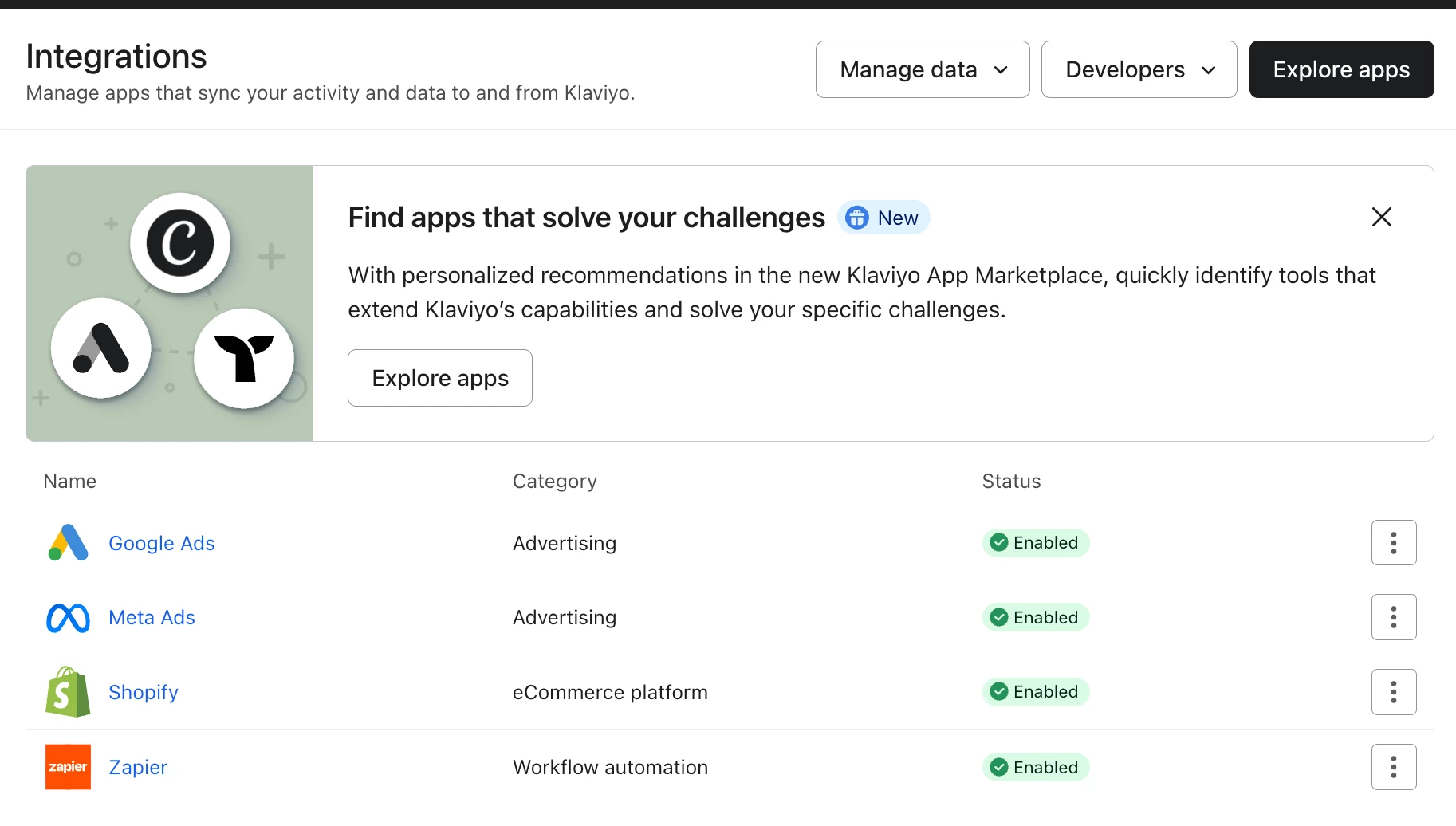
Step 1: Confirm the integration is enabled In Klaviyo, go to the left-hand menu → Integrations → find the Shopify app and confirm the status shows "Enabled." Even if it looks enabled, click into the Shopify settings to verify the details.
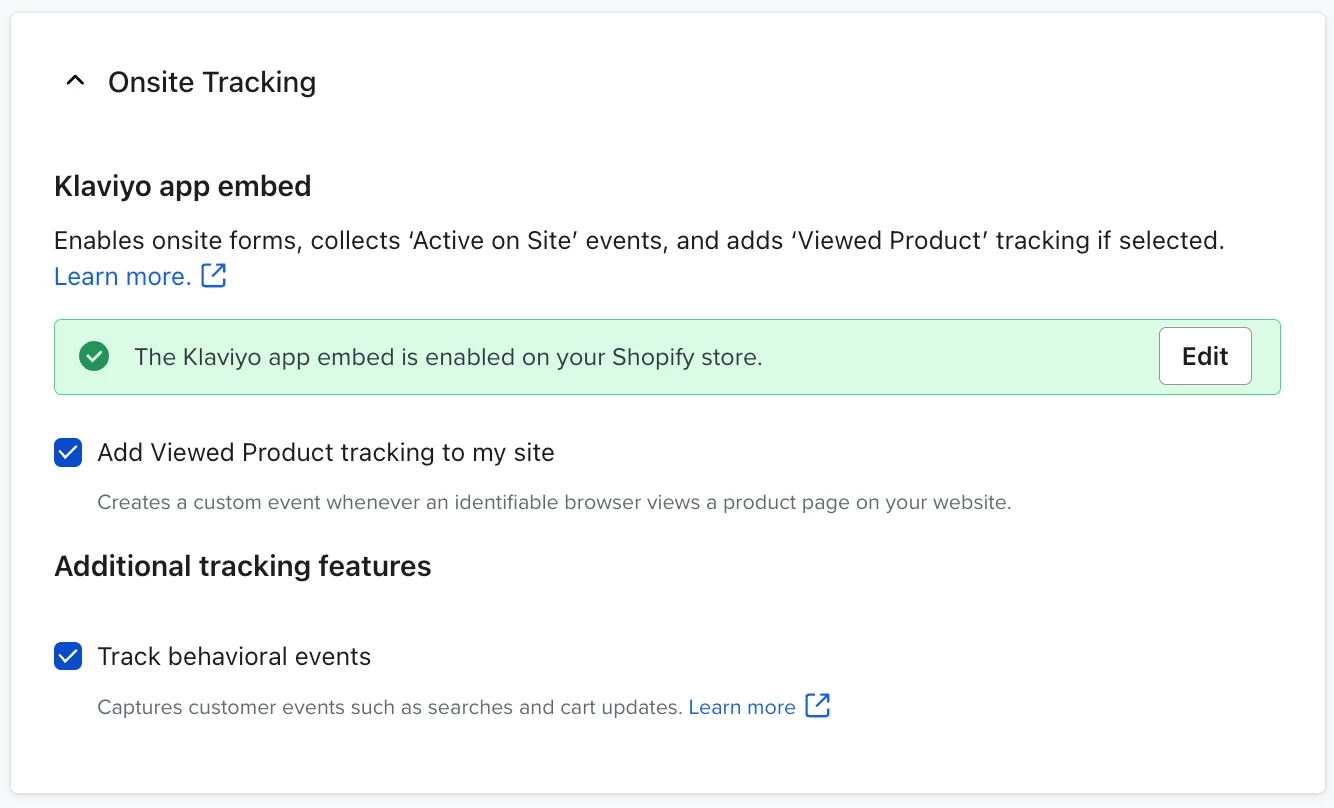
Step 2: Check that Onsite Tracking is set up Inside the Shopify integration settings, confirm that Onsite Tracking is turned on. This is required for "Checkout Started" to fire — it's not enough for the integration to be connected.
Step 3: Verify contact sync Confirm that contacts are correctly syncing from Shopify to Klaviyo. Mismatched or missing profiles can prevent events from attaching properly.
Step 4: Check Recent Data for event logs At the bottom of the Shopify integration settings page, there's a "Recent Data" section. Look for "Placed Order" and "Checkout Started" events — if they're appearing there, the integration is receiving data. If not, proceed to the next step.
Step 5: Delete and reinstall the integration If all settings look correct and events still aren't showing:
In Klaviyo: delete the Shopify integration
In Shopify: uninstall the Klaviyo app
Reinstall Klaviyo from the Shopify App Store
Reconnect the integration in Klaviyo and re-enable it
If this doesn’t help, create a new question in the Community forum to get more tailored support from other users.
Hi @zhichun
Thank you for posting your question in the community, and I am sorry you are having some issues with the Shopify event. The first place to start is to make sure the Shopify integration with Klaviyo is completed and verified.
In the left-hand menu, scroll down to the Integrations section.
Then, you’ll want to a.) see the Shopify App, and b.) verify the status is Enabled.
Even if you see its Enabled, I would click on “Shopify” to enter the settings for the integration. While Checkout Started and Placed Order are part of the native integration, I would also be sure you have set up the Onsite Tracking.
And make sure you are correctly syncing contacts from Shopify to Klaviyo.
At the bottom, you’ll see the Recent Data section where Placed Order and Checkout Started events are being logged and how recently they’ve fired.
Now if all of this is set up, my best recommendation would be to disable/delete the integration and then re-integrate it fresh.
If all this looks good, you might need to contact Klaviyo support for additional troublshooting, but in my experience 99% of the time, if you disable/delete and reintegrate Shopify, it will start working without any issues.
Please let us know if you have any additional questions or issues.
Thank you for posting your question in the community, and I am sorry you are having some issues with the Shopify event. The first place to start is to make sure the Shopify integration with Klaviyo is completed and verified.
In the left-hand menu, scroll down to the Integrations section.
Then, you’ll want to a.) see the Shopify App, and b.) verify the status is Enabled.
Even if you see its Enabled, I would click on “Shopify” to enter the settings for the integration. While Checkout Started and Placed Order are part of the native integration, I would also be sure you have set up the Onsite Tracking.
And make sure you are correctly syncing contacts from Shopify to Klaviyo.
At the bottom, you’ll see the Recent Data section where Placed Order and Checkout Started events are being logged and how recently they’ve fired.
Now if all of this is set up, my best recommendation would be to disable/delete the integration and then re-integrate it fresh.
If all this looks good, you might need to contact Klaviyo support for additional troublshooting, but in my experience 99% of the time, if you disable/delete and reintegrate Shopify, it will start working without any issues.
Please let us know if you have any additional questions or issues.
@In the Inbox
Bryan Richey // Klaviyo Champion & Email Strategist at In the Inbox // https://intheinbox.co/
Thank you for posting your question in the community, and I am sorry you are having some issues with the Shopify event. The first place to start is to make sure the Shopify integration with Klaviyo is completed and verified.
In the left-hand menu, scroll down to the Integrations section.
Then, you’ll want to a.) see the Shopify App, and b.) verify the status is Enabled.
Even if you see its Enabled, I would click on “Shopify” to enter the settings for the integration. While Checkout Started and Placed Order are part of the native integration, I would also be sure you have set up the Onsite Tracking.
And make sure you are correctly syncing contacts from Shopify to Klaviyo.
At the bottom, you’ll see the Recent Data section where Placed Order and Checkout Started events are being logged and how recently they’ve fired.
Now if all of this is set up, my best recommendation would be to disable/delete the integration and then re-integrate it fresh.
If all this looks good, you might need to contact Klaviyo support for additional troublshooting, but in my experience 99% of the time, if you disable/delete and reintegrate Shopify, it will start working without any issues.
Please let us know if you have any additional questions or issues.
@In the Inbox
Thank you for your response. I checked my integration settings and everything seems fine. Should I disable the Shopify integration and then re-enable it before testing again?
Thank you for posting your question in the community, and I am sorry you are having some issues with the Shopify event. The first place to start is to make sure the Shopify integration with Klaviyo is completed and verified.
In the left-hand menu, scroll down to the Integrations section.
Then, you’ll want to a.) see the Shopify App, and b.) verify the status is Enabled.
Even if you see its Enabled, I would click on “Shopify” to enter the settings for the integration. While Checkout Started and Placed Order are part of the native integration, I would also be sure you have set up the Onsite Tracking.
And make sure you are correctly syncing contacts from Shopify to Klaviyo.
At the bottom, you’ll see the Recent Data section where Placed Order and Checkout Started events are being logged and how recently they’ve fired.
Now if all of this is set up, my best recommendation would be to disable/delete the integration and then re-integrate it fresh.
If all this looks good, you might need to contact Klaviyo support for additional troublshooting, but in my experience 99% of the time, if you disable/delete and reintegrate Shopify, it will start working without any issues.
Please let us know if you have any additional questions or issues.
@In the Inbox
Oh, thank you so much! I deleted the integration, uninstalled Klaviyo from Shopify, then reinstalled Klaviyo and re-enabled the Shopify integration. Now I can see “Started Checkout” and “Placed Order” data showing up in the metrics. I really appreciate your help—thank you so much!
TL;DR – If Klaviyo isn't tracking "Checkout Started" or "Placed Order" events from Shopify, the most reliable fix is to delete the Shopify integration from Klaviyo, uninstall the Klaviyo app from Shopify, then reinstall and reconnect. Before doing that, verify your integration is enabled, onsite tracking is active, and contacts are syncing.
Step 1: Confirm the integration is enabled In Klaviyo, go to the left-hand menu → Integrations → find the Shopify app and confirm the status shows "Enabled." Even if it looks enabled, click into the Shopify settings to verify the details.
Step 2: Check that Onsite Tracking is set up Inside the Shopify integration settings, confirm that Onsite Tracking is turned on. This is required for "Checkout Started" to fire — it's not enough for the integration to be connected.
Step 3: Verify contact sync Confirm that contacts are correctly syncing from Shopify to Klaviyo. Mismatched or missing profiles can prevent events from attaching properly.
Step 4: Check Recent Data for event logs At the bottom of the Shopify integration settings page, there's a "Recent Data" section. Look for "Placed Order" and "Checkout Started" events — if they're appearing there, the integration is receiving data. If not, proceed to the next step.
Step 5: Delete and reinstall the integration If all settings look correct and events still aren't showing:
In Klaviyo: delete the Shopify integration
In Shopify: uninstall the Klaviyo app
Reinstall Klaviyo from the Shopify App Store
Reconnect the integration in Klaviyo and re-enable it
If this doesn’t help, create a new question in the Community forum to get more tailored support from other users.
Hi @zhichun
Thank you for posting your question in the community, and I am sorry you are having some issues with the Shopify event. The first place to start is to make sure the Shopify integration with Klaviyo is completed and verified.
In the left-hand menu, scroll down to the Integrations section.
Then, you’ll want to a.) see the Shopify App, and b.) verify the status is Enabled.
Even if you see its Enabled, I would click on “Shopify” to enter the settings for the integration. While Checkout Started and Placed Order are part of the native integration, I would also be sure you have set up the Onsite Tracking.
And make sure you are correctly syncing contacts from Shopify to Klaviyo.
At the bottom, you’ll see the Recent Data section where Placed Order and Checkout Started events are being logged and how recently they’ve fired.
Now if all of this is set up, my best recommendation would be to disable/delete the integration and then re-integrate it fresh.
If all this looks good, you might need to contact Klaviyo support for additional troublshooting, but in my experience 99% of the time, if you disable/delete and reintegrate Shopify, it will start working without any issues.
Please let us know if you have any additional questions or issues.