is it possible to create a similar products flow that I can send as a email rather than a pop up?
for example: someone buys a blanket from my company with with bananas printed all over it. But I also sell shirts - sweatshirts - pants - etc. with that same banana print pattern.
I want to be able to send a automated email to those buyers showing them we have other products with that same pattern they just bought from me.
can someone give me a hand or point me in the right direction? Thanks !
Hi @Mikeike777, welcome to the community with your first post!
It’s great that you’re thinking about ways to personalize emails based on their product purchases. You can create a “Post Purchase” Flow that does exactly that. To filter it based on the product, you can use a Trigger Split in the Flow to send different messages based on what Items they have purchased.
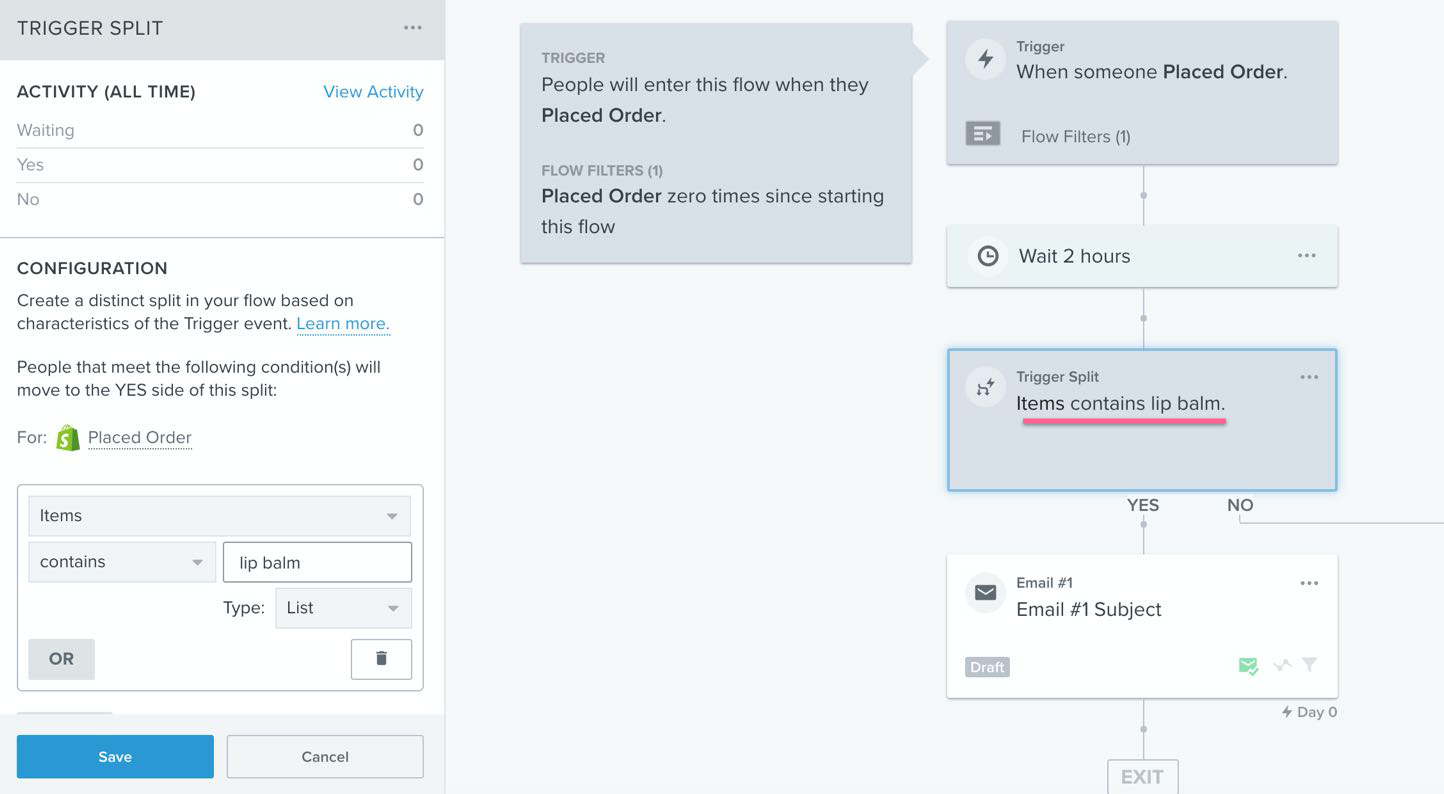
You can see from the example here, they are splitting on a product “lip balm” and then sending a specific email if “Yes” here:
If you have lots of products, it may feel tedious to setup a branch path for each and every unique product. If you can group products that share common elements (like a Banana Print), you can use Trigger Splits based on those groupings (either through categories or product tags). You may have to use a different Trigger (Ordered Product) to access those details of an item, but it works in a very similar way as the “Placed Order” trigger. Doing it that way, if someone buys any of the items with a “Banana Print” - they will can go into a common Flow branch that sends them more “Banana Print” product ideas or emails about “Banana Print” orders.
Hope this helps!
Joseph Hsieh // retentioncommerce.com // X: @retention
Hi @Mikeike777, welcome to the community with your first post!
It’s great that you’re thinking about ways to personalize emails based on their product purchases. You can create a “Post Purchase” Flow that does exactly that. To filter it based on the product, you can use a Trigger Split in the Flow to send different messages based on what Items they have purchased.
You can see from the example here, they are splitting on a product “lip balm” and then sending a specific email if “Yes” here:
If you have lots of products, it may feel tedious to setup a branch path for each and every unique product. If you can group products that share common elements (like a Banana Print), you can use Trigger Splits based on those groupings (either through categories or product tags). You may have to use a different Trigger (Ordered Product) to access those details of an item, but it works in a very similar way as the “Placed Order” trigger. Doing it that way, if someone buys any of the items with a “Banana Print” - they will can go into a common Flow branch that sends them more “Banana Print” product ideas or emails about “Banana Print” orders.
Hope this helps!
Joseph Hsieh // retentioncommerce.com // X: @retention