




What is Klaviyo Composer? Public beta access, credits, and what you can do today
Hey everyone,
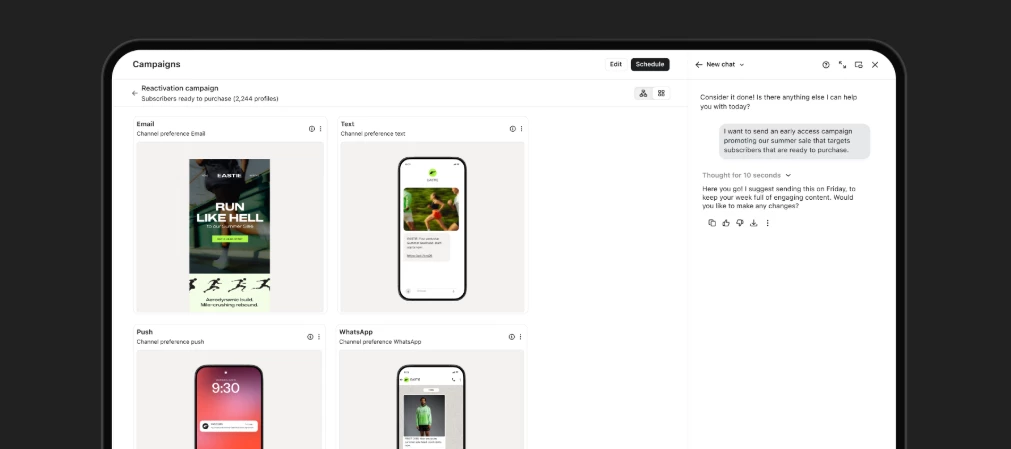
Composer, Klaviyo’s AI marketing agent, is now in public beta as of June 30. It was announced at K:LDN, along with some other cool Q2 updates. If you’re already a Klaviyo customer, there’s nothing extra to sign up for or install. Composer should already be available in your account, with 10,000 complimentary credits to use over 90 days.
I wanted to put together a practical rundown of what Composer can do right now, where it’s still more “recommendation engine” than “hands-off execution,” and a few good first prompts to try if you’re opening it for the first time.
What is Composer?
Composer is Klaviyo’s AI marketing agent, built directly into Klaviyo.
The simple version: you describe what you’re trying to do in plain language, and Composer helps you get there. Depending on the task, it can analyze what’s already in your account, spot issues, recommend fixes, QA a campaign before you send it, or draft new campaign content for you to review.
The important part: you stay in control. Composer does not send, publish, schedule, or change anything in your account on its own. It recommends, drafts, audits, and QAs. You review everything before it goes live.
What makes it different from a general-purpose AI tool is the context it can work from. Composer is operating inside your Klaviyo account, so it can use things like your flows, campaigns, segments, brand context, and performance history. That means the output should be more specific to your setup than a generic AI response.
Do I need to sign up?
Nope. If you’re a current Klaviyo customer, Composer is already available in your account. There’s no opt-in, activation step, or credit card required for the public beta access.
You get:
- 10,000 complimentary Composer credits
- 90 days to use them
- No sign-up required
- Unused free credits can roll into your first paid month if you choose to move to a paid plan
For the most up-to-date details on where to find Composer and how credits work, I’d check the Composer Help Center docs directly.
What can I actually try in Composer right now?
The easiest way to think about Composer is that it has two main modes:
- Analyze and audit — Composer reviews something you already built and tells you what needs attention.
- Create — Composer drafts campaign content from a goal you describe.
Here are the main things worth trying today.
1. Campaign creation
You can ask Composer to create an email, SMS, or MMS campaign from a plain-language prompt.
For example:
- “Create a summer sale campaign for customers who bought in the last 90 days.”
- “Build an email and SMS campaign for lapsed customers with a 20% off offer.”
- “Draft a VIP campaign for customers who purchased twice in the last six months.”
Composer can help draft the content, reflect your brand voice and context, and bring the draft back into Klaviyo’s editor so you can review and edit it like any other campaign.
I’d still treat the output as a strong first draft, not something to send untouched. Review the audience, links, offer details, compliance language, timing, and tone before anything goes out.
2. Flow audits
This is probably one of the best places to start, especially if your account has been around for a while.
You can ask things like:
- “Audit my welcome flow and tell me what needs attention.”
- “Are any of my flows conflicting with each other?”
- “Why might my post-purchase flow be underperforming?”
- “What should I fix first in my flow program?”
Composer can review flow structure, trigger logic, performance, and potential overlap across flows. That’s especially useful if your account has a large flow library, older automations, or flows that were built by different people over time.
One thing I like about this use case: it can surface issues that are easy to miss manually, like multiple automations competing for the same audience or sending more messages than intended.
3. Campaign QA before sending
Before you schedule a campaign, you can ask Composer to QA it.
It can check things like:
- Subject line and preview text
- Links and tracking
- Audience and exclusions
- Send settings
- A/B test setup
- Compliance basics
This is a nice “second set of eyes” use case. It will not replace your own review, but it can help catch things before they become a post-send headache.
Prompt to try:
“QA this campaign before I send it and flag anything critical.”
4. Template and content review
Composer can also review email and SMS/MMS content for things like accessibility, deliverability, compliance, mobile readiness, and content quality.
For email templates, that might include issues like missing alt text, mobile layout concerns, or design elements that could affect readability.
For SMS/MMS, it can help flag things like restricted content, deliverability concerns, tone issues, or areas where you may want to review compliance more closely.
A good prompt here:
“Audit this email template for accessibility, compliance, and mobile readiness.”
Or:
“Audit the SMS in my welcome flow and tell me what I should review before sending.”
5. Forms review
Composer can review signup forms and return recommendations around design, copy, targeting, fields, timing, and incentive.
This is helpful if you have a popup that is technically working, but not converting the way you expected.
Prompt to try:
“What’s wrong with my welcome popup?”
Or:
“Audit this signup form and tell me what might be hurting conversions.”
6. Segment audits
Composer can review segment definitions for things like broken logic, duplicate or overlapping segments, coverage gaps, and deliverability or consent risks.
This feels especially useful for teams with a lot of legacy segments, one-off campaign segments, or naming conventions that have gotten a little messy over time.
Prompt to try:
“Audit all my segments and tell me what to clean up.”
What Composer does not do today
This part is worth calling out clearly: Composer does not fully take over execution.
Today, Composer can recommend, draft, audit, and QA. But you still review, edit, approve, and apply the changes yourself.
That means:
- It does not send campaigns on its own.
- It does not publish or schedule without your approval.
- It does not automatically apply audit fixes.
- It does not replace your own judgment.
- It can still make mistakes, so everything needs a human review.
Basically: think of Composer as a very helpful teammate that can move fast, spot issues, and draft work — not a fully autonomous operator you leave unsupervised.
What happens when the free credits run out?
Your free Composer access lasts until either:
- 90 days have passed, or
- You use the 10,000 complimentary credits
After that, you can choose whether to move to a paid plan.
At launch, the entry paid plan is listed at $14/month introductory pricing for 2,000 credits. The list price is $20/month. Additional credit packs are available if you need more.
You can manage usage through Billing Preferences, including options like auto-upgrading to the next credit tier, throttling usage, or stopping usage entirely. Composer also sends usage alerts at 75%, 90%, and 100%, so you should have warning before you hit your limit.
One useful detail: unused free credits can roll into your first paid month if you convert. They do not continue rolling over month to month after that.
A few things to know before you start
A couple of honest caveats:
- Composer is in public beta, so output quality can vary.
- You should review everything before sending or applying recommendations.
- Audit findings are advisory. Composer tells you what to fix, but you decide what to change.
- Content generation works best when your templates have a healthy mix of text and images. Image-heavy templates may need more manual editing.
- For compliance-sensitive content, treat Composer as a reviewer, not the final authority.
Where I’d start
If you’re opening Composer for the first time, I’d start with a flow audit.
Try:
“Audit my flows and tell me what needs attention.”
That prompt gives Composer enough room to look across your setup and surface the highest-priority issues. From there, you can ask follow-up questions like:
- “Which of these should I fix first?”
- “Why does that matter?”
- “How would you rewrite this message?”
- “What’s the impact if I leave this as-is?”
That back-and-forth is where Composer starts to feel more useful than a one-off audit.
Additional resources
Check out the prompt library! This is such an amazing resource. If you are interested in contributing feedback or one of your own prompts, please share in the community and add “AI Prompt” to your post title!
To stay up-to-date with updates as they come, head to https://www.klaviyo.com/whats-new
How does the Klaviyo Community feel about Composer?
There is already a thread here where people are sharing there thoughts, if you are interested!
Curious what everyone tries first. If you’ve already used Composer, what did it catch? And if you’re running it on a larger or more complex account, I’d especially love to hear what came back.