

Contributor I
September 14, 2026
Question

Replenishment Flow Setup for supplement brand

  • September 14, 2026
  • 4 replies
  • 28 views

Hi there, I am currently building a replenishment strategy for a supplement brand. My current chosen plan is: 

  • several flows per replenishment window category (e.g. replenish after 15 days, 30 days, 40 days, and so on) - info is based on the Shopify collection - I am ending up with 7 flows
  • trigger: ordered product (not placed order) because i want to only show the relevant product in the email when it comes to multi item orders with different replenishment windows
  • email content: I am working with universal content blocks so that I do not have to adjust each email in each flow manually in case something changes

I want to integrate a button that links to the ordered product -  what is the right link address to enter here so that it links directly to the product page - or even better: a pre-filled cart (is that possible)?

Using this dynamic product block.
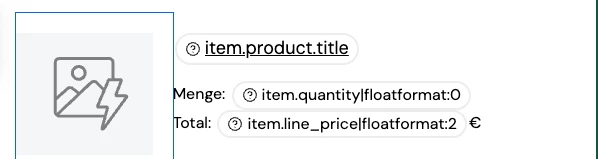
Also if someone has a suggestion for a better setup, feel free to share.

Thanks for your help! 

4 replies

Nick
Problem Solver IV
Problem Solver IV
September 14, 2026

If you do it on ordered product you will only have one product within the event data and therefore could just use the event data as the link address (no need for a dynamic table as seen in your screenshot). So the link should be something like {{ event.product_url }} (if you open the preview and click on the Product url you get the right placeholder for it). 

That being said: On ordered product you will always have the issue that people could be in several flows and in several flows several times (if they order an amount of 2 or 3 items for example). So you would always have to find ways of making sure that they don’t receive several emails from you at a time. That wouldn’t be an issue if you only have a certain amount of products but as soon as you have more than let’s say 20 and people buying several products in one cart it can get messy. 

What we usually do is to trigger everything on Delivered Shipment (or Fulfilled Order if Delivered Shipment is not available) and use the new split logic to say something like “If product XY is in the Delivered Shipment event AND was not ordered since starting this flow” send this message, if product YZ is … “ and so on. We then connect everything after again and wait til the next round of replenishment is due (and repeat the process with those products). 
 

That way we ensure that there is a certain hierachy on which product replenishment mails go out first while ensuring that people still receive other replenishment mails for products that need to be refilled later. 

It’s never 100% accurate but it’s the closest we can get to finding the right time for each product without sending out several emails at the same time. 

Another option would also be to just use the replenishment time in the same logic as above but then have one email where you use the show and hide logic to show more than one product (if they have the same replenishment time and been bought together). 

Definitely several options to tackle that. 

Contributor I
September 14, 2026

With the suggested option of the new split logic + fulfilled order trigger: what products do you see in the Mascara email from your example if the person ordered more products than Mascara and with a different replenishment window? I think it would be the whole order right?

EDIT: Ah sorry, I now get your approach. This wont work in my example because there are too many single products. And I need to split the flows based on the collections you see above.

My example has 7 different replenishment windows = 7 paths, split based on the collection:


The downside for me until now was that the mail showed the full order IF there are more products with different replenishment windows. 


Nick
Problem Solver IV
Problem Solver IV
September 14, 2026

Ah I see what you mean. I think it will still be a bit tricky for you to work with a dynamic table as the collection is unfortunately (and I don’t know why) not part of the line_items that could be used for that.

For example for a different client I am using a dynamic table on event.extra.line_items looking either at the product.tags or the title to either show or hide products that have those. 


If it would be possible for your client to tag the products with refill-15days etc. I think you could adapt that logic there. So you would still need your 7 splits to make out how long the email should wait but then you use for example: 


<style>
.reorder-wrapper {
background-color: #F3F6E7;
border-radius: 16px;
padding: 24px;
margin: 0;
overflow: hidden;
box-sizing: border-box;
}

.reorder-container {
width: 100%;
}

.reorder-column {
text-align: center;
box-sizing: border-box;
}

.reorder-image-wrapper {
text-align: center;
}

.reorder-image {
width: 200px;
max-width: 100%;
height: auto;
display: block;
margin-left: auto;
margin-right: auto;
border-radius: 10px;
}

.reorder-title {
text-align: center;
margin: 0 0 18px 0;
line-height: 1.25;
}

.reorder-title-link {
color: #7E8D3D;
font-family: europa, Helvetica, Arial, sans-serif;
font-weight: 400;
font-size: 18px;
text-decoration: none;
}

.reorder-button-wrapper {
text-align: center;
margin-top: 12px;
}

.reorder-button {
display: block;
width: 100%;
box-sizing: border-box;
background-color: #697727;
color: #ffffff !important;
text-decoration: none;
padding: 12px 10px;
border-radius: 40px;
font-family: europa, Helvetica, Arial, sans-serif;
font-size: 14px;
line-height: 1.2;
font-weight: 700;
text-align: center;
}

.reorder-later {
text-align: center;
margin-top: 12px;
font-size: 12px;
line-height: 1.4;
}

.reorder-later a {
color: inherit;
text-decoration: underline;
}

/* DESKTOP / WIDER EMAIL CLIENTS */
@media (min-width: 500px) {
.reorder-container {
display: flex;
justify-content: space-between;
align-items: center;
}

.reorder-column {
flex: 0 0 48%;
width: 48%;
}
}

/* MOBILE */
@media (max-width: 499px) {
.reorder-container {
display: block;
text-align: center;
}

.reorder-column {
width: 100%;
}

.reorder-column:first-child {
margin-bottom: 18px;
}

.reorder-button {
font-size: 17px;
}
}
</style>


{% if "refill-15days" in item.product.tags %}

<div class="reorder-wrapper">

<div class="reorder-container">


<!-- PRODUCT IMAGE -->
<div class="reorder-column">

<div class="reorder-image-wrapper">

{% if item.product.variant.images.0.src %}

<a href="{{ organization.url|trim_slash }}/cart/{{ item.variant_id }}:{{ item.quantity|floatformat:'0' }}">

<img
src="{{ item.product.variant.images.0.src }}"
class="reorder-image"
width="200"
alt="{{ item.title }}"
>

</a>

{% else %}

<a href="{{ organization.url|trim_slash }}/cart/{{ item.variant_id }}:{{ item.quantity|floatformat:'0' }}">

<img
src="{{ item.product.images.0.src|missing_product_image }}"
class="reorder-image"
width="200"
alt="{{ item.title }}"
>

</a>

{% endif %}

</div>

</div>


<!-- PRODUCT CONTENT -->
<div class="reorder-column">


<!-- PRODUCT TITLE -->
<h3 class="reorder-title">

<a
href="{{ organization.url|trim_slash }}/products/{{ item.product.handle }}"
class="reorder-title-link"
>
{{ item.title }}
</a>

</h3>


<!-- REORDER BUTTON -->
<div class="reorder-button-wrapper">

<a
href="{{ organization.url|trim_slash }}/cart/{{ item.variant_id }}:{{ item.quantity|floatformat:'0' }}"
class="reorder-button"
>
Erneut bestellen
</a>

</div>


<!-- LATER LINK -->
<div class="reorder-later">

<a href="{% update_property_link 'Nachschub' 'Spaeter' 'https://seewinkler-naturprodukte.com/' %}">
Danke, ich hab noch
</a>

</div>

</div>

</div>

</div>

{% endif %}

Then only the products from that order (placed order or fulfilled should work) that have refill-15days as a tag will show. 

Nick
Problem Solver IV
Problem Solver IV
September 14, 2026

Table would look like that.