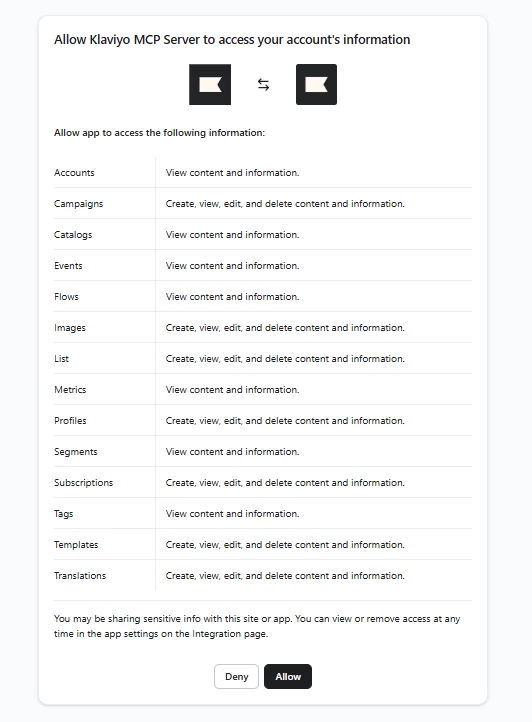
Hi @MMacca – sorry for my delayed response. Moved us over to a new dedicated thread. These are great questions, so I want to be sure they don’t get buried in the other topic. I will say that you were very correct that it was not easy to find a straightforward answer about permissions. After more digging around, here is what I have figured out (if this doesn’t help, I can bring this straight to the MCP team):
To address your first question: you're right that approving the MCP connector grants Claude access to the permissions shown in that dialog. I believe the best current approach to limit exposure is to use the Custom Connector option and append read-only=true as a query parameter to the MCP server URL. This disables any tools that can perform write actions on your account.
You can also add disable-tools-with-user-generated-content=true to further restrict what Claude can read. Your URL would look like:
https://mcp.klaviyo.com/mcp?read-only=true&disable-tools-with-user-generated-content=true
To set this up via Custom Connector in Claude:
- Go to Settings > Connectors > Add custom connector
- Name it (e.g. "Klaviyo - [Account Name]")
- Paste in the URL above with your desired query parameters
- Click Add, then Connect and authorize
To your second question in the other post: yes, the local MCP server option uses a private API key instead of OAuth, which means you control exactly which scopes are granted from the very start. You'd create a Klaviyo private API key with only the specific permissions you need (e.g. read-only on Lists and Segments, nothing on Profiles), and configure it in Claude Desktop or Cursor. This gives you the most granular control over what data Claude can access.
Full setup docs here: https://developers.klaviyo.com/en/docs/klaviyo_mcp_server
Please let me know if that helps and if not, like I said, I can bring escalate the question to the mcp team!