We have a client that has a specific user type, “Pro”, in WordPress. When the user becomes a “Pro”, we want to create and/or update the user in Klaviyo with the custom property of “Pro”. I know that we have to use the Track API but I don’t know the specifics on how to get this done as I am not a programmer. Any insights or help would be greatly appreciated.
This sort of integration will likely require some development knowledge, as all of them will require you making automated API calls from your server to one of Klaviyo’s endpoints.
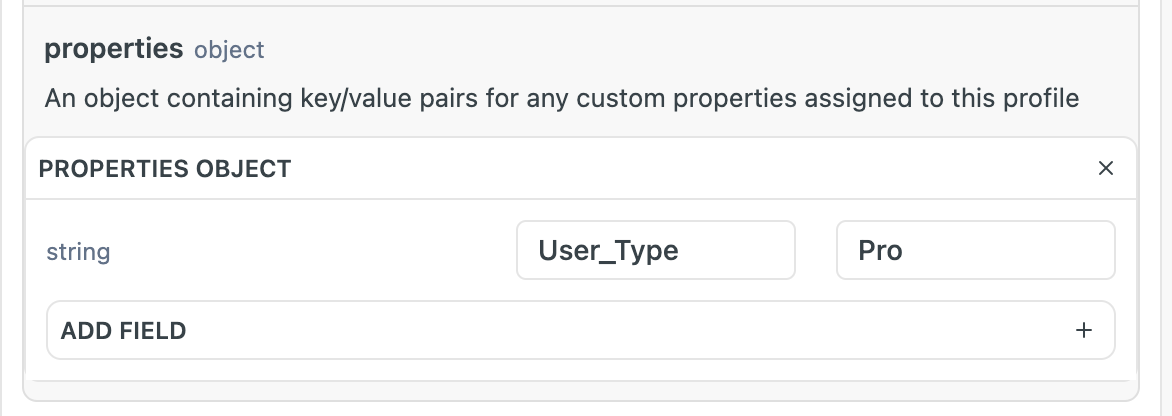
The exact steps may vary depending on how users become “Pro’s”, but this can be accomplished in several ways. First, you could use the Update Profile to add a custom property called “Pro” to a profile using the properties object. For example, the property name could be User_Type and the value could be Pro:
Or, like you said, you could use the Create Client Event API (formerly the Track API) to accomplish the same thing, by passing in a profile property in the properties object as in the screenshot above.
The difference between these two methods is that the Update Profile endpoint is on the server-side, while the Create Client Event endpoint is on the client (browser) side, so the choice will depend on the mechanism through which users become “Pro” users on your site.
Although we can provide direction on which endpoints to use and when, advising on the actual structure of how you make the API calls would warrant a custom use case beyond the scope of Community/Support. That said, if you are looking for extra development help, you’re always welcome to reach out to one of our wonderful Official Klaviyo Partners.
This sort of integration will likely require some development knowledge, as all of them will require you making automated API calls from your server to one of Klaviyo’s endpoints.
The exact steps may vary depending on how users become “Pro’s”, but this can be accomplished in several ways. First, you could use the Update Profile to add a custom property called “Pro” to a profile using the properties object. For example, the property name could be User_Type and the value could be Pro:
Or, like you said, you could use the Create Client Event API (formerly the Track API) to accomplish the same thing, by passing in a profile property in the properties object as in the screenshot above.
The difference between these two methods is that the Update Profile endpoint is on the server-side, while the Create Client Event endpoint is on the client (browser) side, so the choice will depend on the mechanism through which users become “Pro” users on your site.
Although we can provide direction on which endpoints to use and when, advising on the actual structure of how you make the API calls would warrant a custom use case beyond the scope of Community/Support. That said, if you are looking for extra development help, you’re always welcome to reach out to one of our wonderful Official Klaviyo Partners.
I am familiar with Zapier and did find a WordPress/Klaviyo integration. This is likely the solution I will use but still weighing out my options. Thank you guys for your responses. It is much appreciated.