

Contributor I
Dec 1, 2021 4:20 AM UTC
Solved

Change color of unsubscribe link

Hi,


I’m new with Klaviyo so I need some helps to change the color of the subscriber link. I have read the previous topic about this one before but I have no clues to start with.

Can someone help me to point it out step by step to do it?

Thank you so muchhh!!!

Quinn.

    This topic has been closed for replies.
    Dov
    DovAnswer
    Klaviyo Alum
    Dec 1, 2021 3:50 PM UTC

    Hi @Quinnthe Queens,

    Thank you for sharing this with us in the community. Happy to help you out here!

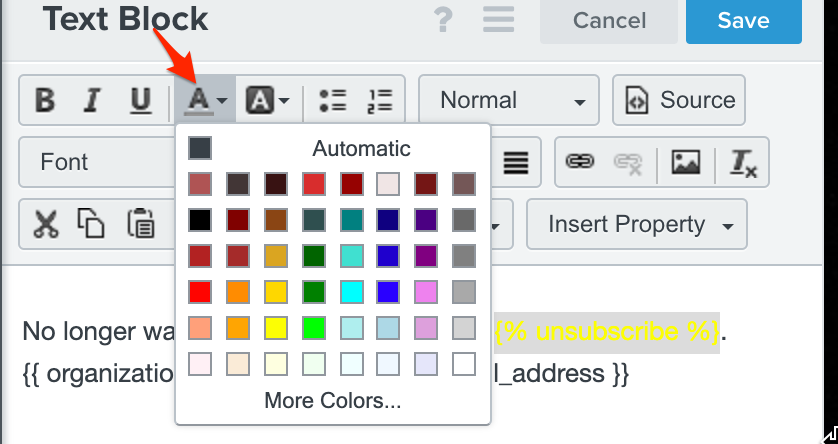
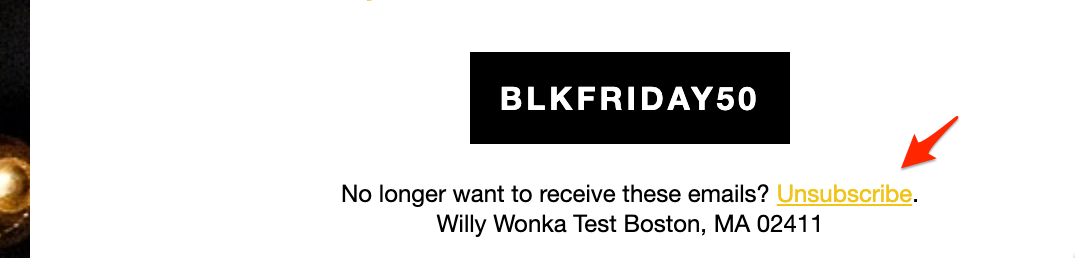
    You can accomplish this by clicking on the block containing the unsubscribe link and highlighting the text containing the unsubscribe link and choosing a color in the text block ribbon panel:


    Alternatively, you can click on the block containing the unsubscribe link and paste the following in the Source of a text block:

    <a href="{% unsubscribe_link %}" style="color: #ffffff !important;">unsubscribe</a>
     

    you can replace #ffffff with the hexidecimal value of your choosing. 

    I hope that helps!
     

    DD

    2 replies

    Dov
    DovAnswer
    Klaviyo Alum
    Dec 1, 2021 3:50 PM UTC

    Hi @Quinnthe Queens,

    Thank you for sharing this with us in the community. Happy to help you out here!

    You can accomplish this by clicking on the block containing the unsubscribe link and highlighting the text containing the unsubscribe link and choosing a color in the text block ribbon panel:


    Alternatively, you can click on the block containing the unsubscribe link and paste the following in the Source of a text block:

    <a href="{% unsubscribe_link %}" style="color: #ffffff !important;">unsubscribe</a>
     

    you can replace #ffffff with the hexidecimal value of your choosing. 

    I hope that helps!
     

    DD
    Contributor I
    Dec 2, 2021 3:41 AM UTC

    Thank you so much for this!!!

    I really appreciate it!!!