Contributor I
February 22, 2022
Solved

Change the background of Notify me when available

  • February 22, 2022
  • 2 replies
  • 112 views

Here is my product page that is out of stock: 

https://empava.com/products/48-inch-freestanding-air-bathtub-empv-48jt011

I want to set up a background color under “Notify Me When Available”, such as red or blue  in order to let customers see this button.

Hope you can help us with this.


Thank you so much. Looking forward to your reply.

    This topic has been closed for replies.
    Best answer by stephen.trumble

    Hey @Empava Appliances 

    Thank you so much for reaching out to the Klaviyo Community!

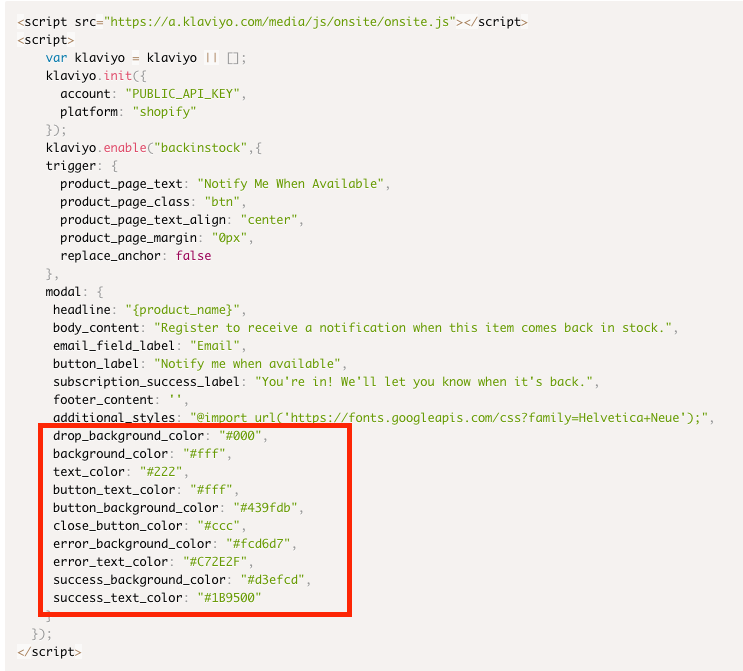
    The Klaviyo "Notify Me" button and form are highly configurable. You can change the colors, fonts, text, and other elements according to your design preferences. The article I included goes in depth into the different elements that can be updated.

    The default values included in the code snippet you already added to your site can be changed to meet your design needs. If you make updates, make sure to update the value and not the label itself.

    Thank you so much for being part of the Klaviyo Community!

    2 replies

    Contributor IV
    February 23, 2022

    Unable to access your product page link 

    stephen.trumble
    Klaviyo Alum
    February 23, 2022

    Hey @Empava Appliances 

    Thank you so much for reaching out to the Klaviyo Community!

    The Klaviyo "Notify Me" button and form are highly configurable. You can change the colors, fonts, text, and other elements according to your design preferences. The article I included goes in depth into the different elements that can be updated.

    The default values included in the code snippet you already added to your site can be changed to meet your design needs. If you make updates, make sure to update the value and not the label itself.

    Thank you so much for being part of the Klaviyo Community!

    -Stephen