Contributor III
September 15, 2021
Solved

Format Quantity in Event Variables

  • September 15, 2021
  • 4 replies
  • 1254 views

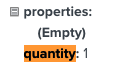
How do I remove the “.0” in product quantities? 

The value from the e-commerce platform only shows “1”


    This topic has been closed for replies.
    Best answer by Taylor Tarpley

    Hi @jdbrngr


    Welcome to the Community! We’re so glad you’re here!


    Does your question pertain to previewing a customer’s event data in an email? If so, this is because the information displayed is a List Data Entry. It is very common to misunderstand the 0 in List Data as the quantity of the product. These List Entries in the event data are numbered starting at 0, not 1, indicating it is the first item in an array of items. The number does not equal the quantity of products in the event. For instance, if {{ event.extra.line_items.0.product.name }} is the variable entry for an image, the 0 indicates that it is the first item in the array (and not that there is no product images).


    For more information explaining this, I recommend reading this section of Event Variables In Emails.


    Thanks for sharing your question in the Community as I’m sure it will inform many others! 


    Best,

    Taylor 

    4 replies

    Taylor Tarpley
    Community Manager
    Community Manager
    September 15, 2021

    Hi @jdbrngr


    Welcome to the Community! We’re so glad you’re here!


    Does your question pertain to previewing a customer’s event data in an email? If so, this is because the information displayed is a List Data Entry. It is very common to misunderstand the 0 in List Data as the quantity of the product. These List Entries in the event data are numbered starting at 0, not 1, indicating it is the first item in an array of items. The number does not equal the quantity of products in the event. For instance, if {{ event.extra.line_items.0.product.name }} is the variable entry for an image, the 0 indicates that it is the first item in the array (and not that there is no product images).


    For more information explaining this, I recommend reading this section of Event Variables In Emails.


    Thanks for sharing your question in the Community as I’m sure it will inform many others! 


    Best,

    Taylor 

    Active Contributor II
    January 28, 2022

    Hi, 

    I am having the same problem. I have read the guide but there isn't clear instructions to what must be inputted to retrieve the quantity to display correctly, other than you mist input the ‘exact’ event variable which still displays incorrectly, I must be miss interpreting the instructions?. Please can you provide an example?

    Many thanks!

    Michael


    Now [SOLVED] Thanks!

    Taylor Tarpley
    Community Manager
    Community Manager
    January 28, 2022

    Hi @MNgo


    Happy to hear you were able to solve the issue! Do you mind sharing out your workflow and what you discovered with the Community in case it could help another member having a similar issue in the future? 


    Thank you for participating in the Community!

    -Taylor 

    Active Contributor II
    January 28, 2022

    @Taylor Tarpley Yes sure. I used the float format filter  :point_right_tone2:  {{ items.Quantity|floatformat:0 }}. Have a great weekend!