


Contributor III
March 3, 2022
Solved

How to create a First Purchase Anniversary Flow

  • March 3, 2022
  • 14 replies
  • 6374 views

Hi everyone!

I’m Kim and a newbie to Klaviyo and to all marketing platforms, really. I wanted to ask if the flow I made for First Purchase Anniversary is correct. Prior to this I have also added subscriber's first purchase date: 
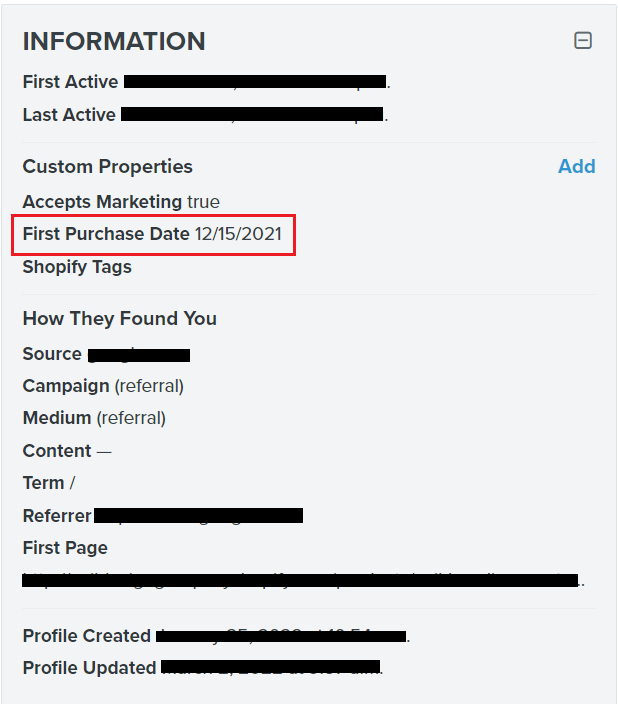
 

Flow:
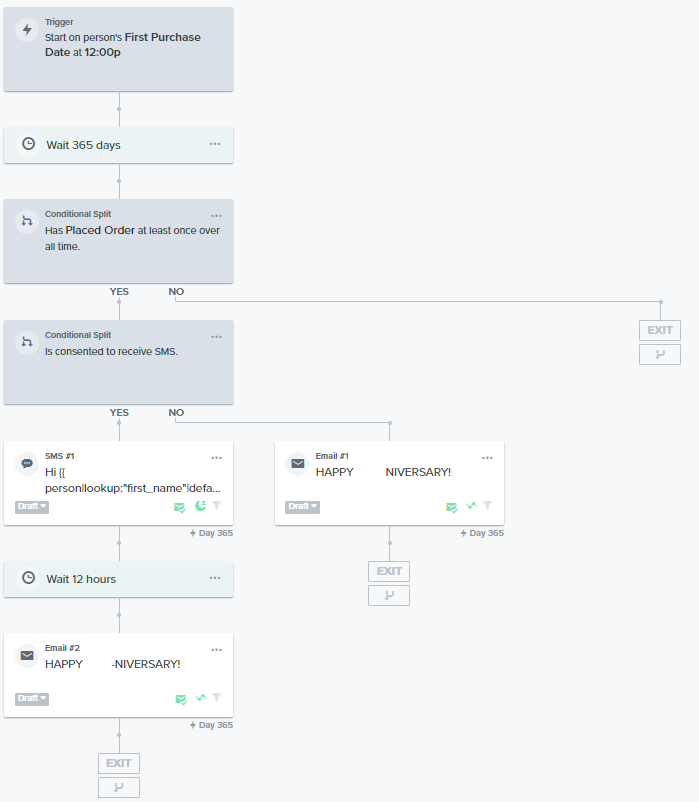


Thank you. 

This topic has been closed for replies.
Best answer by DavidSandel

Looks good to me! (Assuming the custom property is set as a date field)

14 replies

DavidSandel
Partner - Silver
Partner - Silver
March 3, 2022

Looks good to me! (Assuming the custom property is set as a date field)

Klaviyo Silver Master --> LowGravitySolutions.com
j.kmfAuthor
Contributor III
March 4, 2022

Thank you for your comment, @DavidSandel . I have manually added the First Purchase Date property on each of their profile.  

alex.hong
Klaviyo Alum
March 4, 2022

Hi there @j.kmf,

Thanks for posting your question to the Community and I’d love to share more info.

First, it is important to figure out how you want to trigger this flow. It would be pretty easy to build a segment and have that trigger your flow. However, a segment triggered flow can only be sent once to a customer. If you wanted this flow to repeat every year it would not work. In that case we would want to build a date-triggered flow.

Overall, the best solution would be to use a date-triggered flow. You don't HAVE to set that to repeat, but you'll have the option. This just requires a date formatted property on the person's profile. Some people will simply use the "Created" date as this would be the date their profile was created in Klaviyo. Alternatively you can upload a custom property to their profile formatted as a date.

The process would be very similar to a birthday flow, so you might find this guide helpful.

If you end up going the segment triggered route, the definition would be something like "Created - is between - 364 to 365 days ago". 


Hope this helped with the understanding,

Alex

DavidSandel
Partner - Silver
Partner - Silver
March 4, 2022

Thank you for your comment, @DavidSandel . I have manually added the First Purchase Date property on each of their profile.  

To add what @alex.hong said, you can use the post-purchase flow to add this property automatically.

My post-purchase flow separates first time buyers from repeat buyers. And when someone enters the “first-time” branch, I automatically save that date in a custom property.

So, of course, if you have the information for existing customers, manually adding it is the only option. But for everyone else going forward, you can make use of the flows to do it for you automatically.

Klaviyo Silver Master --> LowGravitySolutions.com
j.kmfAuthor
Contributor III
March 7, 2022

Hi @alex.hong thank you for your reply. The flow is date-triggered. What I’m worrying is that I don’t see anything in the flow analytics. Shouldn’t be there any customers in this flow already considering their profiles were already updated and has their first purchase date custom property. 


Also, is it correct that I have put a time delay of 365 days? I checked the article for the birthday flow and the time delay was not mentioned. However when I checked the template for the first purchase anniversary it has a time delay so I added it on my flow as well. I made this flow from scratch, btw. Thanks

j.kmfAuthor
Contributor III
March 7, 2022

Hi @DavidSandel 

I have created this flow that will hopefully create a date property in a first time buyer’s profile. Got this from a youtube video of Flowium. Do you think it will do the trick?


DavidSandel
Partner - Silver
Partner - Silver
March 7, 2022

@j.kmf, yes.

As I mentioned, you can probably do the same thing in your existing post-purchase flow without having it separate. But if you’re happy with this, it should work. 

Klaviyo Silver Master --> LowGravitySolutions.com
alex.hong
Klaviyo Alum
March 7, 2022

Hi @j.kmf,

Klaviyo checks if someone qualifies for a flow daily via a check that runs a full day in advance. This is why we don't need to back-populate date-triggered flows. In addition, Klaviyo will check if someone qualifies for a flow whenever a date is added or updated on a profile. During this time, Klaviyo determines if a profile should enter a flow based on whether that date falls within the flow’s full timeline. A person will only be added to a flow if the day, month, and year fall within a flow’s timeline, so if a date is in the future (e.g., 12/1/2025), they won’t be added to a flow before that time. Let us know if data does not go through once set to live.

You can learn more about how date-based flows queue recipients in this article here .


Best,

Alex

j.kmfAuthor
Contributor III
March 16, 2022

Hi @alex.hong , thank you for the article you shared and for explaining why I didnt have recipients. I did however just checked the flow again and it does have one but it’s skipped. 


I have been searching online what date property value change means and how I can fix this. I have not changed anything in the customer’s profile and we have not sent any emails to our subscribers as we are still in the process of setting up everything. Do you know why this happened and what I need to do to fix it? 

alex.hong
Klaviyo Alum
March 16, 2022

Hi there @j.kmf,

Once a Profile enters a Date-triggered Flow and they are queued to receive a message on a certain date: if the value of the date is modified this can cause the Flow to skip the Profile since it can no longer verify that the originally scheduled time is the time that the Profile should be sent the message. The Skipped reason "Date property value changed" is normally an indication that the value that the Flow is relying upon as a trigger has since been changed from to a newer value then what it was when the recipient was scheduled for that message (this can be as simple as a time value change.) Is there possibly a trigger that was not posted in the screenshot?

Although I cannot find the exact details, here’s my thoughts on potentially what could be happening:

The issue could be that the profile property is updating before the email is fully evaluated and sent which is causing the Skip to occur. It seems that when these events are happening at the same time this can cause some issues if there's even a slight delay in the SMS/email going out.
The change you'll need to make here is to make sure the SMS message is above the profile property change change & then add a time delay between the email and SMS messages. Something like a 5 minute delay should take care of this but I would suggest a half hour, to cover any contingencies.
 

Hope that helped!
Alex