

shoshana.antunes
Klaviyo Employee
Klaviyo Employee
November 27, 2020

I have a password protected landing page on my Shopify store and my subscribers aren't being added to a list. What should I do?

  • November 27, 2020
  • 19 replies
  • 5659 views

This is likely happening due to your signup form not being configured properly to ensure that new signups get added to your list. There are two main steps to take to resolve this issue! The first will take place in your Klaviyo account and the second will take place from your Shopify Admin page. Ensure you’re logged into both for a speedy fix! 

  • Login to Klaviyo, navigate to the Integrations tab, and select your Shopify integration

From here, ensure that the “Subscribe customers who Accept Marketing to a Klaviyo list” check box is selected. If it isn’t, check this box and select the list you’d like subscribers added too. Be sure to click the Update Shopify Settings button when done.
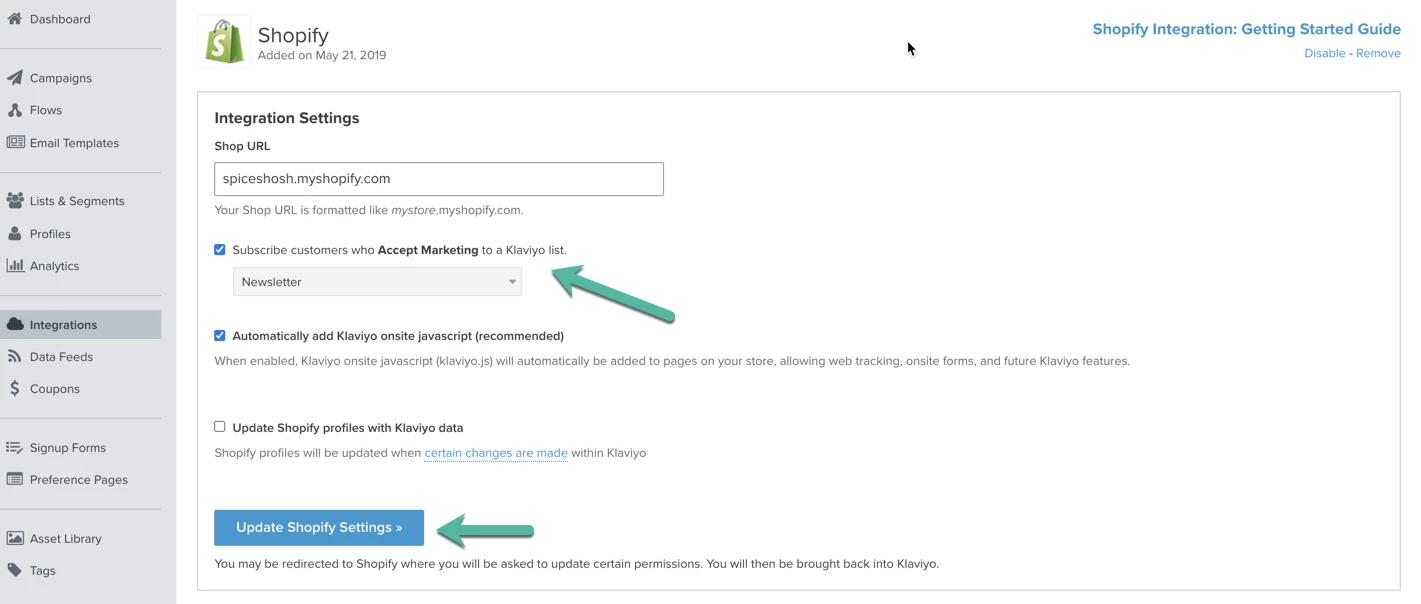
 

  • Login to Shopify Admin and search for the password-content.liquid template within your store’s theme

When you find the page, look within that .liquid file for this code snippet:

<input type="hidden" name="contact[tags]" value="prospect, password page">​


You’ll need to update this snippet to include "newsletter" within the value section. It should end up looking like this:

<input type="hidden" name="contact[tags]" value="prospect, password page, newsletter">​


Once this has been updated, new subscribers will be correctly added to your Klaviyo account! Note that they will be added to the list you selected in your Shopify Integration Settings page (screenshot above). If you’ve done the above steps and are still experiencing issues with adding people to your main list in Klaviyo, reach out to our support team at success@klaviyo.com for assistance! 

19 replies

shoshana.antunes
Klaviyo Employee
Klaviyo Employee
March 10, 2022

Hi @wouter ! Based on your screenshot, everything seems to be in order. I am wondering whether people are not being added to your newsletter list due to double opt-in. If double opt-in is enabled for your newsletter list, people must first confirm they want to subscribe to emails from you before they are added to your list. It’s a great way to keep your newsletter list healthy by making sure only engaged subscribers get added!


You can confirm whether double opt-in in enabled by clicking into your newsletter list in Klaviyo, select settings, then scroll down until you see the opt-in process box. From this area, you can also enable single opt-in. If you choose to enable single opt-in instead, just make sure to clean your list regularly so that you’re getting rid of any contacts who aren’t engaging with your messaging! 

SA
Problem Solver I
March 10, 2022

Hi @shoshana.antunes thanks for your reply! Appreciate it.

Yes, absolutely I’ve got double opt in activated and tested. I see that my customers are ‘subscribed’ when they confirm by clicking the confirmation email.  These profiles do end-up in Klaviyo like I wish, but aren’t added to the specific list… 
So I guess the issue is in other settings.

shoshana.antunes
Klaviyo Employee
Klaviyo Employee
March 10, 2022

@wouter It’s great to hear that customers are being added to your Klaviyo account! 


If they’re going to a different list than you anticipated, this could be related to your Shopify integration settings. To double check what list your integration is sending subscribers to, navigate to the integrations tab of your account and click into your Shopify integration. You’ll see what list is selected under the Collect Subscribers section. Best to check that your newsletter list is selected under that drop down as this could be causing the issue :relaxed: 

SA
Problem Solver I
March 10, 2022

Hi @shoshana.antunes thanks again. Yes, I did follow these steps, based on earlier recommendations and the basic set-up that needs to be done to integrate. I was hoping for a solution not mentioned earlier. The specific newsletter list is just not growing. Not sure how to solve this. I will talk to my developer next week, hope we find a solution.

Thanks!


Taylor Tarpley
Community Manager
Community Manager
March 10, 2022

Hey @wouter,


Thanks for confirming that your integration is properly synced to the right list! Users will only automatically be added to a Klaviyo list if they've confirmed their subscription through a Klaviyo double opt-in email. I think it might be worth checking out who the double opt-in message is coming from if your users who sign up are being added into your account, but not the right destination. Can you confirm that the message is a Klaviyo Double Opt-in message vs. a Shopify one? 


You can typically tell if the confirmation email was from Klaviyo if it's design matches the one from within your Klaviyo lists'. You can find how your Double opt-in email design looks like by navigating to Lists and Segments > List you were adding users to > Subscribe and Preference page > Confirmation email. 


If you can confirm that it’s coming from Shopify, I would disable the double-opt in in your Shopify settings as it could be overriding our Klaviyo opt-in. Once this is fixed, it should properly feed subscribers in to the right List, but I would test it on yourself first to see if you receive the right message after signing up. 


Hope this helps! 

-Taylor 

Problem Solver I
March 11, 2022

Thank you @Taylor Tarpley this is useful info. The emails are indeed from Shopify, not Klaviyo...you lead me to another important question...I am using a sign-up form from Shopify, not Klaviyo… I always thought that it would pass on the subscribers to Klaviyo and that it’s not per se needed to use the Klaviyo form. When I should use the Klaviyo form this solves the problem I guess…? That means we solved it. I will test this after the weekend. Thanks again for the adequate answers!!

Problem Solver I
March 18, 2022

Hi all, just wanted to get back to this topic, since it is solved. 
It was related to DNS settings. Unfortunately in our case the DNS verification didn’t go through or wasn’t approved. We did this again and it solved my problems as described above. So please check the DNS set-up instructions carefully.  Link

We still working with the Shopify newsletter sign-up form with Klaviyo double Opt in and all end up in the correct list. So I’m happy.

It also helped in the deliverability of test/preview emails to my Gmail account. 
Cheers, Wouter
 

Contributor I
October 5, 2025

This is too outdated. My UI/UX looks completely different now. Can I please get a refresh? It says that all my email subscribers and SMS subscribers via Shopify will get properly added to my email and SMS lists yet in reality this isn't happening. Specifically, when people go through my Shopify footer email sign-up they don’t get added to anything and appear as an unsubscribed profile in my Klaviyo. 

Byrne C
Community Manager
Community Manager
October 6, 2025

Hi ​@karlschopf,

While we can’t edit the above comments to reflect the current Klaviyo UI, I believe I know where your problem is coming from. Are your lists single opt-in or double opt-in? You can figure this out by going to a list’s settings, and checking the opt-in process in the consent tab. If your lists are double opt-in, people will receive a confirmation email after filling out the form, and will need to confirm that they want to subscribe via the confirmation email before they’re subscribed. You can turn this off if you’d like, so people will be subscribed right after filling out the form!