I have troubled inserting a gif file in an email. The gif is set up to loop indefinitely but in the email it stops looping after a few seconds. Do you have any recommendations to solve this issue?
Thanks for sharing your question with the Klaviyo Community!
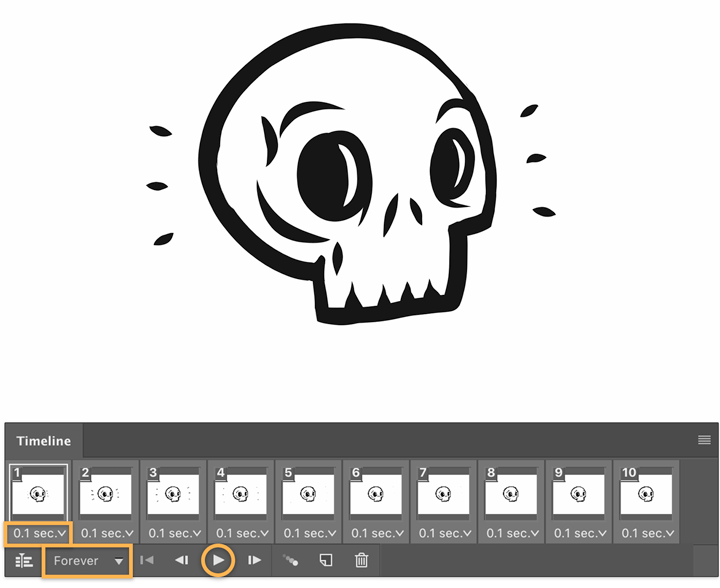
I know you already said the GIF was set to loop indefinitely, but from my experience this sort of behavior typically occurs if the GIF was exported with the loop setting saved as something other than “Forever”.I would suggest checking again to make sure your GIF is exported with the loop setting saved as “Forever” and not just “Once”. For example, if you were using Adobe Photophop, you can find the loop setting on the bottom left corner of the interface:
Alternatively, do you happen to be viewing the email in an Outlook inbox provider? Outlook inbox providers are known to cause some email rendering and behavior differences as mentioned in our My Email Looks Different When Viewed in Microsoft Outlook Help Center article. GIFs not looping when viewed in Outlook inboxes typically impacts older versions of the software and often times do not impact new versions of it. You can also find some support on this from external resources such as the ones below:
Thanks for sharing your question with the Klaviyo Community!
I know you already said the GIF was set to loop indefinitely, but from my experience this sort of behavior typically occurs if the GIF was exported with the loop setting saved as something other than “Forever”.I would suggest checking again to make sure your GIF is exported with the loop setting saved as “Forever” and not just “Once”. For example, if you were using Adobe Photophop, you can find the loop setting on the bottom left corner of the interface:
Alternatively, do you happen to be viewing the email in an Outlook inbox provider? Outlook inbox providers are known to cause some email rendering and behavior differences as mentioned in our My Email Looks Different When Viewed in Microsoft Outlook Help Center article. GIFs not looping when viewed in Outlook inboxes typically impacts older versions of the software and often times do not impact new versions of it. You can also find some support on this from external resources such as the ones below: