


Contributor I
October 29, 2021
Solved

Klaviyo + WooCommerce Transactional Email Missing Image

  • October 29, 2021
  • 5 replies
  • 283 views

Hey there, i´m trying to figure out a transactional e-mail.

Triggered if someone place an order.

I got the dynamic variables for the title price ect.

But somehow the dynamic images won´t show.

if there are 2 Products which are a variable product it works

but if they are a variable product + a single product without variables it won´t work.

Is there somebody who uses Klaviyo + Woo Commerce and alrerady figured out the right dynamic variables ?

    This topic has been closed for replies.
    Best answer by Dov

    Hi @ghostzicht,

    Thanks for sharing this question with the Klaviyo community.

    It sounds like you may be using a tag that is only capturing the variant images.

    The easiest way to fix this is to add the following code to the dynamic block:

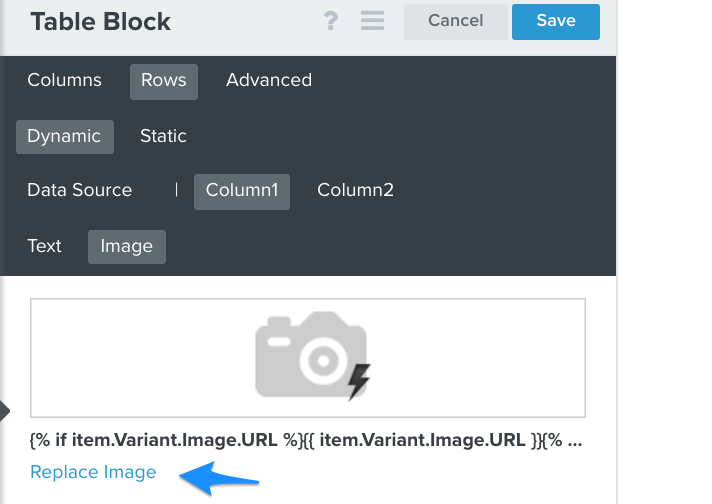
    {% if item.Variant.Image.URL %}{{ item.Variant.Image.URL }}{% else %}{{ item|lookup:'$extra'|lookup:'Images'|lookup:'0'|lookup:'URL' }}{% endif %}

    You will want to navigate to the table block then click Rows > Dynamic > Column 1. Click Replace Image and insert the code and save.

    5 replies

    Dov
    DovAnswer
    Klaviyo Alum
    October 29, 2021

    Hi @ghostzicht,

    Thanks for sharing this question with the Klaviyo community.

    It sounds like you may be using a tag that is only capturing the variant images.

    The easiest way to fix this is to add the following code to the dynamic block:

    {% if item.Variant.Image.URL %}{{ item.Variant.Image.URL }}{% else %}{{ item|lookup:'$extra'|lookup:'Images'|lookup:'0'|lookup:'URL' }}{% endif %}

    You will want to navigate to the table block then click Rows > Dynamic > Column 1. Click Replace Image and insert the code and save.

    DD
    Contributor I
    October 29, 2021

    Hey, thanks for your fast response. Now it works perfect! :raised_hands_tone1:

    Contributor I
    October 29, 2021

    Hey @Dov i just recognized another small problem, the code above works for the most products, but as soon as ther is a product with different sizes and colours its not changing the image to the right colour...

    Dov
    Klaviyo Alum
    October 29, 2021

    Hi @ghostzicht,

    I updated the original post with a new snippet that will accommodate variants as well. Please give this a try.


    DD
    Contributor I
    October 29, 2021

    Hey @Dov , now it works for every product. Big thanks for replying that fast and solving the issue!