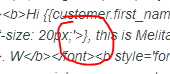
'Name' field displaying with } in Email Preview
Hi there,
I am having trouble with the code in my email templates. I am updating the Shopify notification emails and then replacing the standard shopify email code with the klaviyo code.
When I bring over the code the ‘first name’ always appears with a } bracket at the end of it. See below:
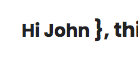
I cannot figure out what part of my code is bringing this through. Please see the code listed below for reference:
<tbody> <tr> <td class="kmTextContent" style="padding-top:18px;padding-bottom:18px;padding-left:18px;padding-right:18px;" valign="top"> <p style="padding-bottom:0; text-align:center"><span style="font-size:18px;"><b>Hi {{customer.first_name}} </b><b style='font-family: Poppins, "Century Gothic", sans-serif; font-size: 20px;'>}, this is Melita From Littlelys</b><font face="Poppins, Century Gothic, sans-serif"><b>. W</b></font><b style='font-family: Poppins, "Century Gothic", sans-serif; font-size: 20px;'>e really appreciate your support.</b></span></p> </td> </tr> </tbody> </table> </td> </tr> </tbody>
Any help would be greatly appreciated!
Thanks,
Melita