Mar 29, 2022 2:23 PM UTC
Solved

Pop up form - how to show homepage dimmed

I am trying to make a popup form on my Shopify homepage so that you see the homepage dimmed behind the form. All I seem to be allowed to do is create a solid color behind it. any ideas?

Dov
DovAnswer
Klaviyo Alum
Mar 30, 2022 3:04 PM UTC

Hi @sheepdreams,

Thank you for sharing this question with us.

It sounds like you’ve found the “Overlay color” section under “Styles” to adjust the overlay display. That’s the correct first step.

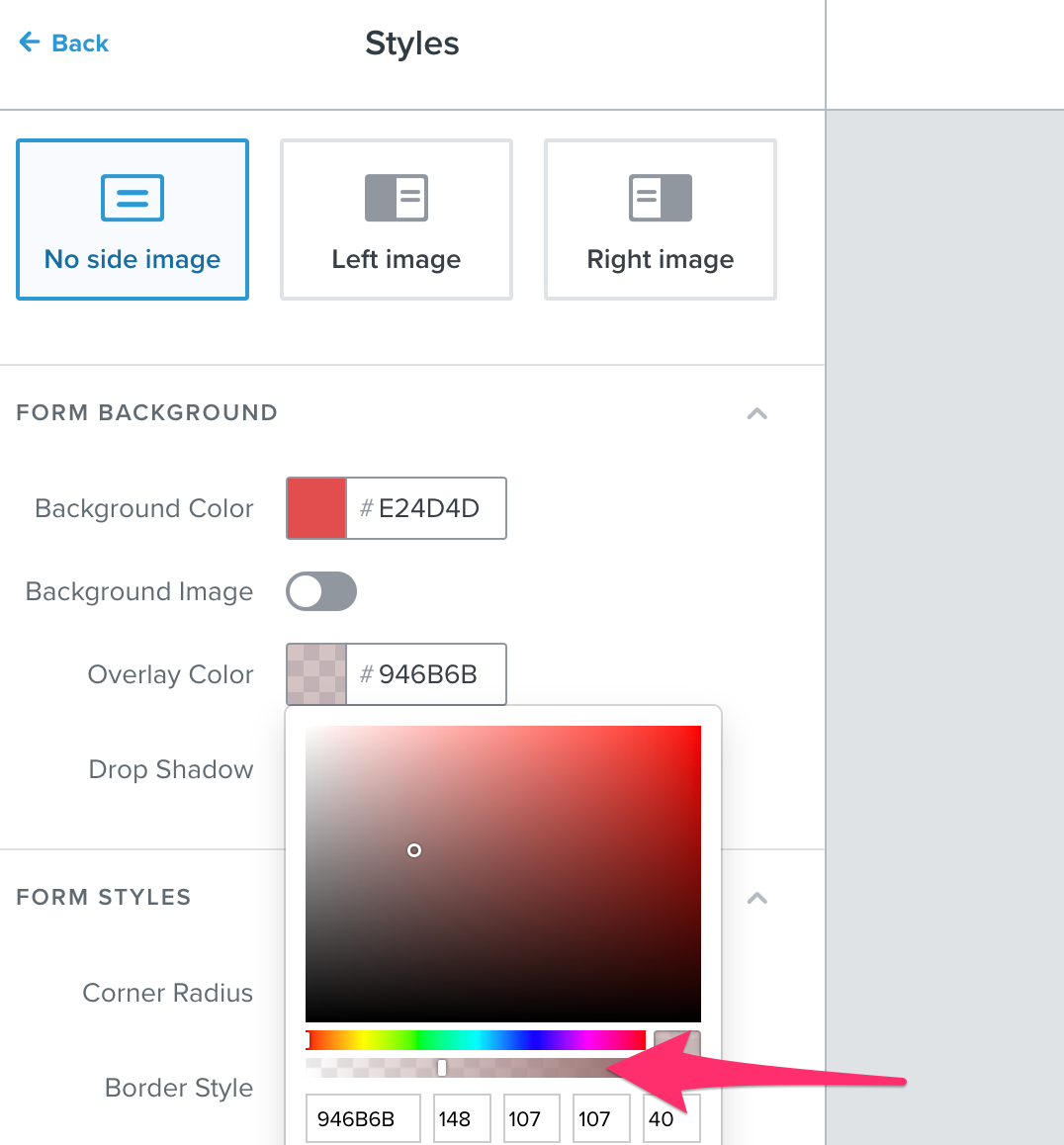
Next, you’ll want to adjust the transparency of the overlay by adjusting the bottom bar in the screenshot below:

Move that bar to the left to make the solid color more transparent, that will give the overlay a more “dimmed” look.

I hope that’s helpful!

DD

4 replies

Dov
DovAnswer
Klaviyo Alum
Mar 30, 2022 3:04 PM UTC

Hi @sheepdreams,

Thank you for sharing this question with us.

It sounds like you’ve found the “Overlay color” section under “Styles” to adjust the overlay display. That’s the correct first step.

Next, you’ll want to adjust the transparency of the overlay by adjusting the bottom bar in the screenshot below:

Move that bar to the left to make the solid color more transparent, that will give the overlay a more “dimmed” look.

I hope that’s helpful!

DD
Problem Solver I
Jul 15, 2025 2:20 PM UTC

Hello, 

how do I go about this when the “Dimmer” bar ist not there?


Byrne C
Community Manager
Community Manager
Jul 17, 2025 3:12 PM UTC

Hi ​@Klavyoyo,

We recently fixed a bug where the transparency setting wasn’t appearing in the form builder. Would you mind refreshing and seeing if this appears again? Thanks! If it’s still not there, let me know!

Problem Solver I
Jul 22, 2025 6:24 AM UTC

Hello Byrne, Thx, that solved the problem.