



Contributor I
September 13, 2021
Solved

Remove Underline from Hyperlinks

  • September 13, 2021
  • 5 replies
  • 3102 views

Hello, does anyone know how I can remove the underline from hyperlinks? I have some links and have changed the font colour as desired, however the blue underline for the link won’t go away. I have tried a few different HTML and CSS combinations but nothing has worked so far. 
    This topic has been closed for replies.
    Best answer by Mailbox Manny

    Definitely, are you trying to change all the hyperlinks your email template to have the underline removed?

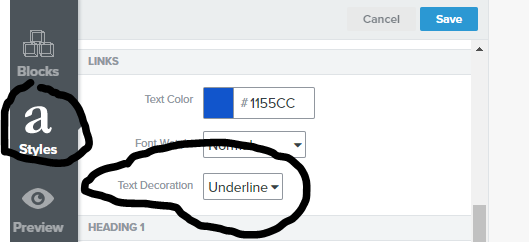
    If so, from your template editor, click “Styles” on the left and then look for the section called “Links”. 

    From there, you’ll see an option for “Text Decoration”, change it to “None”.


    That should do the trick!


    5 replies

    Mailbox Manny
    Partner - Silver
    Partner - Silver
    September 14, 2021

    Definitely, are you trying to change all the hyperlinks your email template to have the underline removed?

    If so, from your template editor, click “Styles” on the left and then look for the section called “Links”. 

    From there, you’ll see an option for “Text Decoration”, change it to “None”.


    That should do the trick!


    Subscribe. Segment. Send. Repeat.
    Taylor Tarpley
    Community Manager
    Community Manager
    September 14, 2021

    Hey @fabrique


    Welcome to our Community! Thanks for asking this as I’m sure future Community members might have this question in the future! @Mailbox Manny, did an incredible job hopping in here and finding a solution.


    Thanks for being a part of the Community,

    -Taylor 

    Contributor I
    February 10, 2022

    So this thread only seems to reference if you do it in the new editor on Klayvio, but I used the classic because I imported via HTML.  I have added text-decoration:none; and also tried text-decoration:none !important to my css.  Nothing works to remove the underline from links.  Any help would be greatly appreciated


    *I was able to figure this out - you need to add a global css at the top of your html file to override this in classic editor.*

    Taylor Tarpley
    Community Manager
    Community Manager
    February 10, 2022

    Hi @kanderson


    Thanks for sharing your question with us! Actually, this question was regarding the classic editor as the new editor hadn’t been released at the time yet. However, thank you so much for sharing our your solution to your problem with us. I know it will help other users who might have a similar issue in the future! 


    -Taylor 

    Contributor I
    May 5, 2022

    Hi there! We have trouble: underlining link in desktop version of the real email, line is hidden in editor, so we thought that situation was ok, but when we sent real message, we discovered that line  displayed below the link.  How to get rid underlining of the link in laptop  version/mobile version is ok