March 7, 2021
Solved

Shopify Footer Newsletter Sign up - not in Klaviyo
  • March 7, 2021
  • 10 replies
  • 2716 views

I have looked for this topic in the community and seen the replies about turning OFF the Shopify Double Opt in. Mine is OFF but still my tests are not ending up in my Klaviyo newsletter list. (I also have the Klaviyo Double opt in OFF)


How do I fix this please?

    This topic has been closed for replies.
    Best answer by julie.accardo

    Hi Trish,

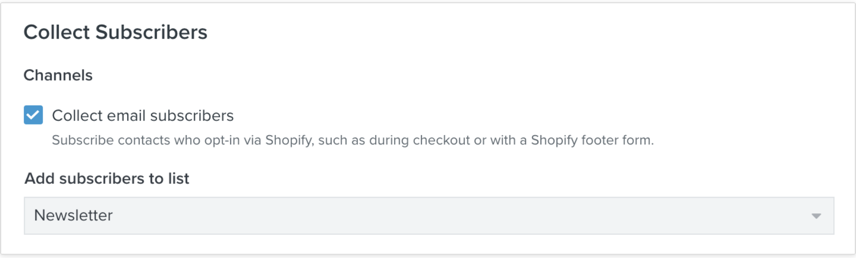
    You will also need to enable the Shopify integration setting (shown below) to re-route your Shopify forms to a list in Klaviyo. Have you done this already?

    Best,

    Julie

    10 replies

    julie.accardo
    Klaviyo Employee
    Klaviyo Employee
    March 7, 2021

    Hi Trish,

    You will also need to enable the Shopify integration setting (shown below) to re-route your Shopify forms to a list in Klaviyo. Have you done this already?

    Best,

    Julie

    JA
    March 7, 2021

    Where do I find this Collect Subscribers box? I cannot locate it? (I’m not on Shopify Plus)

    March 7, 2021

    Ooops Never mind! I found it on Klaviyo side ;)


    Contributor IV
    October 27, 2021

    Hi 

    Hi Trish,

    You will also need to enable the Shopify integration setting (shown below) to re-route your Shopify forms to a list in Klaviyo. Have you done this already?

    Best,

    Julie

    Hi Julie, 


    I have a footer on my Shopify store that some people have submitted their emails. The emails are showing up as profiles in Klaviyo but are not migrating to the Newsletter. How can I make this transition happen? I have the “collect email subscribers” checked as per your direction in the screenshot.


    Thanks!

    -Diana

    Dov
    Klaviyo Alum
    October 28, 2021

    Hi @Diana123,

    Thank you for sharing your question with us in the community.

    Can you check if double-opt in is enabled? This is the default setting in Klaviyo. If it is, the user will receive a confirmation email (and need to confirm their subscription via that email) before being added to the Newsletter list. I recommend testing the footer yourself and checking for the confirmation email, if your email address is already subscribed you can use an alias i.e. youremail+123@gmail.com to trigger a net-new confirmation email.

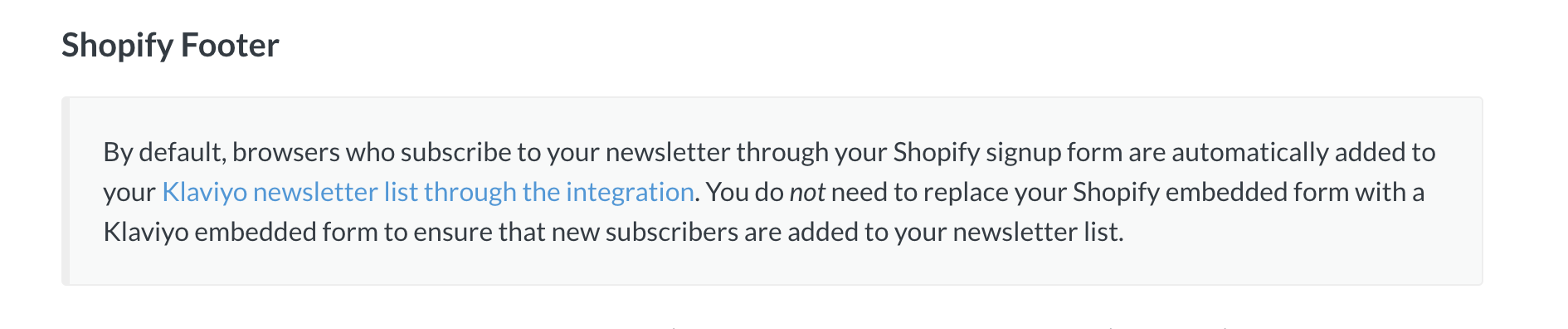
    If you do not see a double opt-in email, after filling out the Shopify form, have a look at the “Shopify Tags” property under “Custom Properties” on your profile. There should be a tag here for “newsletter”. If not, you may have to add it into the Shopify liquid code. More information can be found on this here.

    Customer with the Shopify Tag “newsletter”

    Also, in order for the user to be added to the list at the Shopify checkout, they would have to complete their purchase. We have more information on this topic here

    I’m including a few threads that touch upon the same topic below as well:


    DD
    Contributor IV
    October 29, 2021

    Hi @Diana123,

    Thank you for sharing your question with us in the community.

    Can you check if double-opt in is enabled? This is the default setting in Klaviyo. If it is, the user will receive a confirmation email (and need to confirm their subscription via that email) before being added to the Newsletter list. I recommend testing the footer yourself and checking for the confirmation email, if your email address is already subscribed you can use an alias i.e. youremail+123@gmail.com to trigger a net-new confirmation email.

    If you do not see a double opt-in email, after filling out the Shopify form, have a look at the “Shopify Tags” property under “Custom Properties” on your profile. There should be a tag here for “newsletter”. If not, you may have to add it into the Shopify liquid code. More information can be found on this here.

    Customer with the Shopify Tag “newsletter”

    Also, in order for the user to be added to the list at the Shopify checkout, they would have to complete their purchase. We have more information on this topic here

    I’m including a few threads that touch upon the same topic below as well:


    Thanks for your quick reply! It seems like I’ll have to ask the developer to add in the code.

    Contributor I
    January 11, 2022

    I need to fix the klaviyo sign up form in header and footer of my shopify website, is it possible or not? Klaviyo support is not supporting despite frequent attempt, they say first buy the subscription which i am not doing before i check everything properly..

    Dov
    Klaviyo Alum
    January 11, 2022

    Hi @khitab,

    Thanks for sharing this with us.

    It would be helpful if you could elaborate on the trouble you’re having with respect to the Klaviyo signup forms. If it’s not directly related to this topic, feel free to start a new thread and we’ll work towards a solution.


    DD
    Contributor I
    January 11, 2022

    I made sign up form in the Klaviyo which is integrated to my shopify store. It works as a pop-out well but I also need it fixed in the header and footer of my website, please how can one do it? is it possible?  I searched relevant info a lot but unfortunately to no avail.

    Dov
    Klaviyo Alum
    January 12, 2022

    Hi @khitab,

    Thank you for your reply.

    In order to place the Klaviyo embed in the footer of your Shopify site, you can follow the steps outlined here.

    The header would be the same steps except you would paste our code in the Shopify .liquid file that corresponds to the header of your page. You may want to check in with Shopify to verify which liquid file corresponds to header on your page.

    I hope that’s helpful!


    DD