

January 5, 2022
Solved

Using javascript to pass UTMs from an inbound URL into Klaviyo via their API

  • January 5, 2022
  • 14 replies
  • 1636 views

Hello,

We are using embedded Klaviyo forms on our marketing landing pages built with Zipify in Shopify.  I want to pass UTMs from the inbound URL via hidden fields in a Klaviyo embedded form to Klaviyo.  The reason for doing this is for marketing source attribution for a Profile.  However, Klaviyo support tells me that this is not supported.  They say the best way to accomplish this is to use javascript to get the UTMs parameters and push them into Klaviyo via their API.

I have a script that gets the UTMs (Source, Campaign, Medium, Content, Term) and then pushes those to Klaviyo. I need to activate this upon Button Submit for the Klaviyo Embedded Form.  Can anyone tell me how best to trigger the script upon Button Submit?

Thanks!

Roy
This topic has been closed for replies.
Best answer by Walid

Hi Roy,


The token is set by the “klaviyo.js” snippet on your site (in this case it looks like it’s injected as part of our integration), if you’re able to publish forms to the page then the token should be set correctly. In this case I think there might be a few issues with this code in terms of scoping and naming:

  1. I’d recommend updating the line
    var _learnq = _learnq || [];
    to
    var _learnq = window._learnq || [];
    It looks like it’s being re-set to an empty array (you can see this when it prints in the console as [] rather than an object) when it enters the method so pushing items to it will not produce an Identify request via our Javascript library. Instead, this will set the “local” (to this method) variable for _learnq to the object defined by our Javascript library on the “window” scope.
  2. The line that sets the utm_id variable, utm_id = kevyal[1];, is referring to “kevyal” rather than “keyval” so it throws an error in the console when it runs. Renaming it to “keyval” should fix this.

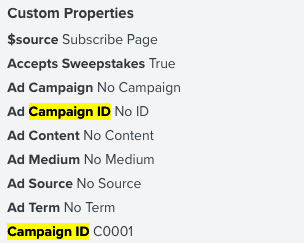
After making these changes I added the script to the console directly, submitted the form, and it looks like it worked as expected!:


14 replies

Dov
Klaviyo Alum
January 5, 2022

Hi @Roy J.,

Thanks for sharing this with the community.

On a high-level, you’d need to add an event listener to the button that runs your custom code. You may find it help to review the general structure of an event listener to help you build that out. If you are having any trouble, feel free to share your code here and perhaps another member of our community will be able to assist. Or you can look into contacting one of our wonderful partners to assist you further. 

Additionally, you may find it helpful to look at the advanced reports tab within your Klaviyo embed form. You’ll be able to review the UTMs there. By default, the time period is set to “last 7 days” but that is adjustable. You can read more about that here.

Thanks for being a member of our community.

DD
January 5, 2022

Hi Dov,

Thank you very much your quick reply. I have created an event listener according to the help page that you linked.  However, I have one question.  This the event listener code is listed at the bottom of this reply.  I have replaced the formId, companyId, and g with the appropriate ids from our account.  It is unclear from the documentation how should I treat $email.  Obviously the email that I want to capture is the email supplied in the form. Do I leave $email set to ‘test@example.com’ in the event listener or replace with a variable designed to capture the form email?

You’re help is greatly appreciated, Thanks! Roy

var event = new CustomEvent("klaviyoForms", {
detail: {
type: 'submit',
formId: 'F12345',
companyId: 'C12345',
metaData: {
g: '12345',
$email: 'test@example.com',
}
});
window.dispatchEvent(event);
January 6, 2022

Looks like I can access email from the form via e.detail.metaData[“$email”], which produced the email submitted by the form...

 window.addEventListener("klaviyoForms", function(e) {
  if (e.detail.type == 'submit') {
    console.log(e.detail.metaData["$email"]);
  }
});
 

Dov
Klaviyo Alum
January 6, 2022

Hi @Roy J.,

Of course, glad I could help and thank you for sharing all of this!

Hi Dov,

Thank you very much your quick reply. I have created an event listener according to the help page that you linked.  However, I have one question.  This the event listener code is listed at the bottom of this reply.  I have replaced the formId, companyId, and g with the appropriate ids from our account.  It is unclear from the documentation how should I treat $email.  Obviously the email that I want to capture is the email supplied in the form. Do I leave $email set to ‘test@example.com’ in the event listener or replace with a variable designed to capture the form email?

You’re help is greatly appreciated, Thanks! Roy

var event = new CustomEvent("klaviyoForms", {
detail: {
type: 'submit',
formId: 'F12345',
companyId: 'C12345',
metaData: {
g: '12345',
$email: 'test@example.com',
}
});
window.dispatchEvent(event);

Looks like I can access email from the form via e.detail.metaData[“$email”], which produced the email submitted by the form...

 window.addEventListener("klaviyoForms", function(e) {
  if (e.detail.type == 'submit') {
    console.log(e.detail.metaData["$email"]);
  }
});


DD
January 11, 2022

Hi again Dove,

I'm now using the Identity API by using _learnq.push to update custom properties when submit is clicked on the embedded form. I'm following the instructions in https://developers.klaviyo.com/en/docs/identify-api-reference and the push returns a value of success (1), but the pushed property data is not overwriting the default values for custom property in the form.

I’ve tested it using an embedded form with and without the custom property already created.  If the custom prop is already created, I only get the default value.  If it’s not created, I do not see the prop appear on the test profile.

I’m not sure what to try next…

Thanks!

Roy

Dov
Klaviyo Alum
January 12, 2022

Hi @Roy J.,

Thanks for sharing this update.

Would you mind also sharing the identify call being made so we can have a look? 

Thanks.

DD
January 12, 2022

 Hi Dove,

I’m just trying to get the first UTM into the Profile, so I’m only trying insert the utm_id currently.  Here is the entire event listener (complete with console.log statements).

I have three screenshots but it doesn’t appear that I can attach them to this reply? 1.) Klaviyo form setup, 2.)  Console output for e.detail.metaData and _learnq &  3.) Custom properties on the resulting profile record after form submission.

Roy


window.addEventListener("klaviyoForms", function(e) {
  if (e.detail.type == 'submit') {
    var _learnq = _learnq || [];
    
    console.log(e.detail.metaData["$first_name"]);
    console.log(e.detail.metaData["$email"]);
    console.log(_learnq);
    
    var self = window.location.toString();
    var querystring = self.split("?");
    
    if (querystring.length > 1) {
      var pairs = querystring[1].split("&");
      var utm_id;
      
      for (i in pairs) {
        var keyval = pairs[i].split("=");
        
        switch (keyval[0]) {
          case 'utm_id':
            utm_id = kevyal[1];
            break;
        } // switch
      } // for

      _learnq.push(['identify', {
        '$email' : e.detail.metaData["$email"],
        '$first_name' : e.detail.metaData["$first_name"],
        'Campaign ID' : utm_id
      }]);

      console.log(_learnq);

    } // if
  } // if
}); // addEventListener
 

January 12, 2022
January 13, 2022

Looks like I may not be setting my token correct?  A return value of 1 just indicates proper formatting, not actual success for the push, will try that now...

WalidAnswer
Klaviyo Employee
January 20, 2022

Hi Roy,


The token is set by the “klaviyo.js” snippet on your site (in this case it looks like it’s injected as part of our integration), if you’re able to publish forms to the page then the token should be set correctly. In this case I think there might be a few issues with this code in terms of scoping and naming:

  1. I’d recommend updating the line
    var _learnq = _learnq || [];
    to
    var _learnq = window._learnq || [];
    It looks like it’s being re-set to an empty array (you can see this when it prints in the console as [] rather than an object) when it enters the method so pushing items to it will not produce an Identify request via our Javascript library. Instead, this will set the “local” (to this method) variable for _learnq to the object defined by our Javascript library on the “window” scope.
  2. The line that sets the utm_id variable, utm_id = kevyal[1];, is referring to “kevyal” rather than “keyval” so it throws an error in the console when it runs. Renaming it to “keyval” should fix this.

After making these changes I added the script to the console directly, submitted the form, and it looks like it worked as expected!: