


Contributor I
October 25, 2021
Solved

Validation and Consent details when creating a Custom Signup Form in Shopify

  • October 25, 2021
  • 1 reply
  • 408 views

Hi All,

Is there any way to show validation on Custom Klaviyo Flyout form when customer tries to submit the form in Shopify?


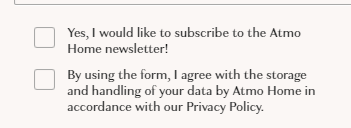
Also, I added 2 checkboxes one is for “Privacy Policy” and other is for “Newsletter” attaching the screenshot below:
 

and using consent for these:
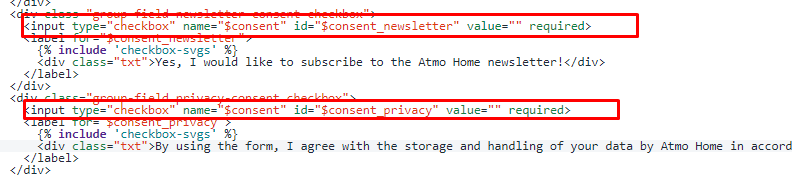


But where I see the record in klaviyo that the customer select these checkboxes?

Your response would be highly appreciated.


Thanks,

Farhan

This topic has been closed for replies.
Best answer by alex.hong

Hi there @Iamfarhan,

Thanks for posting to the Community! 

So to add a record in Klaviyo that would show the customers that clicked those checkboxes, it depends on how you have it coded. Theoretically, you should be able to custom code those 2 boxes to be each passing different custom profile properties similar to how our Klaviyo signup forms function with checkboxes. A community post outlining a similar topic with related articles can be found here:

However, if you were looking to actually apply and tracking Klaviyo's "$Consent" property then that's not possible because we only accept"$Consent" property in an array of [email], [web], [sms], [mail], etc. due to GDPR.

From there you could also sort the people with these custom properties into a segment. You can create a Segment Based on Someone's Properties, even  Custom Properties by navigating to the Segment Tab then Create > Properties About Someone > RSVP > Equals > Yes > Boolean. 


Hope this helped!
Alex

1 reply

alex.hong
alex.hongAnswer
Klaviyo Alum
October 25, 2021

Hi there @Iamfarhan,

Thanks for posting to the Community! 

So to add a record in Klaviyo that would show the customers that clicked those checkboxes, it depends on how you have it coded. Theoretically, you should be able to custom code those 2 boxes to be each passing different custom profile properties similar to how our Klaviyo signup forms function with checkboxes. A community post outlining a similar topic with related articles can be found here:

However, if you were looking to actually apply and tracking Klaviyo's "$Consent" property then that's not possible because we only accept"$Consent" property in an array of [email], [web], [sms], [mail], etc. due to GDPR.

From there you could also sort the people with these custom properties into a segment. You can create a Segment Based on Someone's Properties, even  Custom Properties by navigating to the Segment Tab then Create > Properties About Someone > RSVP > Equals > Yes > Boolean. 


Hope this helped!
Alex