Contributor I
January 15, 2021
Solved

Whats the difference between accepts marketing and the Newsletter list?

  • January 15, 2021
  • 21 replies
  • 8798 views

Hi there, 

I’ve been looking at lists on our account and noticed that our Newsletters list is 5k under the amount of customer we have on a list where the definition is just ‘accepts marketing’ can anyone say why this is? 


Also is there a way we can then add this extra 5k to our newsletter list?!

Thanks in advance,

Ali 

This topic has been closed for replies.
Best answer by ksanfelipe

Hi @Alastairofecw !

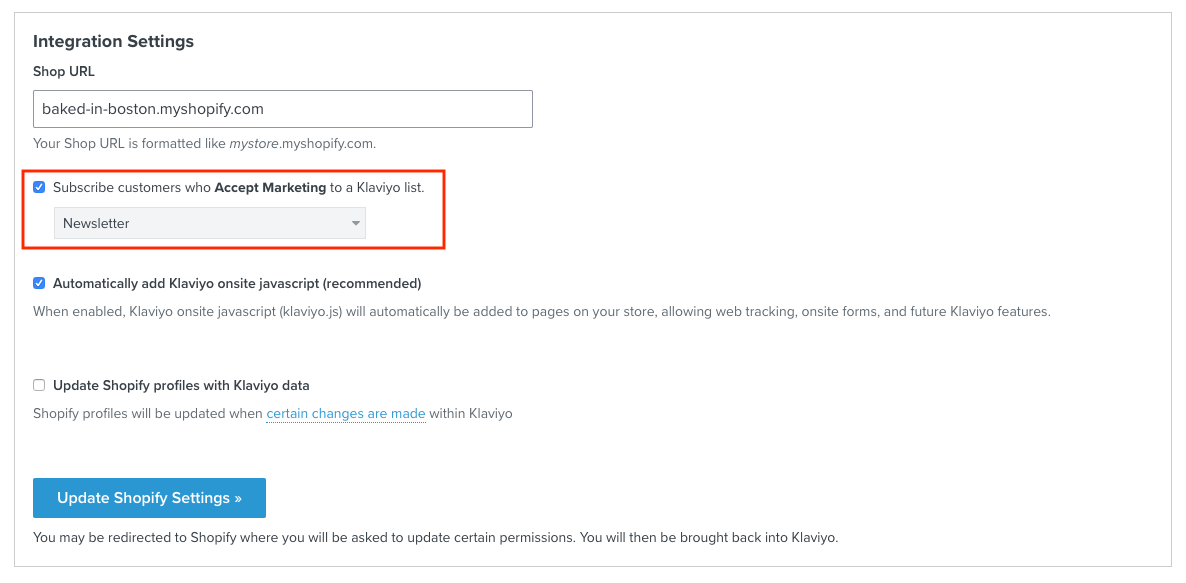
“Accepts marketing” is a Shopify-specific property. If someone opts-in to email marketing in your Shopify store, you will notice that they have a property of “Accepts marketing = true.”

In your integration settings, you can choose to have users who accept marketing in Shopify get added to a list in Klaviyo:


As long as you have this setting checked off, then you can just use your Klaviyo lists as your source of truth for opt-ins. You won’t want to rely on this property because it is a Shopify property, which means subscribers you collect through a Klaviyo signup form will not have this property. 

Generally speaking, your subscriber lists in Klaviyo are the most accurate way to identify users who have given consent for email marketing!

Cheers,

Kalie


21 replies

David To
Klaviyo Employee
Klaviyo Employee
June 16, 2023

Hello @tvg,

On December 14th, 2022, Klaviyo released an update changing the way email subscribers are synced from Shopify to Klaviyo. This sync previously relied on Shopify’s Accepts Marketing tag, but now, subscribers are synced via Shopify’s subscription model.

If you are looking to understand your Shopify subscribers synced before this release and more about the Accepts Marketing tag, I would suggest taking a look at our How to sync Shopify email subscribers to a Klaviyo list and Getting started with Shopify Help Center articles.

It’s also important to note that if you had subscribers synced prior to this update, you would have experienced that profiles whose accept marketing = false are not automatically suppressed. 

For this reason, it’s important to review these profiles carefully if they were synced prior to the update and either suppress them or not market to these profiles. 

As mentioned in the help center articles, there are two situations that can cause pre-existing customers to have accepts marketing set to false, but are still subscribers:

  • If a customer checks out and decides not to accept email marketing at that time, but later subscribes through a Klaviyo sign-up form, they'll still be added to your newsletter list.
  • If a customer checks out and does accept email marketing, they'll be added to your newsletter list. If they check out again, they'll probably decide to not subscribe again since they're already subscribed. Depending on your checkout configuration, Shopify might see this as not accepting marketing (Accepts Marketing = false.) You probably don't want to treat this customer as an unsubscribe. Rather, you'll want to keep this customer on your newsletter list. 

David