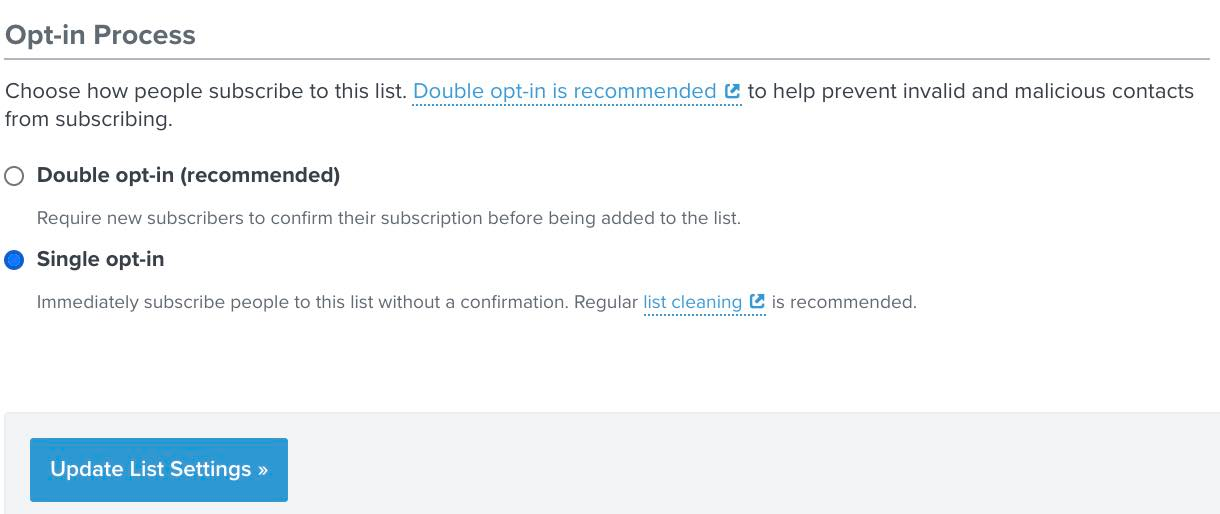
Thanks for sharing your question with us! As, double opt-in is the default setting for Lists, you can change your List setting to Single opt-in by going to List Settings and clicking on the Single Opt-in radio button and updating the new settings, as seen below.
This should prevent users from receiving a second confirmation message after they first confirm their subscription. I would first ensure that you have changed the opt-in of the List connected to the right form in question as it is easy to change the settings of the wrong list accidentally.
Additionally, I would investigate whether or not you’re using 3rd party sign-up forms or apps to re-direct users to your Klaviyo list. If this is the case, it is possible that the opt-in setting from the third-party forms or apps opt-in settings are overriding the new Opt-in settings you’ve changed in Klaviyo.
However, if you have confirmed it is the right list connected to the form in question and have tested it multiple times and you aren’t using any third-party integrations I would contact our wonderful support team as this is not expected behavior!
Thank you for your participation in the Community!
-Taylor
I already did this but it still not working. Thanks
Thanks for sharing your question with us! As, double opt-in is the default setting for Lists, you can change your List setting to Single opt-in by going to List Settings and clicking on the Single Opt-in radio button and updating the new settings, as seen below.
This should prevent users from receiving a second confirmation message after they first confirm their subscription. I would first ensure that you have changed the opt-in of the List connected to the right form in question as it is easy to change the settings of the wrong list accidentally.
Additionally, I would investigate whether or not you’re using 3rd party sign-up forms or apps to re-direct users to your Klaviyo list. If this is the case, it is possible that the opt-in setting from the third-party forms or apps opt-in settings are overriding the new Opt-in settings you’ve changed in Klaviyo.
However, if you have confirmed it is the right list connected to the form in question and have tested it multiple times and you aren’t using any third-party integrations I would contact our wonderful support team as this is not expected behavior!
Thank you for your participation in the Community!
Thanks for sharing your question with us! As, double opt-in is the default setting for Lists, you can change your List setting to Single opt-in by going to List Settings and clicking on the Single Opt-in radio button and updating the new settings, as seen below.
This should prevent users from receiving a second confirmation message after they first confirm their subscription. I would first ensure that you have changed the opt-in of the List connected to the right form in question as it is easy to change the settings of the wrong list accidentally.
Additionally, I would investigate whether or not you’re using 3rd party sign-up forms or apps to re-direct users to your Klaviyo list. If this is the case, it is possible that the opt-in setting from the third-party forms or apps opt-in settings are overriding the new Opt-in settings you’ve changed in Klaviyo.
However, if you have confirmed it is the right list connected to the form in question and have tested it multiple times and you aren’t using any third-party integrations I would contact our wonderful support team as this is not expected behavior!
Thank you for your participation in the Community!
-Taylor
I already did this but it still not working. Thanks
Hi @giannishadj - Just to be sure, like @Taylor Tarpley mentioned towards the bottom of her reply, I would double check the email capture is going to the proper List (where you have Single Opt-in) you expect. Sometimes I find subscribers being Subscribed to different Lists in Klaviyo because they are capturing emails from a variety of places and with different mechanisms or tools - not realizing it’s pointing to different Lists within Klaviyo.
If you are capturing emails from a variety of places, verify they are going the same List whether its a Klaviyo Signup Form, Ecommerce Platform Integration, or a third party email capture tool.
One way to do this is sign up form each place that you have an email capture with a different email and then look up the profile in Klaviyo to see what “Lists” each one ends up in. Give that a shot!
Joseph Hsieh // retentioncommerce.com // X: @retention