

Contributor I
August 29, 2022
Solved

Why is no RSS: Data Feed pop-up is empty

  • August 29, 2022
  • 1 reply
  • 91 views

HI -
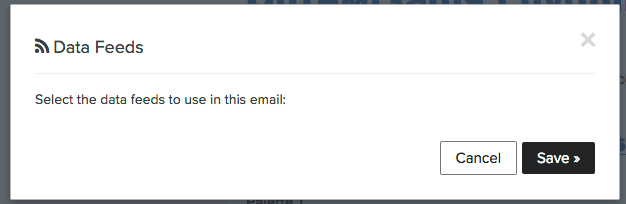
I’ve opened a new template and like to feed it with my RSS. I see Data Feeds link at the bottom of the Editor, but pop-up is empty (foto). Where are I can insert my feed? 
Thanks!
 

    This topic has been closed for replies.
    Best answer by Taylor Tarpley

    Hi @yoshida


    Thanks for sharing your question with us! 


    Have you already connected your custom feed in the Data Feeds tab of your Klaviyo account? You will need to do this before it is an option in your template editor. I’d follow our helpful documentation on how to add a custom feed in your account to get started! 


    Once you’ve done this, how you add the custom feed into your template will depend on which version of the template editor you’re using. If you’re using the Classic Editor, which it appears like you’re using, you’ll click the Data Feeds link in the footer of the template editor and choose which feed you want to use. However, if you use the new editor, you’ll just skip this step and got to the next set of instructions in our documentation.


    Thanks for participating in the Community!

    -Taylor

    1 reply

    Taylor Tarpley
    Community Manager
    Community Manager
    August 29, 2022

    Hi @yoshida


    Thanks for sharing your question with us! 


    Have you already connected your custom feed in the Data Feeds tab of your Klaviyo account? You will need to do this before it is an option in your template editor. I’d follow our helpful documentation on how to add a custom feed in your account to get started! 


    Once you’ve done this, how you add the custom feed into your template will depend on which version of the template editor you’re using. If you’re using the Classic Editor, which it appears like you’re using, you’ll click the Data Feeds link in the footer of the template editor and choose which feed you want to use. However, if you use the new editor, you’ll just skip this step and got to the next set of instructions in our documentation.


    Thanks for participating in the Community!

    -Taylor

