


raWildflows
Partner - Silver
Partner - Silver
March 11, 2022
Solved

Woocommerce integration checkout subscription box isn't showing properely
  • March 11, 2022
  • 3 replies
  • 319 views


Hi team,

Quick question:

I’m using the Woocommerce x Klaviyo integration and checked “collect email subscribers” in settings.

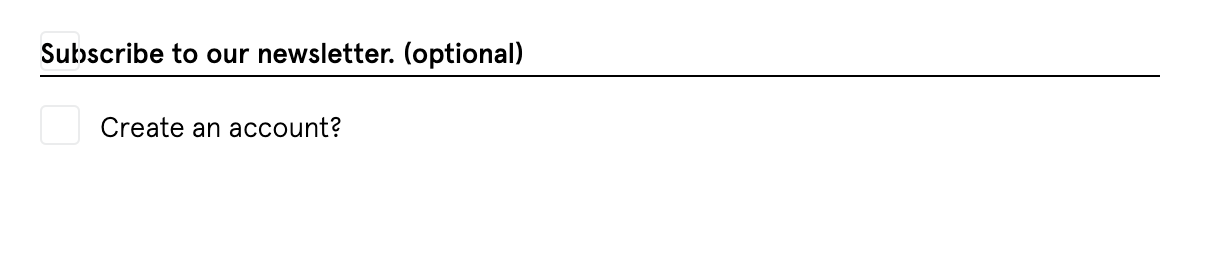
  1. The checkbox and text are overlapping - how do I fix this?
  2. How to remove the line between the ‘subscription’ and ‘account creation’ checkbox?
  3. How do I remove  the word “(optional)”?

If anyone can help me with one or more of these questions - I’d be very grateful :)

    This topic has been closed for replies.
    Best answer by DavidSandel

    The first two are controlled by the CSS coding on your site. You have to edit or create custom CSS to overwrite that and get the correct spacing and remove the line.

    As for the word “optional,” you can’t easily remove that. You’d have to edit the plugin’s PHP code or find a way to hook into it from your child theme’s function.php file.

    3 replies

    DavidSandel
    Partner - Silver
    Partner - Silver
    March 11, 2022

    The first two are controlled by the CSS coding on your site. You have to edit or create custom CSS to overwrite that and get the correct spacing and remove the line.

    As for the word “optional,” you can’t easily remove that. You’d have to edit the plugin’s PHP code or find a way to hook into it from your child theme’s function.php file.

    Klaviyo Silver Master --> LowGravitySolutions.com
    raWildflows
    Partner - Silver
    Partner - Silver
    March 11, 2022

    Thanks @DavidSandel - very helpful!

    Just one more question: is it possible to check the box by default? I remember Mailchimp had this option, but can’t find it in Klaviyo.

    DavidSandel
    Partner - Silver
    Partner - Silver
    March 11, 2022

    It’s not available in the settings, but you can force that to happen using CSS as well.

    Klaviyo Silver Master --> LowGravitySolutions.com