



How we used Composer to recover in minutes when our hero product sold out mid-sale

Our hero product sold out during a major sale. Here's how we used customer click data, inventory checks, and Klaviyo Composer to adapt our next email in minutes instead of losing a trading day.
There's a particular kind of panic that comes with watching your bestselling product sell out while a major sale is still running. You've spent weeks planning the campaign. The emails are out, customers are clicking, and everything is working. Maybe a little too well. Then your hero product sells out.
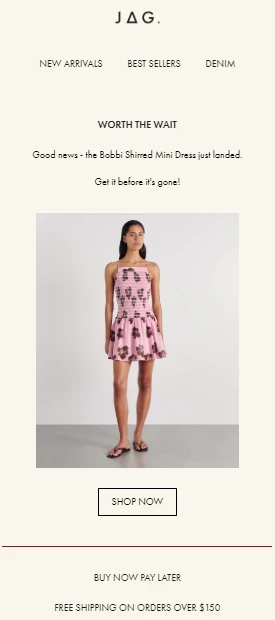
That was the situation we found ourselves in across our Australian fashion brands, JAG, Sportscraft, and SABA.
The obvious next step was to promote something else. The problem? Making that change wasn't nearly as simple as deciding what to feature instead. Historically, even a small email update meant going through the full production process: briefing, design, revisions, building, and QA. By the time we had a replacement ready, we could lose most of a trading day. And during a major sale, a day is a long time to keep sending customers toward something they can't buy.
First, we needed somewhere for that demand to go
A sold-out product doesn't necessarily mean customers have lost interest. In fact, sometimes it tells you exactly what they want.
We'd recently launched back-in-stock notifications, which gave us a way to capture that interest rather than let it disappear. Customers landing on the sold-out product could sign up for an email or SMS notification when it returned.
But that only solved half the problem. We still had a sale running, traffic coming in, and plenty of other products to sell.
So the question became: what should we promote instead?
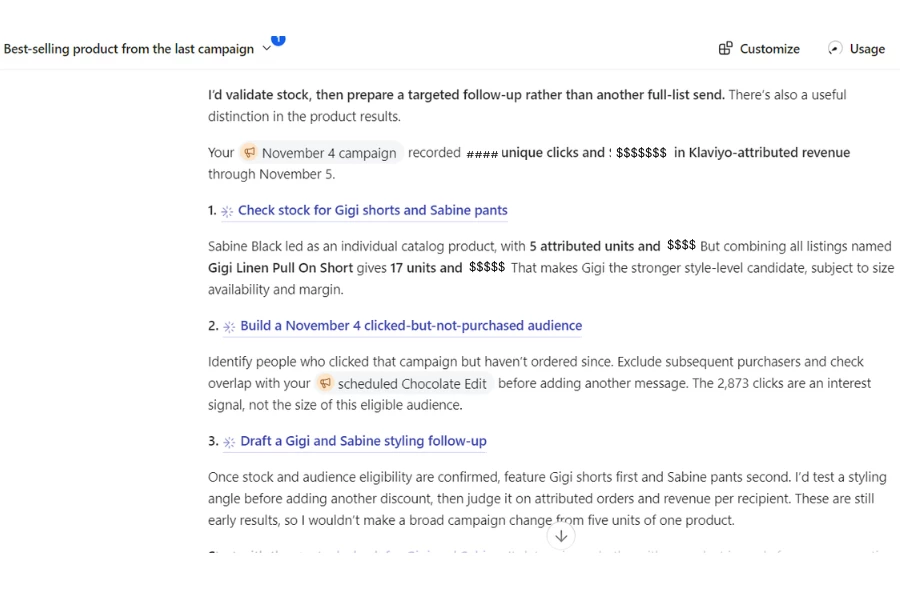
Rather than guess, we used Klaviyo Composer to look at which other products and links customers had clicked most in the campaign.
We identified the next-best performer, checked that we had enough inventory to support the demand, and moved it into the hero position for our next send. When the original product came back in stock, customers who'd requested notifications could hear about it.
It wasn't a particularly complicated strategy. But being able to make the decision and update the email in minutes, rather than spending most of a day on production, made a real difference.
The bigger change: letting customer behavior influence the next send
That sell-out made us rethink something beyond how quickly we could update an email. For a long time, our reporting and campaign production were two separate processes. We'd send a campaign, pull the results, review what performed, decide what to change, and then start another production cycle. The insights were useful, but they weren't always timely.
Now, we're building a different habit. After a campaign goes out, we use Composer to explore questions like:
- Which products received the most clicks?
- Which categories are attracting the most interest?
- Are there customer segments that might respond better to a different version?
- What performed well enough to deserve more visibility in the next campaign?
Then we use those answers to inform the next send, whether that's changing the featured product, adjusting the copy, or creating a variation for a specific audience.
The goal isn't to send more emails just because we can. It's to make the next email more relevant based on what customers have already told us through their behavior.
There's also an important catch: a popular product isn't always the right product to promote. If something is already running low on stock, featuring it more prominently might create the exact same problem we're trying to solve. We're learning to look at performance and inventory together, rather than treating clicks as the only signal that matters.
What about the design team?
This is probably where we've seen one of the more interesting changes in how we work. Our designers still lead the creative direction. They own the campaign concepts, seasonal visuals, templates, and overall look and feel of our brands.
And we want them spending their time doing exactly that. What they shouldn't have to do is interrupt their day every time ecommerce needs to swap a product image, adjust some copy, or make a small change to an existing campaign.
We've started separating those responsibilities more clearly. Design establishes the creative foundation. Ecommerce handles the smaller, reactive updates within that framework.
For example, we might ask Composer to replace a featured product while keeping the layout and tone the same, or update one banner without changing the rest of the email. That gives our ecommerce team more flexibility without turning every last-minute request into another job for design.
It's not about replacing creative work. It's about being more intentional about where we need it.
A few things I'd do before attempting this during a major sale
We're still figuring out what works best, but if another ecommerce team wanted to try a more reactive approach, I'd encourage them to get a few things in place before the sale starts.
1. Agree on what deserves a reaction.
Just because you can update a campaign quickly doesn't mean you should react to every fluctuation in performance. Decide which signals matter ahead of time. Maybe it's a product selling faster than forecast, inventory dropping below a certain level, or an unexpectedly strong performer worth featuring again. The important thing is having a reason for the change, not just the ability to make one.
2. Set the creative boundaries with your designers.
Build your templates, establish your brand guidelines, and agree on what ecommerce can change independently. Being specific helps. Instead of asking Composer to redesign an email, we might ask it to swap one hero product while preserving the layout and tone.
3. Check the stock, not just the clicks.
I can't emphasize this enough. Something can be your best-performing product and still be the wrong choice for your next campaign if you're about to run out of sizes. Performance data tells you what customers want. Inventory tells you what you can actually deliver.
4. Practice when the stakes are lower.
Don't make your biggest sale the first time your team experiments with a new workflow. Try a few reactive updates during a normal trading week. Work out who makes the decisions, who checks the changes, and what the approval process looks like.
5. Keep the human QA step.
We still have a second person review every send. Faster production is valuable, but not if you're introducing mistakes at the same speed. The checks don't disappear just because the build takes less time.
What we're still learning
One of the biggest lessons for me is that being agile and being reactive aren't quite the same thing. It's tempting to change everything as soon as new data comes in. But not every spike in clicks deserves another campaign, and not every dip in performance means something is wrong. We're only a few sales into working this way, so we're still learning which signals are genuinely useful and when it's better to leave a campaign alone.
What has changed is our ability to act when something does matter. When a product sells out, we're not stuck waiting for another production cycle. When another product starts attracting attention, we can consider giving it more visibility while that interest is still fresh.
And when the data suggests something needs to change, our team can spend more time deciding what to do rather than figuring out how to get the change made. That's the part I'm most excited to keep improving.
I'm curious how other ecommerce teams handle this.
When something unexpected happens mid-campaign, like a bestseller selling out or another product suddenly taking off, how quickly can your team respond?
And what's usually the biggest bottleneck: getting the data, deciding what to change, or actually making the update