Contributor I
July 16, 2021
Solved

Can I change the default setting of "buy now" button.

  • July 16, 2021
  • 23 replies
  • 2913 views

When we create an e-mail in Klaviyo and put product block on it, the button is “buy now”.

Can I change the default setting of “buy now” to another word?  

    Best answer by Dov

    Hello @greensnap,

    Thank you for sharing this question with the Community.

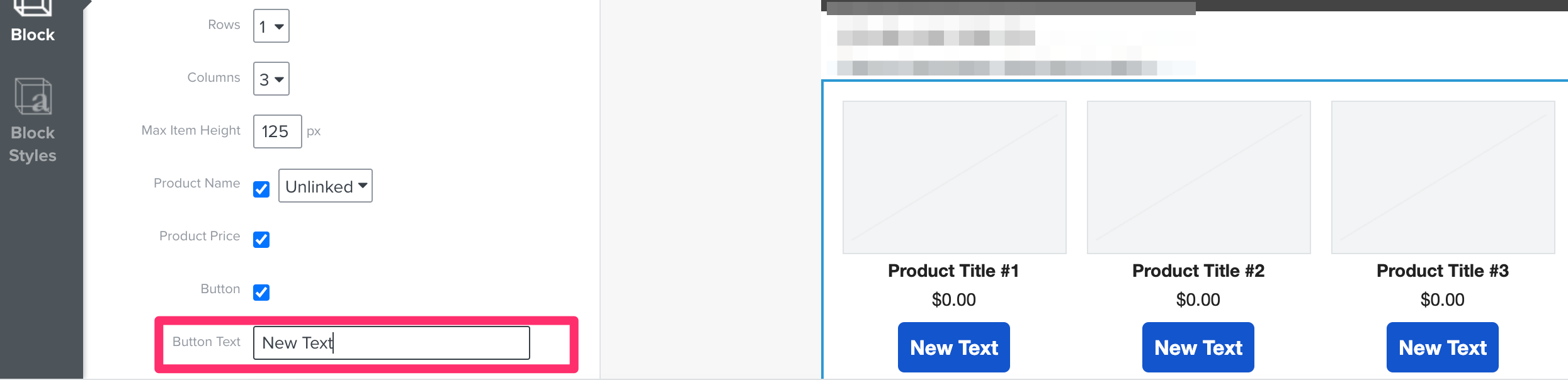
    While you cannot change the default text outright after dragging and dropping a product block, you can update the text that displays in the buttons using the Block option on the left-hand side after clicking on the product block. 

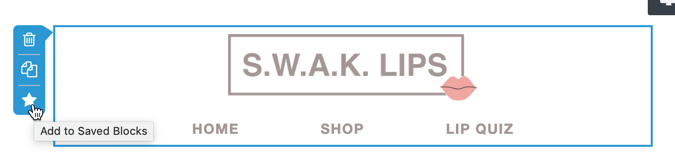
    Once you make this change to the button text, save the product block. This is achieved by clicking on the block and then on the little star icon on the bottom-left of the block.

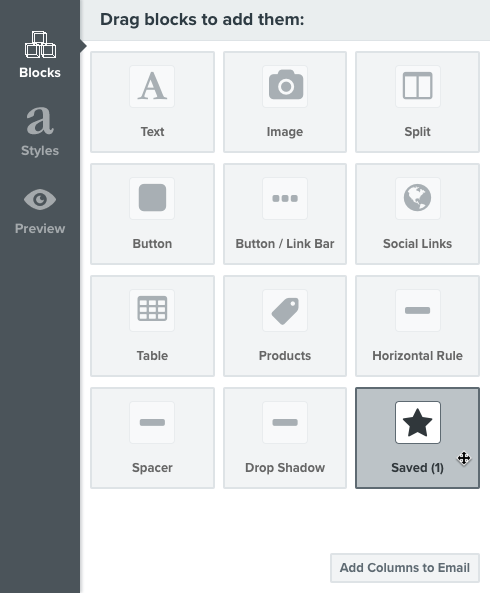
    After the block is saved, the saved block would serve as your de facto default product block for future emails. You can drag and drop this product block with the updated button text into any email using the Saved block option in the template editor.

    I hope that was helpful! Thanks for being a member of our Community.

    23 replies

    Dov
    DovAnswer
    Klaviyo Alum
    July 16, 2021

    Hello @greensnap,

    Thank you for sharing this question with the Community.

    While you cannot change the default text outright after dragging and dropping a product block, you can update the text that displays in the buttons using the Block option on the left-hand side after clicking on the product block. 

    Once you make this change to the button text, save the product block. This is achieved by clicking on the block and then on the little star icon on the bottom-left of the block.

    After the block is saved, the saved block would serve as your de facto default product block for future emails. You can drag and drop this product block with the updated button text into any email using the Saved block option in the template editor.

    I hope that was helpful! Thanks for being a member of our Community.

    DD
    Contributor I
    April 13, 2022

    This seems to have changed in the last Klaviyo Update since the Button text is no longer available in the same interface.  Where can we change it now?  This is especially problematic for non-English emails.

    alex.hong
    Klaviyo Alum
    April 13, 2022

    Hi there @DanYUL!
    If you are referring to our new template editor, I recommend reading up on our documentation regarding the changes you might see!
    Klaviyo's New Template Editor vs. Classic Template Editor and Guide to the Email Template Editor (new editor) will help you get on track for trying to edit your templates.


    All the best,

    Alex

    Contributor I
    April 14, 2022

    Hello Alex,

    I don’t see how to change the “Buy Now” button in the product block in this documentation. Can you quote the new procedure?


    Thanks

    alex.hong
    Klaviyo Alum
    April 14, 2022

    Hi there @DanYUL,

    I am having a bit of trouble understanding what button you are referring to.

    If you go to our new template editor and add a new button, you can edit the text under Content > Text

    Can you give examples of where you are looking to change something? The block option and text has not been changed too much for old and new versions.


    Thanks,

    Alex

    Contributor I
    April 15, 2022

    Hello Alex,

    The button I am talking about is the “Buy Now” button in the Product BLOCK.

    In the product block you can edit

    • Dynamic / Static Content (Products)
    • Layout
    • Text Style
    • Button format (but not button text)
    • Block

    So my question is… How to change the “Buy Now” button text to something like “Get yours now”, “Acheter” or something else?


    That option was there in the old editor, but can be found in the new one.


    Thanks


    alex.hong
    Klaviyo Alum
    April 15, 2022

    Hi @DanYUL,

    Once you create a product block in the new editor and fill it with a catalog, you can still edit the button text.


    Contributor I
    April 26, 2022

    Hello again Alex,

    Actually, I just noticed that the “Buy Now” button text is changeable when the source is dynamic, but when it is static, the option is not there.


    alex.hong
    Klaviyo Alum
    April 26, 2022

    Hi @DanYUL,

    Actually even in the static block, you can individually change the button text for each product you select. 


    Thanks,

    Alex

    Contributor IV
    June 14, 2022

    @alex.hong How do you change the style of the default button in the New Template editor?

    When I drag the button block into a template, it populates with some styles already applied, but I want to change these styles and save it so moving forward every time I drag the button into a template, it will show with the new styles I create. 

    I cannot change these styles every time individually as I have to change font size, style, padding, and corner radius... so looking to change what populates when I drag the button icon into a template.

    Thanks for your help!