Contributor I
July 16, 2021
Solved

Can I change the default setting of "buy now" button.

  • July 16, 2021
  • 23 replies
  • 2913 views

When we create an e-mail in Klaviyo and put product block on it, the button is “buy now”.

Can I change the default setting of “buy now” to another word?  

    Best answer by Dov

    Hello @greensnap,

    Thank you for sharing this question with the Community.

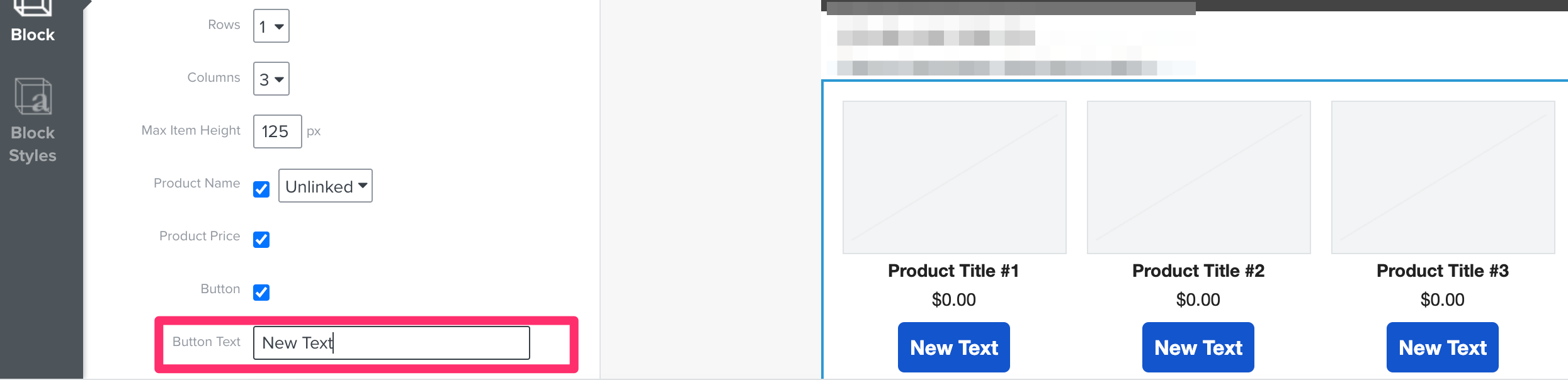
    While you cannot change the default text outright after dragging and dropping a product block, you can update the text that displays in the buttons using the Block option on the left-hand side after clicking on the product block. 

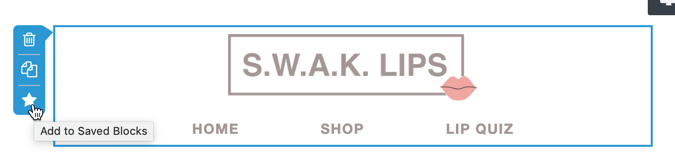
    Once you make this change to the button text, save the product block. This is achieved by clicking on the block and then on the little star icon on the bottom-left of the block.

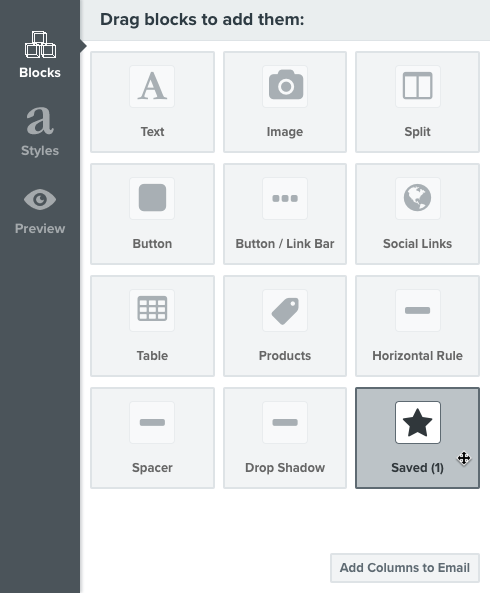
    After the block is saved, the saved block would serve as your de facto default product block for future emails. You can drag and drop this product block with the updated button text into any email using the Saved block option in the template editor.

    I hope that was helpful! Thanks for being a member of our Community.

    23 replies

    alex.hong
    Klaviyo Alum
    June 15, 2022

    Hi @Malavate,

    Unfortunately, you aren’t able to edit the default placeholder buttons that appear in our templates. But you can create universal and saved content so you can just make a button once and reapply it to other areas. 


    Contributor IV
    June 15, 2022

    @alex.hong Thank you. But the default button that appears when I drag a Button block into the new template editor already has some default formatting of our brand, like color and font style, and it already has specific padding and corner radius. Where is it generating this initial formatting from? 


    alex.hong
    Klaviyo Alum
    June 16, 2022

    Hi @Malavate,

    I assume it is generating from a template or theme that is preset. Which styles are you seeing on your end?


    Contributor IV
    July 11, 2022

    @alex.hong Sorry for the delay. Here is a quick video showing what happens for me. https://www.loom.com/share/416e4aa35fca44809a11b130dfe2a5c3

    Thank you for your help!

    alex.hong
    Klaviyo Alum
    July 12, 2022

    Hi @Malavate,

    I would recommend creating a saved button block with your preferred styles so that you can just drag it in to your templates after creating one button.


    Let me know if that works,

    Alex

    Problem Solver I
    August 12, 2022

    Has there been any update on setting the default “Buy Now” text? Every time we add or change products in the saved template, the button text is reverted to “Buy Now” again.

    alex.hong
    Klaviyo Alum
    August 12, 2022

    Hi @Aram Becker ,

    To change the Buy Now text on the button of a product block, you can do this by selecting the Product Block and under Layout, you will see a field to enter a text of your choosing.
    ?name=inline-698160853.png

    The buy now is a placeholder text that is set by default.


    Alex

    Problem Solver I
    August 15, 2022

    Hi @Aram Becker ,

    To change the Buy Now text on the button of a product block, you can do this by selecting the Product Block and under Layout, you will see a field to enter a text of your choosing.

    @alex.hong The issue is, when using a static product feed there is no option to change the text for all “Buy Now” Buttons, it has to be changed for every article added:

    Setting the text for dynamic product lists works well just as you described.

    Contributor I
    November 25, 2022

    hooray!! It worked!  Just click on the “>”. next to the static product you’ve selected and you can edit the ‘buy now’ text button to anything you like:


    Problem Solver III
    November 26, 2022

    Has anyone A/B tested the text in button.


    In my opinion VIEW would be better than BUY NOW as the latter suggests commitment at an earlier stage than customer may be comfortable with?


    Thanks