January 19, 2023
Solved

Can I edit the abandoned cart product table to only show certain items?

  • January 19, 2023
  • 12 replies
  • 2388 views

Hello! First time posting. 


In the Abandoned Cart workflow, the dynamic table that is placed in the email shows a list of items that the customer added to their cart. However, I have some items I don’t want showing in the cart. For example, I dont want “shipping protection” shown which is technically a product line item in their cart, but it’s not the product. It’s just ugly and not necessary to show and I’m hoping to remove it from future emails.

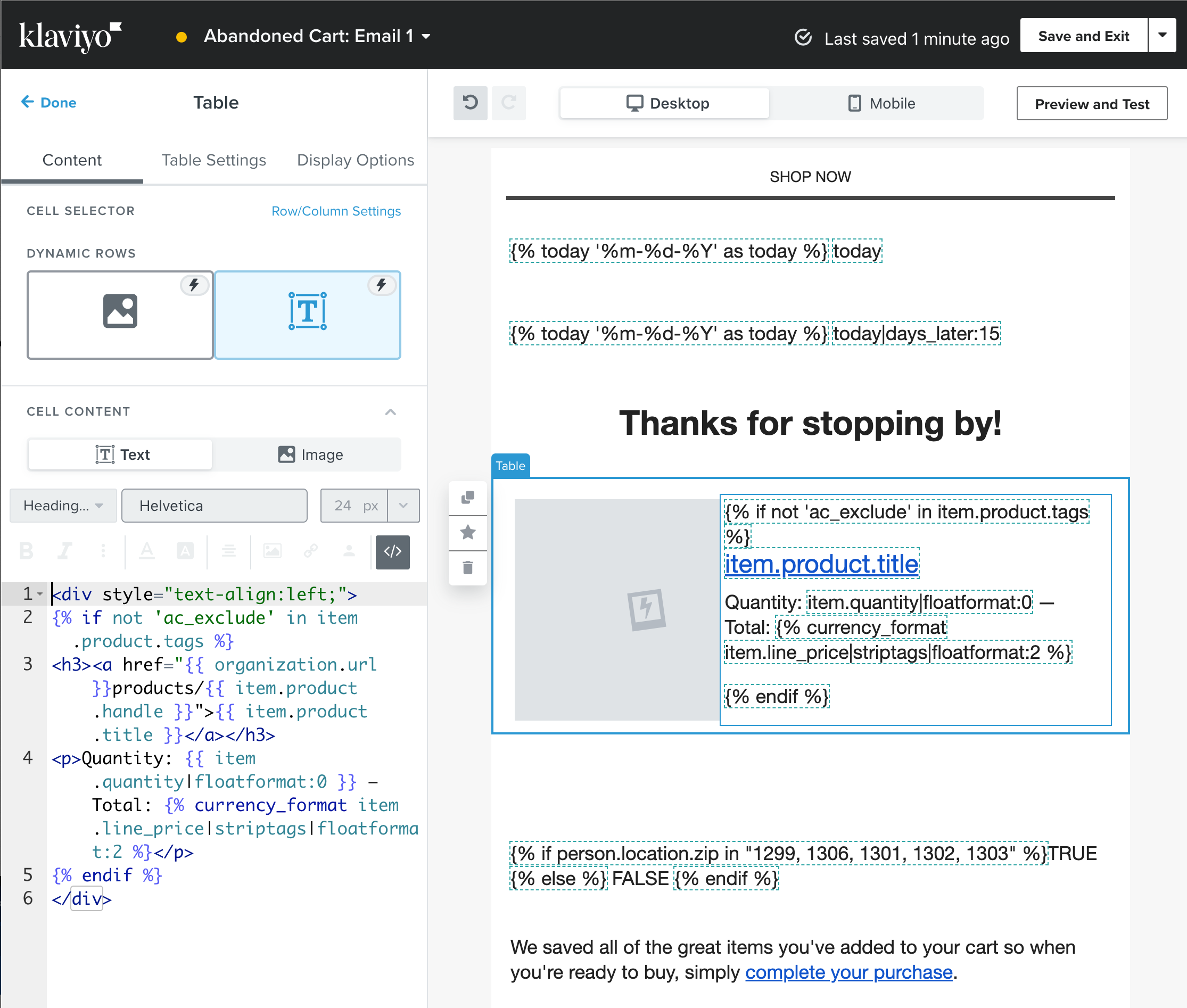
It looks like the solution before was to wrap the table in an IF statement that excluded items I can tag. But I dont know how to do this in the new email builder. The prior solution is demonstrated in the old way.

Here’s the link to the answer using the old builder: 


How can I fix this?  


Thank you!
Steve

This topic has been closed for replies.
Best answer by retention

Hi @RDLE, welcome to the community!

I think the link you referenced was one of my posts to this - so I’d thought I jump in here and see if I could help. In the new editor, you can do the same if/else code wherever a standard Text/HTML or Image source is required. 

See here: 

The tag `ac_exclude` is added to certain products in Shopify, so they will be skipped in the loop of items in the new cart. 

12 replies

Active Contributor I
September 28, 2023

Hi I’m trying to do a similar thing: I want to hide certain products from a for a post-purchase review request email (integration with Judge.me).  

I followed the example from the original reply, but it’s not working - I still see the item (Easyship shipping protection) in the table.

For the text, this is the custom line of code I used:

{% if not 'Easyship Shipping Protection' in event|lookup:'event.products.0.product_title' %}

{{ product|lookup:'product_title' }}<br /></span> <span ><a href="{{ product|lookup:'review_rating_url' }}">Review Now</a></span></div>

{% endif %}


For the image, I used this code:

{% if not 'Easyship Shipping Protection' in event|lookup:'event.products.0.product_title' %}

{% if product|lookup:'product_image_url' %}

{{ product|lookup:'product_image_url' }}

{% endif %}{% endif %}


The result still shows the product (Easyship Shipping Protection) that I tried to hide.


Does anybody know what I should be doing instead?

Thanks!
Yvonne

Active Contributor I
October 2, 2023

Hi,

I’d like to exclude certain products from a for a post-purchase review request email (integrated with Judge.me, so this is a manual review request using a table).  

I followed the example from the topic: "Can I edit the abandoned cart product table to only show certain items?", but it’s not working - I still see the unwanted item (Easyship shipping protection) in the table.

For the text input, this is the custom line of code I used:

{% if not 'Easyship Shipping Protection' in event|lookup:'event.products.0.product_title' %}

{{ product|lookup:'product_title' }}<br /></span> <span ><a href="{{ product|lookup:'review_rating_url' }}">Review Now</a></span></div>

{% endif %}


For the image input, I used this code:

{% if not 'Easyship Shipping Protection' in event|lookup:'event.products.0.product_title' %}

{% if product|lookup:'product_image_url' %}

{{ product|lookup:'product_image_url' }}

{% endif %}{% endif %}


The result still shows the product (Easyship Shipping Protection) that I tried to hide.


Does anybody know what I should be doing instead?

Thanks!